
TIE-AGT-015Reference buildAgent identity/Tool access
Secure MCP servers and tool access with OAuth
Protect every remote MCP server as an OAuth protected resource: clients discover the authorisation server, get audience-bound tokens with tool-level scopes, the server never passes tokens through, and consequential tool calls are authorised per call.
In short#
- Each remote MCP server is an OAuth protected resource: it publishes protected resource metadata, accepts only tokens issued for it (audience-bound with the
resourceparameter), and never passes them through to other APIs. - Clients are known: registered by Client ID Metadata Document or pre-registration under an allow-list; open dynamic registration is off or tightly limited.
- Scopes map to tool groups, consequential tools need step-up and a per-call decision, and a gateway enforces, rate-limits and logs every tool call.
Problem#
An MCP server exposes tools that an agent can discover and call: query a database, create a ticket, send an email, run a deployment. Many early MCP servers were published with a static API key, no authentication at all, or a single broad token that the server then forwarded to every backend API it called. Clients registered themselves freely, and nobody could say which agents had used which tools on whose behalf.
The MCP specification now defines how authorisation should work for remote servers over HTTP, building on OAuth 2.1. It covers discovery, client registration, audience binding and scope challenges. It does not decide which tools a given user and agent should be allowed to call with which arguments; that remains your policy, and it is where most of the risk sits.
When to use it#
Use it when
- You publish remote MCP servers in front of internal or customer-facing systems.
- Agents from other vendors or organisations will call your MCP servers.
- You run an MCP gateway or registry that aggregates tools from many servers.
- MCP servers call downstream APIs on behalf of users.
Avoid it, or add more, when
- Local MCP servers that run over the STDIO transport on the user's own machine. The specification says these should take credentials from their environment instead; govern them through discovery (TIE-AGT-012) and endpoint controls.
- A tool is only ever called by one trusted backend service. Ordinary service-to-service OAuth is enough.
Forces#
- Openness against control. MCP aims to let any client connect to any server; enterprises need to know and limit which clients connect.
- Coarse scopes against fine risk. OAuth scopes describe groups of tools; risk depends on the specific call and its arguments.
- Client capability against best practice. Clients and identity providers support different registration methods; some providers support neither dynamic registration nor metadata documents.
- One token against many backends. Reusing the incoming token downstream is simple and dangerous.
Solution#
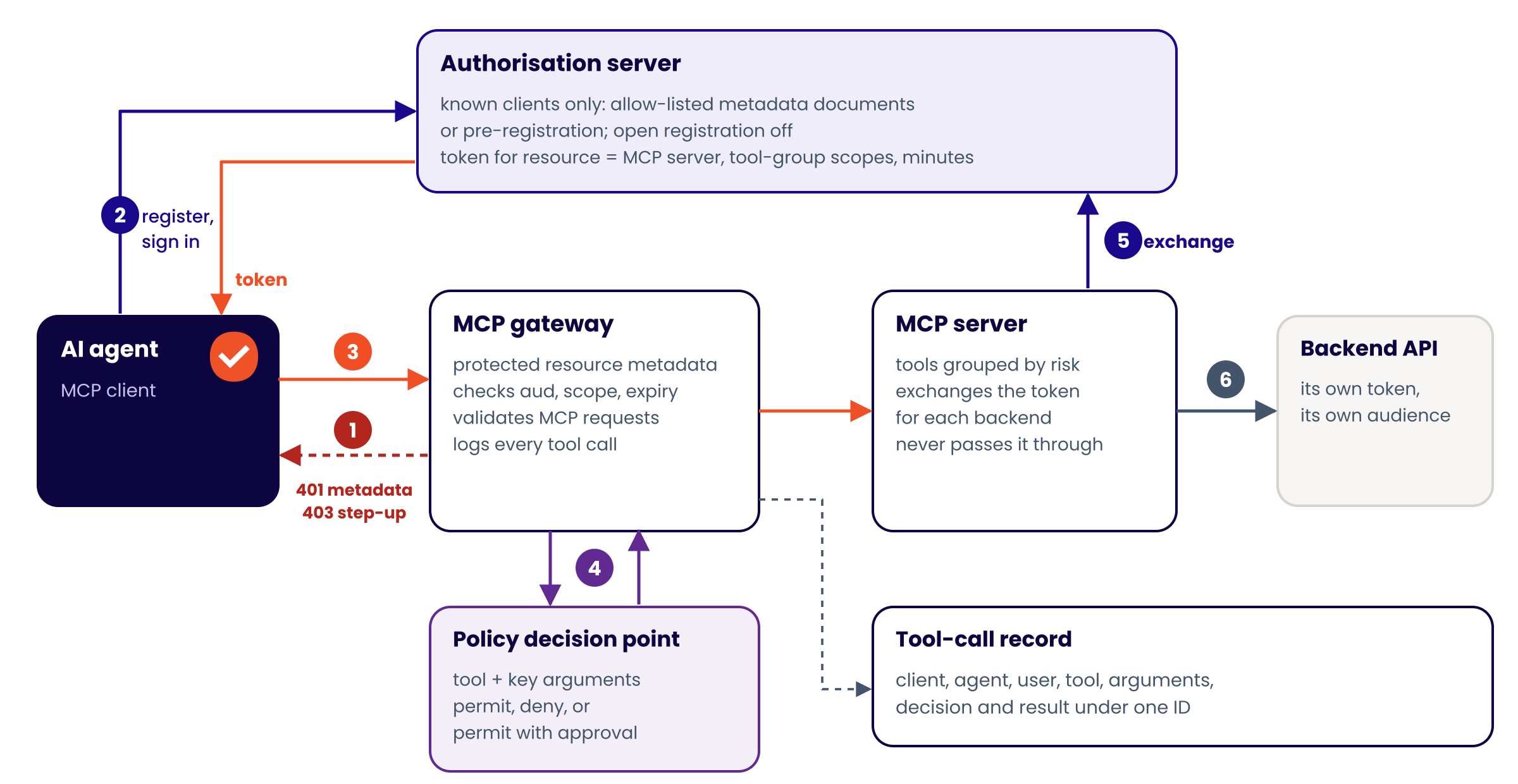
Put a gateway (or the MCP server's own resource-server layer) in front of every remote MCP server. It publishes protected resource metadata that names your authorisation server and the scopes it supports, validates that every token was issued for this server, and answers missing or insufficient scopes with the standard challenges. The authorisation server only issues tokens to known clients. The MCP server, or the gateway, asks a policy decision point before consequential tool calls, and exchanges the user's token for a new one before calling any downstream API.
Specification and additions
| Concern | What the MCP specification requires or recommends | What you add |
|---|---|---|
| Discovery | Servers publish protected resource metadata (RFC 9728); clients use it to find the authorisation server | One metadata document per server, generated by the gateway |
| Client registration | Client ID Metadata Documents recommended; pre-registration allowed; dynamic registration deprecated in the 2026-07-28 revision | An allow-list of client metadata URLs or domains, and pre-registration for enterprise clients |
| Audience | Clients send the resource parameter; servers accept only tokens issued for them | Canonical server URIs agreed and published |
| Token passthrough | Servers must not accept or forward other tokens | Token exchange (RFC 8693) for every downstream call |
| Scopes | Servers signal required scopes in WWW-Authenticate; clients step up on insufficient_scope | Scopes designed around tool groups and risk |
| Tool-level decisions | Not covered | A policy decision per consequential call, with tool name and key arguments |
| Audit | Not covered | One log record per tool call: client, agent, user, tool, decision, result |
How it works
- Publish metadata. For each MCP server, publish protected resource metadata at the well-known path with the canonical resource URI, the authorisation server and the supported scopes.
- Know your clients. On the authorisation server, accept clients identified by metadata documents from allowed domains, or pre-registered clients. Turn off open dynamic registration, or limit it to an allow-list during migration.
- Bind tokens. Require the
resourceparameter and issue tokens whose audience is the MCP server's canonical URI. Reject anything else at the gateway. - Design scopes for tools. Group tools by risk (for example
crm.read,crm.write,crm.admin). Request the minimum at first; challenge withinsufficient_scopewhen a call needs more. - Decide per call. Before a consequential tool runs, the gateway or server asks the PDP with user, agent, tool and key arguments; approval obligations follow TIE-AGT-004.
- Exchange downstream. The MCP server obtains a new, narrower token for each backend API by token exchange. The incoming token stays at the MCP server.
- Log every tool call under one correlation ID, and feed MCP servers into the agent inventory.
{
  "resource": "https://mcp.example.com/crm",
  "authorization_servers": ["https://login.example.com/oauth2/mcp"],
  "scopes_supported": ["crm.read"],
  "bearer_methods_supported": ["header"],
  "resource_documentation": "https://developer.example.com/mcp/crm"
}Design rules#
- Every remote MCP server is a protected resource. No anonymous or static-key servers in production.
- Known clients only. Metadata documents from allowed domains or pre-registration; no open self-registration.
- Tokens are for one server. Validate audience on every request.
- No token passthrough. Exchange for each downstream API.
- Scopes follow tool risk. Start small and step up.
- Consequential tools get a per-call decision. Scopes alone are not enough.
- The tool list is governed. Only published, reviewed tools are discoverable; new tools trigger a re-tier of the agents that use them.
- Log the call, not just the session.
Anti-patterns#
| Anti-pattern | What goes wrong |
|---|---|
| MCP server with a shared API key | No user context, no revocation, no audit of who did what |
| Forwarding the client's token to backend APIs | Confused deputy; the token works wherever its audience is loose |
| Open dynamic client registration | Any client, including a malicious one, can register and phish consent |
One mcp scope for all tools | Read-only clients can call destructive tools |
| Authorisation only at connect time | Every later tool call is trusted regardless of arguments |
| Tool descriptions written by untrusted authors | Tool poisoning: descriptions that instruct the agent to misuse other tools |
Trade-offs#
Benefits
- MCP servers that any compliant client can use, without giving up control over which clients and users.
- Tokens that cannot be replayed against other systems.
- Fine-grained control over consequential tool calls.
- A complete record of agent tool use for investigation and audit.
Costs and risks
- Gateway and authorisation server configuration for each MCP server.
- Client registration management (metadata allow-lists or pre-registration).
- Identity providers that support neither dynamic registration nor metadata documents need pre-registration or a proxy.
- Policy design for tools and arguments.
Recipes#
How to build this pattern on specific products. Each recipe shows its own maturity and when it was last verified.
Ping Identity recipe
Ping Identity
PingGateway MCP security gateway with PingOne or Advanced Identity Cloud
PingGateway's MCP filters serve protected resource metadata, check token audience and validate MCP requests; Ping's authorisation engine decides consequential tool calls. Trevonix has built agent tool enforcement at PingGateway in a lab tenant; the MCP filters themselves are documented by Ping.
Components
| Component | Role in this pattern |
|---|---|
| PingGateway McpProtectionFilter | Serves protected resource metadata, adds the metadata pointer to challenges and checks the token audience against the resource ID |
| OAuth2ResourceServerFilter | Validates tokens (introspection or JWT) and scopes |
| McpValidationFilter | Validates MCP protocol compliance: origin, headers and JSON-RPC payload |
| McpAuditFilter and PingAuthorizeFilter | Audits MCP calls and asks Ping's authorisation engine about consequential tools |
| PingOne or Advanced Identity Cloud | The authorisation server; Advanced Identity Cloud also supports Client ID Metadata Documents |
Configure
- In PingOne or Advanced Identity Cloud, create a resource for the MCP server whose audience is the server's canonical HTTPS URL, with scopes per tool group.
- Decide client registration: register known clients, or enable Client ID Metadata Document support in Advanced Identity Cloud for clients that publish metadata.
- In PingGateway, create a route for the MCP path with, in order: an MCP audit filter, the McpProtectionFilter (resource ID, authorisation server URI, the resource server filter and supported scopes), the McpValidationFilter, then the authorisation filter for tool-level decisions, then the reverse proxy to the MCP server.
- In the MCP server, obtain a separate token by token exchange for each downstream API.
- Test with Ping's sample MCP agent before connecting production clients.
Gotchas
- The MCP filters have evolving interface stability; pin your PingGateway version and re-test on upgrade.
- If the server streams responses with server-sent events, enable streaming and raise the proxy's socket timeout.
- Add a CORS filter for the well-known endpoint if browser-based clients need it.
Okta recipe
Okta
Okta custom authorization servers, MCP server registration and Cross App Access
Custom authorization servers issue MCP-scoped tokens; MCP servers and AI agents are registered in Okta; Cross App Access gives enterprise-managed access. Trevonix has built Cross App Access to protected MCP resources in a lab tenant.
Components
| Component | Role in this pattern |
|---|---|
| Custom authorization server | Issues tokens with the MCP server as audience and tool-group scopes |
| MCP servers in Okta for AI Agents | Registers MCP servers as managed resources (Applications and Resources > MCP Servers) |
| Agent Gateway | Aggregates tools from registered MCP servers behind one Okta-secured endpoint |
| Cross App Access (ID-JAG) | Enterprise-managed access for AI clients to MCP servers |
Configure
- Create a custom authorization server (not the org authorization server) with the MCP server's URL as audience and custom scopes per tool group.
- Register the MCP server under Applications and Resources > MCP Servers and link it to that authorization server.
- Register MCP clients you trust: AI agents can be registered with a Client ID Metadata Document URL or key-based credentials; avoid open dynamic registration.
- For employee use of third-party AI clients, configure Cross App Access so access is granted by IT policy rather than per-user consent (see TIE-AGT-007).
- Where the MCP server calls downstream resources, enable it as an OAuth client with a public key and a resource connection so it exchanges tokens instead of forwarding them.
Microsoft Entra recipe
Microsoft Entra
Microsoft Entra ID with Azure API Management or App Service authentication
Written from vendor documentation and design experience; not yet lab-tested by Trevonix. Validate each step in a non-production tenant first.
Pre-registered app registrations, delegated scopes per tool group and token validation in front of the MCP server; on-behalf-of for downstream APIs. Written from Microsoft documentation; not lab-tested by Trevonix for this pattern.
Components
| Component | Role in this pattern |
|---|---|
| App registration for the MCP server | Exposes delegated scopes per tool group; its application ID URI is the audience |
| Pre-registered client app registrations | Entra does not offer dynamic registration or client metadata documents |
| Azure API Management or App Service authentication | Validates Entra tokens in front of the MCP server; App Service can serve protected resource metadata (preview) |
| Conditional Access | Register custom MCP tools as applications so policies can target them |
Configure
- Create an app registration for the MCP server, set its application ID URI, and expose delegated scopes per tool group.
- For each MCP client you allow, create or approve a client app registration with the redirect URIs that client uses, and grant it only the scopes it needs.
- Front the MCP server with API Management (validate the Entra token, audience and scopes) or with App Service authentication for MCP, which can serve protected resource metadata.
- In the MCP server, use the on-behalf-of flow to get a separate token for each downstream API.
- Target the MCP server's application in Conditional Access for user and agent policies.
Gotchas
- Many MCP clients expect dynamic registration or metadata documents. With Entra you must give them a pre-registered client ID, or run a small authorisation proxy that maps known clients to a pre-registered app.
Saviynt recipe
Saviynt
Saviynt Agent Access Gateway
Written from vendor documentation and design experience; not yet lab-tested by Trevonix. Validate each step in a non-production tenant first.
Publishes governed tools to agents and evaluates each tool call at runtime. Written from Saviynt's published material; not lab-tested by Trevonix.
Capabilities used
| Capability | Role in this pattern |
|---|---|
| Agent Access Gateway | Sits between agent clients and MCP servers; only tools published through it are discoverable |
| Intent-Aware Runtime Authorization | Evaluates each tool call against identity, context, policy and intent |
| Inbound and outbound access controls | Governs who may use an agent and which tools and resources the agent may reach |
Configure
- Publish approved MCP servers and tools through Agent Access Gateway so agents can only discover governed tools.
- Define static and dynamic tool policies, and turn on intent-aware evaluation for consequential tools.
- Keep your authorisation server as the token issuer; the gateway validates the user's bearer token on each inbound request before forwarding.
Auth0 or Keycloak as the MCP authorisation server recipe
Auth0 or Keycloak as the MCP authorisation server
Written from vendor documentation and design experience; not yet lab-tested by Trevonix. Validate each step in a non-production tenant first.
Standards-based authorisation servers with MCP-specific guidance; check metadata document support per version.
Auth0 and Keycloak can act as the authorisation server for MCP. Keycloak documents which MCP authorisation requirements it meets per specification revision and offers Client ID Metadata Document support as an experimental feature; enable it deliberately and test with your clients.
Verification tests#
| Test | Expected result |
|---|---|
| Call the MCP server without a token | 401 with WWW-Authenticate pointing to the resource metadata |
| Present a token issued for another resource | Rejected |
| Present a valid read token on a write tool | 403 insufficient_scope naming the required scope |
| Unknown client tries to register or authorise | Refused |
| MCP server calls a backend API | Uses an exchanged token for that API; the original token is not forwarded |
| Consequential tool call with arguments outside policy | Denied or held for approval; logged with reason |
| Revoke the client or the user's grant | Next token request fails; gateway rejects existing tokens at expiry or on introspection |
Maturity and verification#
Reference build. Trevonix has built enterprise-managed access from an AI agent to protected MCP resources on Okta, and agent tool calls enforced at PingGateway with Ping's authorisation engine, in lab tenants (November 2026). The Microsoft Entra and Saviynt recipes are written from vendor documentation and have not yet been lab-tested by Trevonix for this pattern.
Frequently asked questions#
Do we need dynamic client registration?
No. The 2026-07-28 revision deprecates dynamic client registration and keeps it only for compatibility. Prefer Client ID Metadata Documents, with an allow-list of domains you trust, or pre-registration for known enterprise clients.
Our identity provider is Microsoft Entra. What changes?
Microsoft Entra ID supports neither dynamic registration nor client metadata documents today, so MCP clients must be pre-registered as app registrations, or you place an authorisation proxy in front that maps known clients to a pre-registered app. Check Microsoft's current guidance before you choose.
Are scopes not enough?
Scopes say which group of tools a token may use. A decision per call says whether this user, through this agent, may run this tool with these arguments now. Consequential tools need both.
What about local MCP servers?
Govern them as endpoint software: discover them (TIE-AGT-012), allow-list approved servers, and keep their credentials in the operating system's secure store rather than in configuration files.
Related patterns and references#
- Model Context Protocol: Authorization (latest revision)
- RFC 9728: OAuth 2.0 Protected Resource Metadata
- RFC 8707: Resource Indicators for OAuth 2.0
- PingGateway: McpProtectionFilter
- Okta Help: Add an MCP server manually
- Microsoft Learn: Configure built-in MCP server authorization in App Service
- Saviynt: Why Agent Access Gateway is required to close AI access control gaps
Cite this pattern
Trevonix (2026). Secure MCP servers and tool access with OAuth (TIE-AGT-015, version 1.0). Identi Patterns. https://exchange.trevonix.com/patterns/tie-agt-015-secure-mcp-servers-and-tool-access-with-oauth
Licensed under CC BY 4.0. Credit Trevonix and link to this page when you reuse it.
Patterns are guidance, provided as is and without warranty. Test in a non-production environment and check current vendor documentation before you rely on them. Read the full disclaimer.