
TIE-AGT-003Reference buildAgent identity/Runtime authorisation
Externalised authorisation for agent actions
Take the allow-or-deny decision for each agent action out of the agent and its prompt, make it in a policy decision point with full context, and enforce it at a gateway or the resource.
In short#
- The agent asks; it never decides. Every consequential action becomes a request to a policy decision point (PDP): which agent, for which user, doing what, to which resource, in what context.
- The PDP returns permit, deny or permit with obligations, such as "get human approval", "step up the user" or "remove these fields", plus a reason.
- A policy enforcement point (PEP) outside the agent, usually a gateway, carries out the decision. If the PDP cannot be reached, the action does not happen.
Problem#
Traditional access control answers a coarse question once, when a token is issued: may this client call this API with this scope? AI agents need a finer question answered every time they act: should this agent, acting for this user, perform this action on this resource, now? A payments scope cannot tell a £20 refund from a £20,000 transfer; a repository role cannot tell a test branch from a production deployment.
Teams try to close the gap inside the agent: an instruction in the system prompt, a check in the tool code, a list of forbidden actions. Those controls run in the same place as the thing they are meant to control. A prompt injection, a model error or a developer shortcut bypasses them, and every agent ends up with its own slightly different version of the rules.
When to use it#
Use it when
- Agents can take actions with real consequences: moving money, changing records, deploying code, sending messages, exporting data.
- The same rules must apply to many agents, built by different teams on different platforms.
- Decisions depend on context that scopes cannot express: amounts, data classification, time, risk signals, approval state.
- You need to show auditors exactly which rule allowed or blocked each action.
Avoid it, or add more, when
- The agent only reads public or low-sensitivity data, and scopes already express everything you need.
- You cannot put an enforcement point in the request path. Fix that first; a PDP nobody consults protects nothing.
- You hope a PDP will replace identity basics. It needs registered agents and delegated tokens to decide well (see TIE-AGT-001 and TIE-AGT-002).
Forces#
- Precision against latency. Every decision adds a network call; agents may make many calls per task.
- Central rules against local knowledge. Security wants one policy; application teams know what their data and actions really mean.
- Fail closed against availability. Denying when the PDP is down is safe but can stop the business.
- Expressiveness against reviewability. Powerful policy languages can encode anything, and can become rules nobody can read.
Solution#
Split authorisation into three roles. The PEP sits in the request path, ideally a gateway in front of the APIs and tools the agent uses, and builds a decision request from the token, the request and context. The PDP evaluates versioned policies against that request and returns a decision with optional obligations and a reason. Policy information points supply facts the request does not carry, such as the agent's risk tier, the user's entitlements or the data's classification. The agent sees only the outcome.
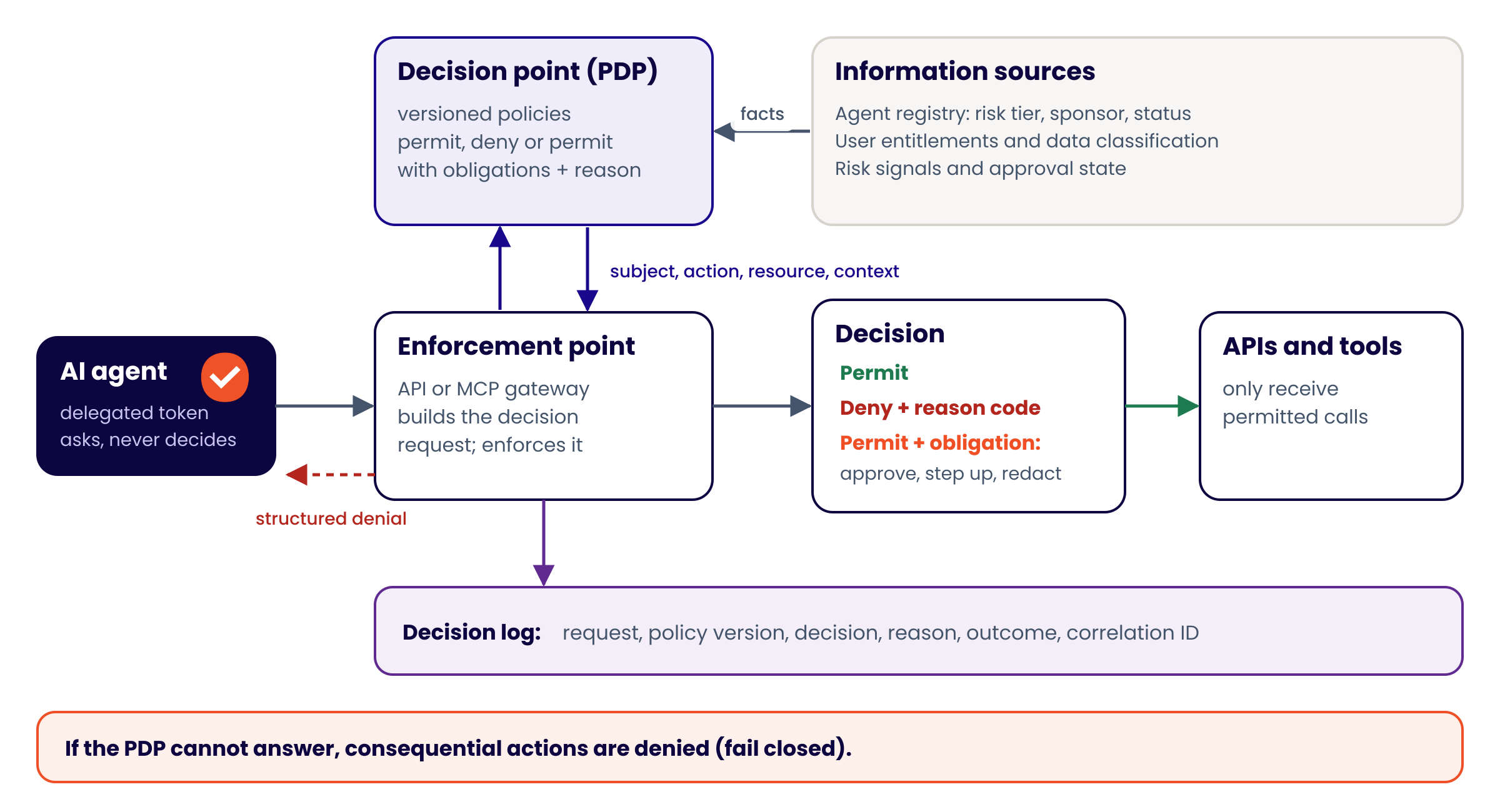
What a decision request and response contain
| Element | What goes in | Example |
|---|---|---|
| Subject | The acting agent and the user it acts for | agent agt-refunds-prod (risk tier 2) acting for customer 4821 |
| Action | The operation, in business terms rather than HTTP verbs | refund.issue |
| Resource | What the action touches, with its attributes | order 99213, value £340, customer-owned |
| Context | Facts about the moment | channel = chat, time = 23:40, user risk = low, approval = none yet |
| Decision | permit, deny, or permit with obligations | permit with obligation approval.required because value > £250 |
| Reason | Why, in a form both people and agents can use | refund_over_agent_limit |
How it works
- Intercept. The agent calls an API or tool through the PEP with its delegated token.
- Describe. The PEP validates the token and builds a decision request: subject (agent and user), action, resource and context.
- Enrich. The PDP pulls missing facts from information points: agent registry, entitlements, data catalogue, risk signals.
- Decide. The PDP evaluates the policies and returns permit, deny or permit with obligations, with a reason code.
- Enforce. The PEP forwards the call, fulfils the obligations (for example holds it for approval), or returns a structured denial the agent can explain to the user.
- Record. The PEP and PDP log the request, the policy version, the decision and the outcome under one correlation ID.
POST /access/v1/evaluation
{
  "subject":  { "type": "agent", "id": "agt-refunds-prod",
                "properties": { "on_behalf_of": "customer-4821", "risk_tier": 2 } },
  "action":   { "name": "refund.issue" },
  "resource": { "type": "order", "id": "99213",
                "properties": { "amount_gbp": 340, "owner": "customer-4821" } },
  "context":  { "channel": "chat", "approval": "none" }
}

200 OK
{ "decision": false,
  "context": { "reason": "refund_over_agent_limit",
"obligation": "approval.required", "approver_role": "team-lead" } }Design rules#
- The agent never holds the rules. Instructions in the prompt are guidance, not control. Enforcement happens outside the agent.
- Describe actions in business terms.
refund.issuewith an amount beatsPOST /v2/refunds; policies stay readable and survive API changes. - Decide on both identities. Every request carries the agent and the user it acts for; policies can limit either.
- Fail closed for consequential actions. If the PDP cannot answer, deny. Allow cached or degraded decisions only for read-only, low-risk calls.
- Return reasons and obligations, not just yes or no. The agent can tell the user what happens next; the PEP knows what to do.
- Version, test and review policies like code. Every change has an owner, a test case and a record of which version made each decision.
- One PDP, many PEPs. Put enforcement at gateways and resources; keep decision logic in one place so all agents get the same answer.
- Log every decision. Request, policy version, decision, reason and outcome, joined by a correlation ID.
Anti-patterns#
| Anti-pattern | What goes wrong |
|---|---|
| Rules in the system prompt | A prompt injection or model error removes the rule; nothing outside the agent notices |
| Each agent's own if-statements | Every team implements the rules slightly differently; nobody can say which rules are in force |
| Scopes as the only control | A refund scope permits every refund; amounts, data and context are invisible |
| PDP consulted by the agent itself | The agent can skip the call, or call and ignore the answer |
| Fail open when the PDP is down | An outage, or an attacker who causes one, switches all controls off |
| Yes or no with no reason | Agents retry blindly or invent explanations for users; investigators cannot tell which rule fired |
Trade-offs#
Benefits
- Consistent rules for every agent, whatever platform built it.
- Decisions that use amounts, data sensitivity, risk and approval state.
- A natural place for human approval, step-up and redaction.
- Clear evidence of which policy version allowed each action.
- Policies can change without redeploying agents.
Costs and risks
- Latency per decision. Keep the PDP close to the PEP and cache low-risk read decisions briefly.
- A new critical dependency: the PDP needs high availability and monitoring.
- Policy engineering skills, and an owner for each policy.
- Licensing for a commercial PDP, or the effort to run an open-source one well.
Recipes#
How to build this pattern on specific products. Each recipe shows its own maturity and when it was last verified.
Ping Identity recipe
Ping Identity
PingGateway with PingOne Authorize or PingAuthorize
PingGateway is the enforcement point and calls Ping's authorisation engine for each protected request through the PingAuthorizeFilter. Policies return statements that PingGateway turns into actions such as holding a request for approval.
Components
| Component | Role in this pattern |
|---|---|
| PingGateway | The enforcement point: validates the agent's delegated token and asks for a decision on every protected route |
| PingAuthorizeFilter | PingGateway filter that calls PingOne Authorize, or the PingAuthorize Sideband API, and enforces the result |
| PingOne Authorize (or PingAuthorize) | The decision point: attributes, policies and statements (obligations) |
| API service and API gateway records | Tell PingOne Authorize which API it protects and which gateway is calling |
| Recent decisions | Visualises how each decision was reached, for testing and support |
Before you start
- Add PingOne Authorize to the PingOne environment, or have a PingAuthorize deployment with the Sideband API enabled.
- Agree action names and the attributes policies will need (agent ID, risk tier, on-behalf-of user, amount, data classification) before you write policies.
Configure the decision and enforcement points
- In PingOne, go to Authorization > API Services and add an API service for the API the agent calls, with its base URL and the operations you want to control.
- Go to Authorization > API gateways and add a gateway record for PingGateway. Note its Service URL and create the gateway credential.
- In the policy editor, define attributes for the agent, the user it acts for, the action and the resource, and build a policy for the API service. Add statements for obligations such as approval required, with a reason code.
- In PingGateway, add a route for the API with a token validation filter followed by a PingAuthorizeFilter pointing at the gateway's Service URL and credential.
- Send a test call through PingGateway, then open Authorization > Recent Decisions, select the decision endpoint and check how the decision was reached.
Gotchas
- Earlier PingGateway releases document the PingOneApiAccessManagementFilter for this integration; current releases use the PingAuthorizeFilter. Use the filter documented for your PingGateway version.
- Statements are only useful if the enforcement point acts on them. Decide, per statement code, what PingGateway does, and deny when it meets a code it does not understand.
- PingGateway can also act as an enforcement point for PingAM policies (PolicyEnforcementFilter); for agent actions with business attributes, the PingOne Authorize integration is the better fit.
Check it works
- A permitted call reaches the API, and Recent Decisions shows the policy path that permitted it.
- A call that breaks a rule returns a denial with your reason code, and the API never sees it.
Okta recipe
Okta
Okta for AI Agents with Agent Gateway
Written from vendor documentation and design experience; not yet lab-tested by Trevonix. Validate each step in a non-production tenant first.
Okta controls which agent may reach which tool, for whom, at token time and through Agent Gateway. Business-rule decisions need an external decision point. Written from Okta's documentation; not yet lab-tested by Trevonix for this pattern.
Components
| Component | Role in this pattern |
|---|---|
| Agent Gateway (Okta for AI Agents) | Identity-native proxy in front of MCP servers: verifies the agent, applies policy to each tool call and injects downstream credentials |
| Custom authorization server policies | Coarse decisions at token time: which agent, which audience, which scopes, how long |
| Resource connections | Define which tools and resources each AI agent may reach |
| External PDP (optional) | Fine-grained, context-rich decisions called from your gateway or API |
Configure
- Register the agent under Directory > AI Agents and connect it to an Agent Gateway that fronts the MCP servers it uses.
- In the gateway, add each MCP server and review its discovered tools; allow only the tools the agent's purpose needs.
- On the authorization server used by the gateway, add access policy rules that limit scopes and token lifetime for the agent.
- For decisions that need amounts, data classification or approval state, call an external PDP from the API or a gateway in front of it, using an AuthZEN-shaped request.
- Use the gateway activity view to confirm each tool call is attributed to the agent and the user it acts for.
Gotchas
- Agent Gateway decides which agent may call which tool on whose behalf; it is not a general business-rule engine. Keep amount limits and similar rules in a PDP.
Microsoft Entra recipe
Microsoft Entra
Microsoft Entra Agent ID with Azure API Management
Written from vendor documentation and design experience; not yet lab-tested by Trevonix. Validate each step in a non-production tenant first.
Entra controls which permissions an agent holds and can block risky agents at token time; per-action decisions need a gateway and an external decision point. Written from Microsoft documentation; not yet lab-tested by Trevonix.
Components
| Component | Role in this pattern |
|---|---|
| Agent identity and permissions | Coarse control: which APIs and permissions the agent holds |
| Conditional Access for agents | Token-time block for agents, for example agents flagged as high risk |
| Azure API Management (or another gateway) | The enforcement point in front of APIs and tools |
| External PDP | Fine-grained decisions; Entra does not provide a general-purpose policy decision point |
Configure
- Give the agent identity only the permissions its purpose needs (see TIE-AGT-001 and TIE-AGT-002).
- Put the agent's APIs and tools behind a gateway such as Azure API Management. Validate the Entra-issued token there (issuer, audience, the agent identity) before anything else.
- From the gateway, call your PDP with the agent, the user, the action, the resource and context, and enforce the result: forward, deny with a reason, or hold for approval.
- Create a Conditional Access policy that blocks agent identities with high agent risk, so a compromised agent cannot get tokens at all.
- Log gateway decisions to the same workspace as Entra sign-in logs and join them on correlation ID.
Gotchas
- Conditional Access for agent identities offers Block access as its only grant control; it is a token-time switch, not a per-action decision.
Saviynt recipe
Saviynt
Saviynt Agent Access Gateway
Written from vendor documentation and design experience; not yet lab-tested by Trevonix. Validate each step in a non-production tenant first.
Saviynt's Agent Access Gateway evaluates agent actions at runtime against identity, context, policy and intent. Written from Saviynt's published material; not lab-tested by Trevonix.
Capabilities used
| Capability | Role in this pattern |
|---|---|
| Agent Access Gateway | Runtime authorisation layer between agents and applications, data, APIs, tools and other agents |
| Intent-Aware Runtime Authorization (IARA) | Evaluates each agent action on identity, context, policy and intent |
| Static and dynamic tool policies | Control which tools an agent may use, and under what conditions |
Configure
- Onboard the agents and the tools and MCP servers they use into Saviynt's AI inventory, with owners.
- Route agent traffic to protected tools through Agent Access Gateway.
- Define static policies for which tools each agent may use, and dynamic policies for context such as data sensitivity or risk.
- Review decision logs with the agent's owner and tune policies before you switch from monitoring to blocking.
Gotchas
- Agent Access Gateway and IARA were introduced in 2026; check availability, supported integrations and licensing for your tenant.
Open Policy Agent recipe
Open Policy Agent
Written from vendor documentation and design experience; not yet lab-tested by Trevonix. Validate each step in a non-production tenant first.
Open Policy Agent can serve as the decision point behind any gateway, with policies written in Rego. Written from project documentation; not lab-tested by Trevonix for this pattern.
Open Policy Agent (OPA) is an open-source, general-purpose policy engine. Run it as a sidecar or service next to your gateway, write policies in Rego, and have the gateway send AuthZEN-shaped input.
package agents.refunds

default allow := false

allow if {
    input.action.name == "refund.issue"
    input.resource.properties.owner == input.subject.properties.on_behalf_of
    input.resource.properties.amount_gbp <= 250
}

obligations contains "approval.required" if {
    input.action.name == "refund.issue"
    input.resource.properties.amount_gbp > 250
    input.context.approval != "granted"
}
Operate
- Keep policies in source control with unit tests (
opa test), and deploy them as signed bundles. - Turn on OPA decision logs and ship them with the gateway's logs.
Verification tests#
| Test | Expected result |
|---|---|
| Agent requests an action below its limit | Permitted and logged with the policy version |
| Same action above the limit | Denied, or permitted with an approval obligation, with a reason code |
| Same action by a different agent with a lower risk tier | Decision reflects that agent's tier |
| Agent calls the API directly, bypassing the gateway | Rejected by the API (wrong audience or network control) |
| Stop the PDP | Consequential actions are denied; the agent receives a clear "try later" response |
| Change a policy and replay a recorded request | New decision matches the test case for the new version |
| Inspect the decision log for one action | Shows agent, user, action, resource, policy version, decision and reason |
Maturity and verification#
Reference build. Trevonix has built this pattern end to end with PingGateway as the enforcement point and Ping's authorisation engine as the decision point, in a lab tenant (November 2026). The Okta, Microsoft Entra, Saviynt and Open Policy Agent recipes are written from vendor and project documentation and have not yet been lab-tested by Trevonix.
Frequently asked questions#
Does this replace OAuth scopes and roles?
No. Scopes and roles still decide what an agent may ever do, and they are checked when the token is issued. The PDP decides whether a specific action, with its context, is acceptable now. You need both.
Where should the enforcement point sit?
As close to the resource as you can while still seeing every call: an API or MCP gateway in front of the tools is usually the best place. Resources that hold the most sensitive data should also check decisions themselves.
How much latency does it add?
Usually a few milliseconds when the PDP runs near the gateway. Cache read-only, low-risk decisions for seconds, never consequential ones.
What should the agent do when it is denied?
Tell the agent, with a reason code, so it can explain the outcome to the user or take the next step, such as asking for approval. Never leave the agent to guess.
Related patterns and references#
- OpenID Foundation: Authorization API 1.0 Final Specification approved
- OpenID AuthZEN Authorization API 1.0
- NIST SP 800-207: Zero Trust Architecture
- PingGateway: PingOne Authorize integration
- PingAuthorize: Statements
- Okta: Agent Gateway
- Saviynt: Intent-Aware Runtime Authorization for AI agents
- Open Policy Agent documentation
Cite this pattern
Trevonix (2026). Externalised authorisation for agent actions (TIE-AGT-003, version 1.0). Identi Patterns. https://exchange.trevonix.com/patterns/tie-agt-003-externalised-authorisation-for-agent-actions
Licensed under CC BY 4.0. Credit Trevonix and link to this page when you reuse it.
Patterns are guidance, provided as is and without warranty. Test in a non-production environment and check current vendor documentation before you rely on them. Read the full disclaimer.