
TIE-AGT-016Reference buildAgent identity/Incident response
Agent kill switch: stop one agent, or all of them, in minutes
Be able to stop a misbehaving agent, a class of agents or every agent quickly and verifiably, by acting on identity, tokens, enforcement points and runtimes in a planned order, and to restore them safely afterwards.
In short#
- Plan four levels: pause one capability, isolate one agent, stop a class of agents, stop all agents.
- At each level act on every layer: policy, identity, tokens and grants, enforcement points, credentials held elsewhere, and the runtime.
- Know the time to effect (it is bounded by token lifetime unless enforcement points check status), who may pull it, and how to verify it worked. Test it before you need it.
Problem#
An agent starts sending emails to every customer, deleting records, or following instructions hidden in a document it read. Someone says "turn it off". In practice that means different things in different places: the agent identity can be disabled, but access tokens already issued remain valid until they expire; consent grants and API keys live in SaaS tenants and model providers; a gateway may cache decisions; and the agent's process keeps running and retrying.
Teams without a plan improvise under pressure: they delete the agent identity (destroying the audit trail), miss the API key in the CI system, or block every agent in the tenant because they cannot target one.
When to use it#
Use it when
- Any agent that can change data, move money, communicate externally or affect production.
- Agents that process untrusted content (email, web pages, documents) or other agents' output.
- You need to demonstrate human oversight and incident readiness for AI.
Avoid it, or add more, when
- Never skip it for consequential agents. For read-only, low-tier agents, the standard identity disable may be enough; document that choice.
Forces#
- Speed against precision. A tenant-wide block is fast but stops good agents too; a targeted stop needs preparation.
- Containment against evidence. Deleting things stops them but destroys what investigators need.
- Central control against local knowledge. The SOC can act fast; the sponsor knows what the agent should be doing.
- Token lifetime against performance. Short tokens and status checks make stops bite faster but add load.
Solution#
Define the kill switch as a layered runbook with four levels, prepared in advance. Every level acts in the same order: first deny at the policy decision point (fastest, most targeted), then disable the identity so no new tokens are issued, then revoke grants, sessions and keys, then block at enforcement points for tokens already in flight, and finally stop the runtime. Disable rather than delete, so logs keep their links. Restore only after review, in reverse order.
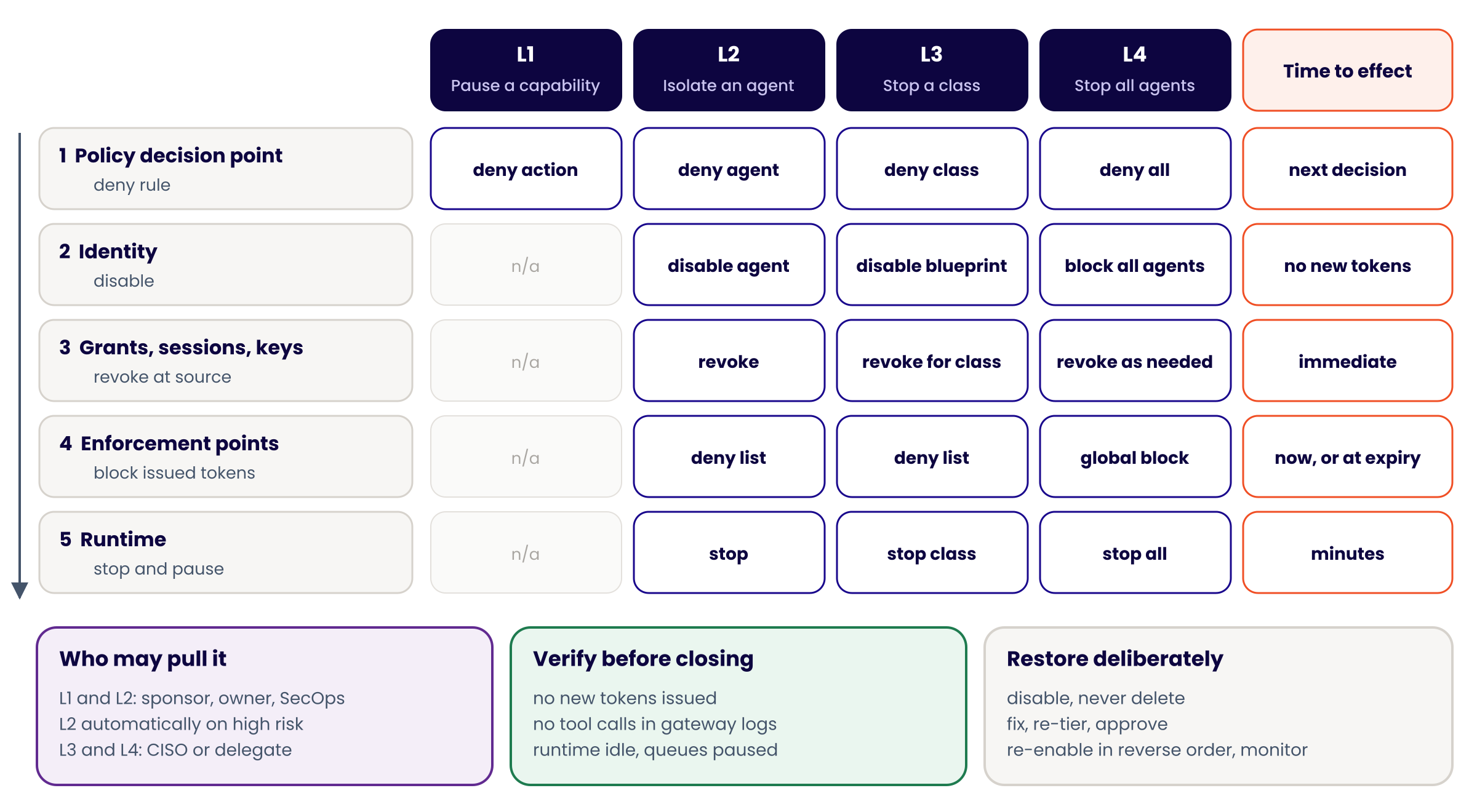
Levels
| Level | Scope | Typical trigger | Who may pull it |
|---|---|---|---|
| L1 Pause a capability | One action or tool for one agent | Unexpected behaviour on one tool | Sponsor, owner or security operations |
| L2 Isolate an agent | One agent identity | Compromise suspected, sponsor request, high agent risk | Sponsor, security operations, or automated on high risk |
| L3 Stop a class | A blueprint, platform, tier or tool | Vulnerability in a platform or shared tool | Security operations with risk owner |
| L4 Stop all agents | Every agent identity | Systemic attack or regulator instruction | CISO or delegate, break-glass |
Layers, in order
| Layer | Action | Time to effect |
|---|---|---|
| Policy decision point | Deny rule for the agent, class or action | Next decision |
| Identity | Disable the agent identity, blueprint or class | No new tokens from now |
| Grants, sessions and keys | Revoke refresh tokens, consent grants, vaulted check-outs; rotate model-provider and SaaS API keys | Immediate for the revoked item |
| Enforcement points | Deny list at the gateway; introspection or continuous access evaluation at resources | Immediate where supported; otherwise up to the access token lifetime |
| Runtime | Stop or scale to zero; pause schedules and triggers; suspend integrations | Minutes |
How it works
- Prepare. For every tier 3 and 4 agent, record in the inventory its identity, blueprint, grants, keys held elsewhere, enforcement points and runtime, and who may stop it. Pre-build the policies you will need (for example a disabled block-all-agents policy) and the gateway deny list.
- Trigger. A named person, or an automated high-risk signal, starts the runbook at the right level.
- Act in order. Deny at the PDP, disable the identity, revoke grants and keys, block at enforcement points, stop the runtime.
- Verify. No new tokens issued, no tool calls in gateway or resource logs, runtime idle, downstream queues drained or paused.
- Preserve evidence. Keep logs, the identity (disabled, not deleted) and the agent's state for investigation.
- Restore deliberately. Fix the cause, re-tier if needed, re-enable in reverse order with the sponsor's approval, and monitor closely.
Design rules#
- Plan four levels. Targeted stops need preparation; blanket stops need authorisation.
- Act on every layer. Identity alone leaves tokens, grants, keys and runtimes alive.
- Policy first, runtime last. The fastest targeted control goes first.
- Disable, do not delete. Keep the audit trail intact.
- Pre-authorise who may pull which level, including out of hours.
- Verify, do not assume. Check logs for new tokens and tool calls.
- Restore with review. Re-enabling is a change, not an undo.
- Test regularly. Quarterly for tier 4 agents, at launch for tier 3.
Anti-patterns#
| Anti-pattern | What goes wrong |
|---|---|
| Disable the identity and declare victory | Issued tokens, consent grants and API keys keep working |
| Delete the agent identity | Logs lose their link; investigation and restore get harder |
| Only a tenant-wide block exists | Every agent stops because one misbehaved |
| Nobody knows where the agent's keys are | The model-provider key in CI keeps the agent running |
| Kill switch only in the agent's own code | A compromised agent ignores it |
| Never tested | Steps fail, permissions are missing, or the stop takes hours |
Trade-offs#
Benefits
- Misbehaving agents stopped in minutes, not hours.
- Targeted stops that do not take down healthy agents.
- Evidence of human oversight and incident readiness.
- Confidence to give agents more autonomy, because stopping them is reliable.
Costs and risks
- Preparation per agent: recording grants, keys, enforcement points and runtimes.
- Pre-built policies, deny lists and roles that must be maintained.
- Regular tests, including out-of-hours call trees.
Recipes#
How to build this pattern on specific products. Each recipe shows its own maturity and when it was last verified.
Ping Identity recipe
Ping Identity
PingOne AI agents, PingGateway and Ping authorisation
Disable the agent identity, deny at the policy decision point and block in-flight tokens at PingGateway. Trevonix has stopped agents by denying their requests at PingGateway in a lab tenant.
Components
| Component | Role in this pattern |
|---|---|
| AI agent identity in PingOne or Advanced Identity Cloud | Disable to stop new tokens |
| PingGateway | Deny list or route rule for the agent; introspection so revoked tokens fail |
| PingOne Authorize or PingAuthorize | Deny rule for one action or class (L1, L3) |
| PingOne Privilege | Revoke an agent's keys to the AI gateway instantly |
Configure
- L1: add a deny rule for the agent and action in your authorisation policy and deploy it.
- L2: in the PingOne admin console under AI Agents (or AI Agents in Advanced Identity Cloud), disable the agent; revoke its refresh tokens.
- Make sure PingGateway routes for consequential APIs validate tokens by introspection, or add the agent to a deny condition, so tokens issued before the disable stop working.
- Revoke any keys the agent holds in PingOne Privilege, then stop the runtime.
Okta recipe
Okta
Okta for AI Agents
Written from vendor documentation and design experience; not yet lab-tested by Trevonix. Validate each step in a non-production tenant first.
Deactivate the AI agent record, its linked app and authorization server to stop new tokens; the expanded kill switch revokes active tokens at Agent Gateway. Written from Okta documentation; not lab-tested by Trevonix for this pattern.
Components
| Component | Role in this pattern |
|---|---|
| AI agent record (Universal Directory) | Deactivate to stop the agent obtaining new tokens |
| Linked OIDC app and authorization server | Deactivate as well, per Okta's kill switch guidance |
| Agent Gateway | Revokes active tokens at the gateway with the expanded kill switch announced in 2026 |
| Resource connections and vaulted secrets | Remove or rotate what the agent could check out |
Configure
- In the Admin Console, open Directory > AI agents, select the agent and deactivate it.
- Deactivate the linked application and, if it is dedicated to this agent, the associated authorization server; Okta's guidance is that all three are needed to stop new tokens.
- Where the agent uses Okta's Agent Gateway, use the gateway's kill switch to revoke active tokens.
- Rotate any vaulted credentials or service account passwords the agent used, and revoke OAuth grants in third-party apps it connected to.
Gotchas
- Okta's kill switch is a manual action today: policy violations and risk signals do not trigger it automatically. Script your own automation through the APIs if you need L2 to start on a signal.
Microsoft Entra recipe
Microsoft Entra
Microsoft Entra Agent ID and Conditional Access for agents
Disable an agent identity or its blueprint to stop token issuance; Conditional Access blocks classes or all agents; ID Protection can disable risky agents. Trevonix has disabled governed agents in Entra Agent ID in a lab tenant.
Components
| Component | Role in this pattern |
|---|---|
| Disable agent identity | Blocks token issuance for one agent (L2) |
| Disable agent identity blueprint | Stops all agent identities created from it (L3) |
| Conditional Access for agents | Block all agent identities, a class by custom security attribute, or high-risk agents (L3, L4) |
| ID Protection Risky Agents report | Response actions including disabling the agent |
| Enterprise applications | Revoke delegated grants and application permissions held by AI tools |
Configure
- L2: in the Entra admin center browse to Entra ID > Agents > Agent identities, select the agent and choose Disable. You can select several agents and disable them together. This needs at least the Agent ID Administrator role, or ownership of the agent.
- L3: browse to Agent blueprints, select the blueprint and choose Disable to stop every agent created from it, or enable a pre-built Conditional Access policy that blocks agents with a given custom security attribute.
- L4: enable a pre-built Conditional Access policy that targets All agent identities with Block for all resources. Keep it created and switched off, and test it in report-only mode.
- Revoke delegated permission grants and app role assignments held by third-party AI tools under Enterprise applications.
- Stop the runtime in its own platform (for example the Foundry or Copilot Studio agent, or the hosting service).
Gotchas
- Access tokens already issued remain usable until they expire at resources that do not re-check status; plan for that window.
- Conditional Access policies do not apply in some cases (for example when security defaults are on); check the documented boundaries.
Saviynt recipe
Saviynt
Saviynt Agent Access Gateway and lifecycle management
Written from vendor documentation and design experience; not yet lab-tested by Trevonix. Validate each step in a non-production tenant first.
Blocks tool calls at runtime and suspends the agent's identity and entitlements. Written from Saviynt's published material; not lab-tested by Trevonix.
Capabilities used
| Capability | Role in this pattern |
|---|---|
| Agent Access Gateway | Blocks the agent's tool calls at runtime |
| Identity lifecycle management | Suspends or decommissions the agent and its entitlements |
| Posture management | Shows what else the agent can reach so nothing is missed |
Configure
- Add a block policy for the agent (or class) in Agent Access Gateway so its tool calls are refused immediately.
- Suspend the agent identity and remove its entitlements through Saviynt's connectors.
- Use the posture view to list remaining grants and credentials and revoke them at source.
Model providers, source control and cloud recipe
Model providers, source control and cloud
Written from vendor documentation and design experience; not yet lab-tested by Trevonix. Validate each step in a non-production tenant first.
Rotate keys, suspend integrations, disable workload identities and pause triggers outside the identity platform.
Most agent credentials outside the identity platform can be revoked quickly if you know where they are: rotate model-provider API keys in the provider's console, suspend the GitHub App or revoke the personal access token, disable the cloud workload identity, and pause the scheduler or event trigger that starts the agent.
Verification tests#
| Test | Expected result |
|---|---|
| L1: deny one tool for a test agent | Next call to that tool denied; other tools still work |
| L2: disable a test agent identity | No new tokens issued; sign-in logs show failures |
| L2: call an API with a token issued before the disable | Rejected where the gateway checks status; otherwise accepted only until expiry (measure it) |
| Revoke a consent grant and an API key held elsewhere | Calls using them fail |
| L3: disable a blueprint or class | Every agent in it stops; agents outside it continue |
| L4 in a test tenant | All agent token requests fail; human sign-ins unaffected |
| Restore | Agent works again only after review; events logged |
Maturity and verification#
Reference build. Trevonix has stopped governed agents by disabling their identities in Microsoft Entra Agent ID and by denying their requests at PingGateway, in lab tenants (November 2026). The Okta and Saviynt recipes are written from vendor documentation and have not yet been lab-tested by Trevonix for this pattern.
Frequently asked questions#
Is disabling the agent identity enough?
Not by itself. Disabling the identity stops new tokens. Tokens already issued work until they expire unless the API or a gateway checks the agent's status. Grants, keys and runtimes elsewhere also need action.
Who should be allowed to pull it?
The sponsor or owner for their own agents, and security operations for any agent. Stopping a whole class or every agent needs a senior risk owner or CISO, with a break-glass path for out of hours.
Should the kill switch trigger automatically?
Yes, for clear signals such as a high-risk rating from your identity protection tool or a burst of denied actions, start with L1 or L2 automatically and alert a human. Keep L3 and L4 manual.
Related patterns and references#
Cite this pattern
Trevonix (2026). Agent kill switch: stop one agent, or all of them, in minutes (TIE-AGT-016, version 1.0). Identi Patterns. https://exchange.trevonix.com/patterns/tie-agt-016-agent-kill-switch-stop-one-agent-or-all-of-them-in-minutes
Licensed under CC BY 4.0. Credit Trevonix and link to this page when you reuse it.
Patterns are guidance, provided as is and without warranty. Test in a non-production environment and check current vendor documentation before you rely on them. Read the full disclaimer.