
TIE-AGT-013DocumentedAgent identity/Risk and governance
Risk-tier agents and scale controls to the tier
Classify every agent into a small number of risk tiers from what it can reach, how autonomously it acts and who can instruct it, and attach a fixed control baseline to each tier so policies, reviews and approvals follow the tier automatically.
In short#
- Score each agent on five factors: reach, impact of its actions, autonomy, exposure to untrusted instructions, and identity mode.
- Map the score to four tiers, each with a fixed control baseline: credentials, token lifetime, approval gates, logging, review cadence and testing.
- Store the tier on the agent identity so policies read it, and re-tier on change: a new tool, data class, audience or level of autonomy.
Problem#
A meeting-notes summariser and an agent that can issue refunds to customers are both "AI agents", but they do not deserve the same controls. When an organisation has one rule for all agents, it usually ends up in one of two places. Either the rule is strict, and low-risk agents drown in approvals and reviews until people work around the process, or the rule is light, and high-risk agents go live with the same thin controls as a chatbot.
Risk is also not fixed. An agent that started as read-only gains a write tool; an internal assistant is exposed to customers; a supervised pilot becomes autonomous. Without a trigger to reassess, controls stay at the level the agent had on day one.
When to use it#
Use it when
- You run, or are about to run, more than a handful of agents with very different reach.
- Reviewers and approvers complain about volume, or high-risk agents slip through with light controls.
- You need to show regulators or auditors a proportionate, documented approach to AI risk.
- Policy engines and conditional access need a stable attribute to decide which agents get which controls.
Avoid it, or add more, when
- You have a single agent. Apply the controls it needs directly and adopt tiers when the second and third agents arrive.
Forces#
- Simplicity against precision. Four tiers are easy to apply consistently; a detailed score is more precise but harder to explain and audit.
- Self-assessment against independence. Builders know the agent best but have a reason to under-score it.
- Stability against drift. Tiers must be stable enough for policies to rely on, yet change when the agent does.
Solution#
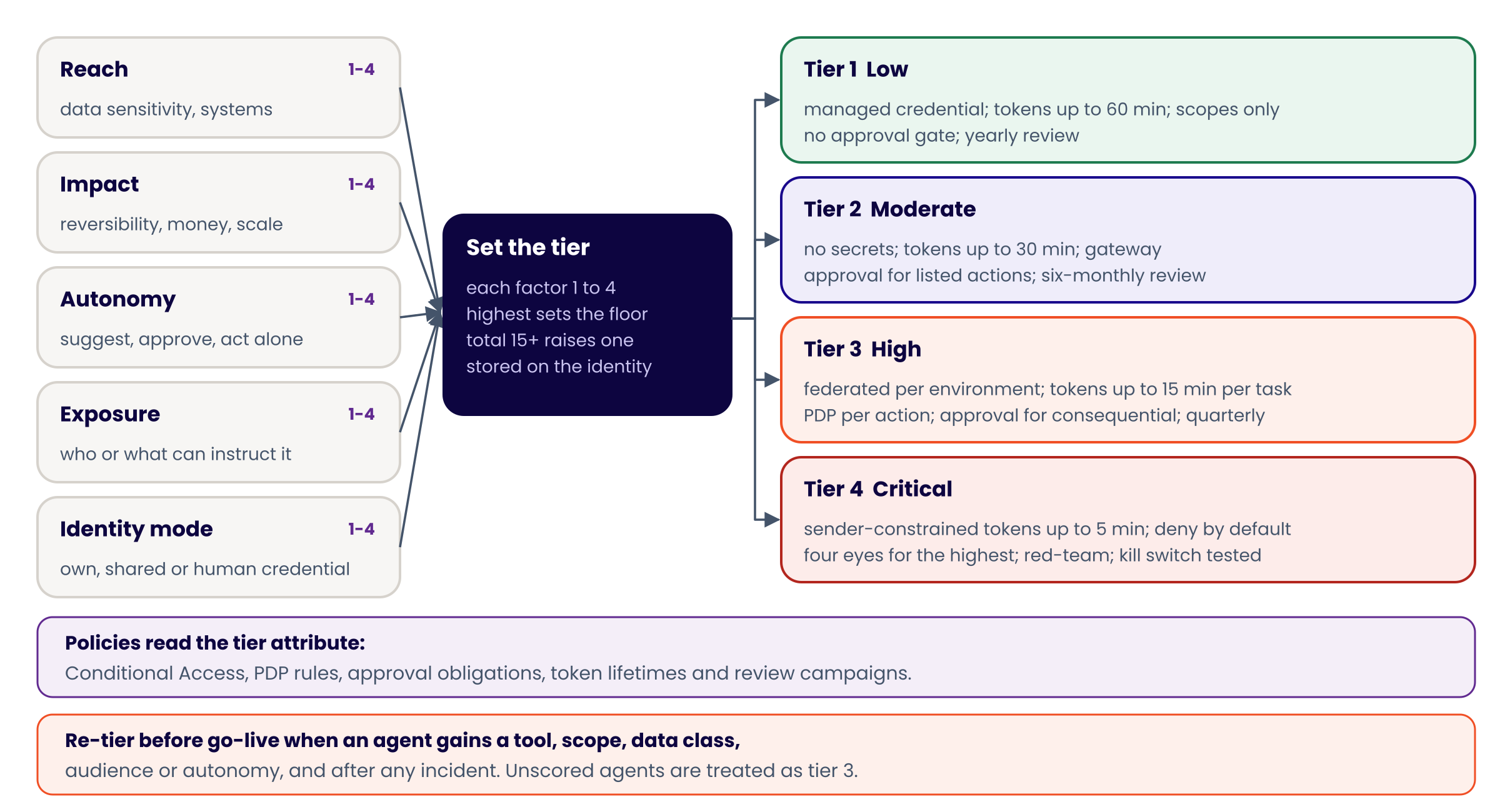
Score each agent on five factors at registration, using its inventory record (see TIE-AGT-012). Each factor scores 1 to 4. The highest factor sets the floor of the tier, and the total can raise it, so one critical factor is never averaged away. Each tier has a control baseline that is mandatory for every agent in it. The tier is stored as an attribute on the agent identity and in the inventory, and every policy that needs it reads it from there.
Scoring factors
| Factor | 1 | 2 | 3 | 4 |
|---|---|---|---|---|
| Reach | Public or own data | Internal data | Confidential or personal data, single system | Restricted or regulated data, or many systems |
| Impact | Read-only, reversible | Low-value writes, easy to undo | External or financial effect, hard to undo | Irreversible, high value, production, access changes |
| Autonomy | Suggests only | Acts after human approval per action | Acts alone within limits | Acts alone, plans its own steps, calls other agents |
| Exposure | Trusted staff only | All staff | Customers or partners | Processes external content (email, web, documents) or other agents' output |
| Identity mode | Own identity with user context | Own identity, app-only | Shared service account | A human's credentials or a personal API key |
Example control baseline per tier
| Control | Tier 1 Low | Tier 2 Moderate | Tier 3 High | Tier 4 Critical |
|---|---|---|---|---|
| Owner and sponsor | Owner | Owner and sponsor | Sponsor plus resource owner sign-off | Sponsor, resource owner and risk sign-off |
| Credentials | Managed, no static secrets | Federated or key-based, no secrets | Federated, per-environment | Federated, per-environment, sender-constrained where supported |
| Access token lifetime | Up to 60 minutes | Up to 30 minutes | Up to 15 minutes, per task | Up to 5 minutes, per task |
| Authorisation | Scopes | Scopes plus gateway | Policy decision point per action | Policy decision point per action, deny by default |
| Human approval | None | For listed actions | For all consequential actions | For all consequential actions, four eyes for the highest |
| Logging | Sign-ins | Sign-ins and actions | Decision log with reasons | Decision log, alerting and replayable evidence |
| Access review | Yearly | Six-monthly | Quarterly | Quarterly, plus on every change |
| Testing | Functional | Functional | Prompt-injection and misuse tests before launch | Red-team before launch and after major changes |
| Kill switch | Standard | Standard | Tested at launch | Tested quarterly |
How it works
- Score at registration. The builder proposes scores from the inventory record; a reviewer outside the build team confirms them.
- Set the tier. Highest factor sets the floor (a 4 anywhere means at least tier 3); a total of 15 or more raises the tier by one, capped at tier 4.
- Record it on the identity. Write the tier as an attribute on the agent identity and in the inventory, with the date and the reviewer.
- Apply the baseline. Policies read the attribute: conditional access, PDP rules, approval obligations, token lifetimes and review campaigns.
- Re-tier on change. Any new tool or scope, data class, audience, autonomy level or a security incident triggers a rescore before the change goes live.
Design rules#
- A few tiers, applied consistently. Four is enough for most organisations.
- One critical factor is enough. Never average away a 4.
- The tier lives on the identity. Policies read an attribute; they do not hard-code agent names.
- Baselines are mandatory. Exceptions are time-limited, approved and recorded.
- Independent confirmation. Someone outside the build team confirms tier 3 and 4 scores.
- Change triggers a rescore. Before go-live of the change, not at the next annual review.
- Unknown means high. Agents without a score are treated as tier 3 until scored.
Anti-patterns#
| Anti-pattern | What goes wrong |
|---|---|
| One control set for all agents | Either approval fatigue or under-protected critical agents |
| Averaging scores | A critical factor disappears behind four harmless ones |
| Tier kept only in a spreadsheet | Policies cannot use it; it drifts from reality |
| Builder scores alone | Optimistic scores; no challenge |
| Score once, never again | A read-only pilot becomes an autonomous writer with day-one controls |
| Tiers named after platforms | Risk depends on what the agent does, not where it was built |
Trade-offs#
Benefits
- Proportionate controls: less friction for low-risk agents, stronger controls where they matter.
- Policies that apply automatically to every agent in a tier, including new ones.
- A documented, explainable approach to AI risk for auditors and regulators.
- A clear trigger to revisit controls when an agent's capabilities change.
Costs and risks
- Effort to score and confirm every agent, and to rescore on change.
- Agreement across security, risk and the business on factor definitions.
- Attribute plumbing so each policy engine can read the tier.
Recipes#
How to build this pattern on specific products. Each recipe shows its own maturity and when it was last verified.
Ping Identity recipe
Ping Identity
Ping AI agent identities with PingOne Authorize or PingAuthorize
Written from vendor documentation and design experience; not yet lab-tested by Trevonix. Validate each step in a non-production tenant first.
The tier is a custom attribute on the AI agent identity and drives per-action policies and token lifetimes. Written from Ping documentation; not lab-tested by Trevonix for this pattern.
Components
| Component | Role in this pattern |
|---|---|
| AI agent identities in Advanced Identity Cloud or PingOne | Hold the tier as a custom attribute on the agent |
| PingOne Authorize or PingAuthorize | Reads the tier in per-action policies and returns approval obligations |
| PingOne Privilege risk score | A discovery-time risk input for the initial score |
Configure
- In the Advanced Identity Cloud admin console, open AI Agents, select the agent and set a custom attribute such as
riskTierunder basic settings or custom attributes. - Include the tier in the agent's tokens (for example through a token modification script) or let the PDP look it up by agent ID.
- In your authorisation policies, branch on tier: tier 3 and 4 consequential actions return an approval statement, tier 4 denies anything not explicitly allowed.
- Set access token lifetimes on the agent's OAuth settings to the tier limits.
Okta recipe
Okta
Okta for AI Agents, custom authorization servers and Okta Identity Governance
Written from vendor documentation and design experience; not yet lab-tested by Trevonix. Validate each step in a non-production tenant first.
Tier-specific authorization server policies, resource connections and certification campaigns; ISPM risk findings trigger rescoring. Written from Okta documentation; not lab-tested by Trevonix for this pattern.
Components
| Component | Role in this pattern |
|---|---|
| Okta for AI Agents (Universal Directory) | The agent record, its owner and its resource connections |
| Custom authorization server policies | Token lifetimes and allowed scopes per agent or group of agents |
| ISPM AI agent risk findings | Dynamic risk signals that should trigger a rescore |
| Okta Identity Governance | Certification campaigns per tier |
Configure
- Record the tier in your inventory and in the agent's description or a custom attribute if your org supports custom attributes on AI agents.
- On the custom authorization servers that agents use, create access policies per tier with the token lifetimes and scopes from the baseline.
- Limit each agent's resource connections to what its tier allows; tier 3 and 4 agents get no vaulted static credentials unless an exception is approved.
- Create certification campaigns per tier with the cadence from the baseline, and route ISPM AI agent risk findings to a rescore.
Microsoft Entra recipe
Microsoft Entra
Microsoft Entra custom security attributes, Conditional Access and ID Protection for agents
Written from vendor documentation and design experience; not yet lab-tested by Trevonix. Validate each step in a non-production tenant first.
The tier is a custom security attribute on agent identities; Conditional Access targets agents by attribute and blocks risky agents; entitlement management applies review cadence per tier. Written from Microsoft documentation; not lab-tested by Trevonix for this pattern.
Components
| Component | Role in this pattern |
|---|---|
| Custom security attributes | Hold the tier (for example AgentGovernance.RiskTier) on agent identities and blueprints |
| Conditional Access for agents | Targets agents by custom security attribute; blocks by tier or by agent risk |
| ID Protection for agents | Adds a dynamic agent risk level alongside the static tier |
| Entitlement management | Access packages and review cadences per tier |
Configure
- In Entra ID > Custom security attributes, create an attribute set (for example
AgentGovernance) with a predefined-values attributeRiskTier(1, 2, 3, 4). Assign Attribute Assignment Administrator only to the governance team. - Assign the tier to each agent identity, or to the blueprint when all its agents share the same tier.
- In Conditional Access, create policies that target agent identities by attribute, for example block tier 4 agents from all resources except their approved apps, and a policy that blocks agents with high agent risk. Start in report-only mode.
- In entitlement management, use separate access packages and assignment policies per tier, with expiry and review cadence from the baseline.
- Pass the tier to your PDP or gateway as a lookup on the agent's object ID, so per-action rules can use it.
Gotchas
- For agents, the only grant control in Conditional Access is block, and the only condition is agent risk. Use the tier to decide which agents are blocked from which resources; use your PDP for finer rules.
- Conditional Access for agents needs Entra ID P1 and ID Protection for agents needs P2 or the bundles that include them; check current licensing.
Saviynt recipe
Saviynt
Saviynt Identity Security for AI
Written from vendor documentation and design experience; not yet lab-tested by Trevonix. Validate each step in a non-production tenant first.
Tier-based certification, approvals and runtime policies in Agent Access Gateway. Written from Saviynt's published material; not lab-tested by Trevonix.
Capabilities used
| Capability | Role in this pattern |
|---|---|
| Posture management for AI | Risk insights and over-privilege findings that inform the score |
| Identity lifecycle and certification | Review cadence and approvals per tier |
| Agent Access Gateway | Runtime policies that can differ by tier |
Configure
- Hold the tier as an attribute on the agent identity in Saviynt.
- Build certification campaigns and approval workflows that select agents by tier.
- In Agent Access Gateway, apply stricter tool policies to higher tiers.
Open Policy Agent recipe
Open Policy Agent
Written from vendor documentation and design experience; not yet lab-tested by Trevonix. Validate each step in a non-production tenant first.
The inventory is published as policy data and rules branch on the agent's tier.
Any policy engine can apply tiers if the tier is available as data. With Open Policy Agent, publish the inventory (agent ID, tier, sponsor) as a data bundle and write rules that branch on data.agents[input.agent_id].tier.
Verification tests#
| Test | Expected result |
|---|---|
| Register an agent with one factor scored 4 and others 1 | Tier 3 or higher |
| Register an agent with no score | Treated as tier 3 until scored |
| Add a write tool to a tier 1 agent | Rescore required before the change is enabled |
| Tier 4 agent requests a token | Lifetime at or below the tier 4 limit; sender-constrained if supported |
| Tier 3 agent attempts a consequential action | Approval obligation applied by policy |
| Change an agent's tier attribute | Conditional access, PDP rules and review campaigns pick up the new tier |
Maturity and verification#
Documented. The tiering model and baselines are Trevonix's recommended starting point, drawn from its agent governance work and published frameworks. The product recipes are written from vendor documentation and have not yet been lab-tested by Trevonix for this pattern.
Frequently asked questions#
How many tiers do we need?
Four tiers with mandatory baselines work for most organisations. Fewer and the differences are too blunt; more and people argue about boundaries instead of applying controls.
Are these the same as EU AI Act risk classes?
Usually not directly. EU AI Act risk classes describe the use case and its regulatory obligations; agent tiers describe identity and access risk. A high-risk AI system under the Act will almost always contain tier 3 or 4 agents, but a tier 4 agent can sit in a use case the Act does not class as high risk.
Where should the tier be stored?
On the agent identity as an attribute (for example a custom security attribute in Entra or a custom attribute on the agent in your identity platform) and in the inventory. Policies should read the identity attribute, not a spreadsheet.
Related patterns and references#
Cite this pattern
Trevonix (2026). Risk-tier agents and scale controls to the tier (TIE-AGT-013, version 1.0). Identi Patterns. https://exchange.trevonix.com/patterns/tie-agt-013-risk-tier-agents-and-scale-controls-to-the-tier
Licensed under CC BY 4.0. Credit Trevonix and link to this page when you reuse it.
Patterns are guidance, provided as is and without warranty. Test in a non-production environment and check current vendor documentation before you rely on them. Read the full disclaimer.