
TIE-AGT-017DocumentedAgent identity/Governance
Lifecycle and access reviews for AI agents
Govern each agent from request to retirement like a joiner, mover and leaver: time-bound access granted through requests, reviews by accountable people at a cadence set by risk, automatic handling when sponsors move or leave, and clean retirement when the agent is no longer needed.
In short#
- Each agent moves through defined states, from requested to retired, and events move it: a new tool, a sponsor leaving, inactivity, an expiry date or an incident.
- Access comes through requests with an end date, not direct grants, and is reviewed by accountable people at a cadence set by the agent's risk tier, with evidence of what the agent actually used.
- Retirement removes everything: access, credentials, grants and runtime, then the identity after the retention period.
Problem#
Human identities have mature joiner, mover and leaver processes tied to HR events. Agents have none of that by default. An agent is created for a project, granted whatever it needs to get the demo working, and left running when the project ends. Its creator moves teams or leaves; nobody is told. Its access is never reviewed because no campaign includes agents, or because the reviewer cannot tell what the agent is for.
The result is an expanding set of identities with standing access, no accountable owner and no end date, the classic orphaned-account problem at machine speed.
When to use it#
Use it when
- Agents hold access to anything beyond their own data.
- Agents outlive the projects or people that created them.
- Auditors expect periodic access certification to cover non-human identities.
- You already run identity governance for people and want agents in the same process.
Avoid it, or add more, when
- Ephemeral agents created and destroyed per task with no standing access. Govern the blueprint or template that creates them instead of each instance.
Forces#
- Thoroughness against reviewer fatigue. Reviewing every agent quarterly is safe and exhausting; reviewing yearly is easy and leaves gaps.
- Automation against judgement. Removing unused access automatically is efficient; some agents are used rarely but legitimately.
- Continuity against accountability. Automatic sponsor transfer keeps agents running; it can also hand responsibility to someone who knows nothing about them.
Solution#
Model agents as governed identities with a lifecycle and a sponsor, exactly as you model contractors. Access is granted through request policies with an expiry, approved by the sponsor and the resource owner. Events from HR (sponsor moves or leaves), from the identity platform (inactivity, risk) and from the inventory (new tool, tier change) move the agent between states and start reviews. Reviews show the reviewer the purpose, tier and usage evidence, and unreviewed access is removed.
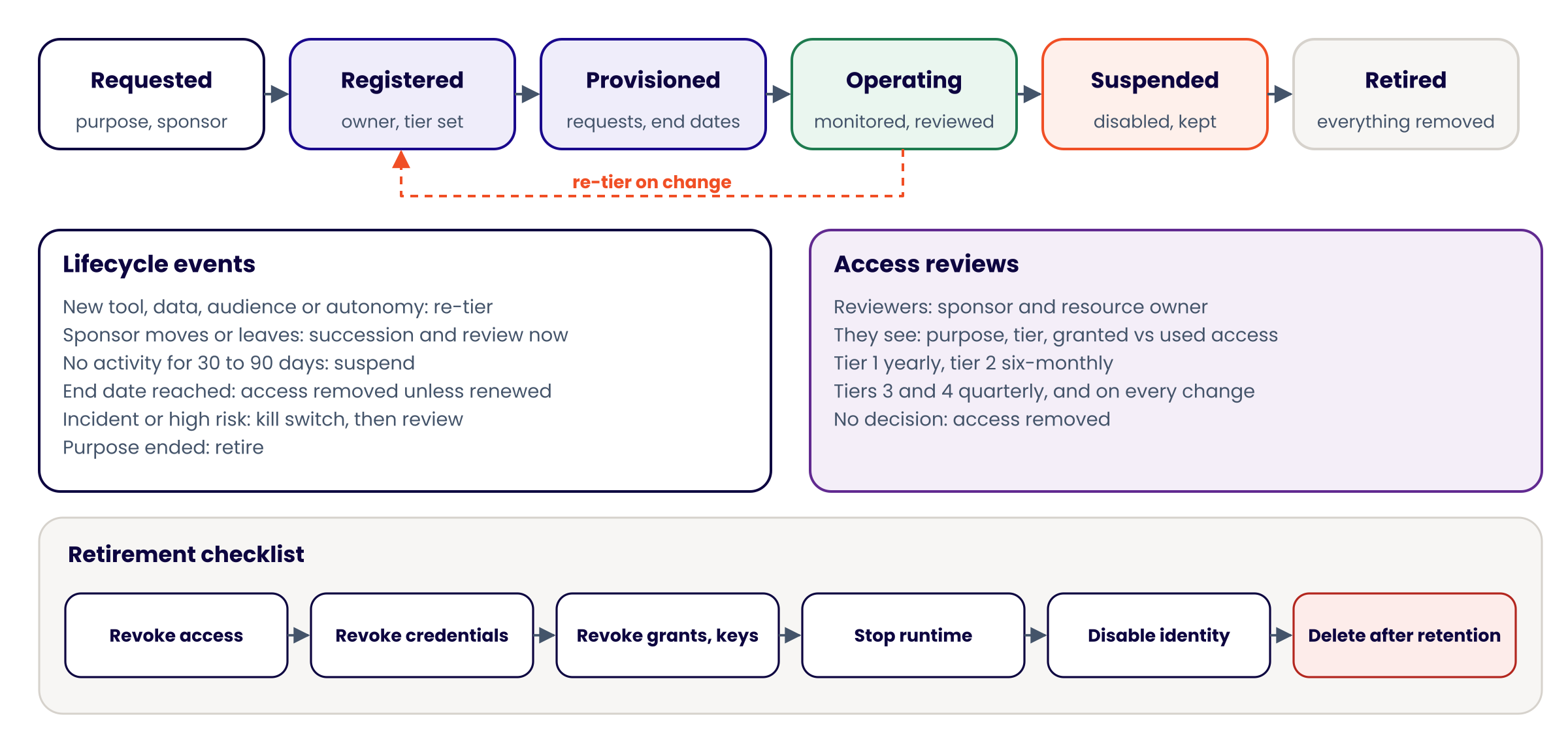
Lifecycle states
| State | Entry condition | What must be true |
|---|---|---|
| Requested | Someone asks for a new agent | Purpose, sponsor and intended reach stated |
| Registered | Approved | Identity created; owner and sponsor set; risk tier recorded (TIE-AGT-013) |
| Provisioned | Access granted | Access through requests with end dates; no direct standing grants |
| Operating | In use | Monitored; reviews scheduled; kill switch prepared |
| Suspended | Inactivity, incident or missing sponsor | Identity disabled; access kept for review |
| Retired | Purpose ended or not renewed | Access, credentials and grants removed; runtime stopped; identity disabled, then deleted after retention |
Lifecycle events
| Event | Response |
|---|---|
| Agent gains a tool, data class, audience or autonomy level | Re-tier, then re-approve access before the change goes live |
| Sponsor moves role | Notify the sponsor's manager and co-sponsors; confirm or reassign sponsorship; review the agent's access |
| Sponsor leaves | Transfer sponsorship to the manager or a named successor and start a review within days, not at the next campaign |
| No sign-in or tool use for 30 to 90 days (by tier) | Suspend; retire if nobody claims it |
| Access end date reached | Access removed unless renewed with justification |
| Incident or high risk | Kill switch (TIE-AGT-016), then review before restore |
How it works
- Request. New agents are requested with a purpose, sponsor and intended reach. The request creates the inventory record.
- Register. The identity is created with owner and sponsor, and the risk tier is set.
- Provision through requests. The sponsor requests access for the agent through access packages or request policies with an end date. Resource owners approve.
- Review at a cadence. Campaigns include agents, grouped by tier. Reviewers see purpose, tier, granted access and last-used evidence. No decision means removal.
- React to events. HR, identity and inventory events move the agent between states and start targeted reviews.
- Retire completely. Revoke access, credentials, grants and keys; stop the runtime; disable the identity; delete it after the retention period.
Design rules#
- Every agent has a sponsor and a successor.
- Access comes through requests with end dates. No direct, permanent grants.
- Review cadence follows risk tier.
- Reviewers see purpose and usage, not just permissions.
- No decision means removal for agent access.
- Sponsor changes start a review now, not at the next campaign.
- Inactivity suspends. Unclaimed agents are retired.
- Retirement is a checklist, not just deleting the identity.
Anti-patterns#
| Anti-pattern | What goes wrong |
|---|---|
| Agents excluded from access reviews | Standing access grows unchecked |
| Reviewer sees only a list of scopes | Approves everything; cannot judge |
| Sponsor transfer with no notification | New sponsor does not know the agent exists |
| Permanent direct grants | No end date; nothing ever expires |
| Retire by deleting the identity only | Keys, grants and runtimes keep working elsewhere |
| One campaign size for all agents | Reviewer fatigue for low-risk agents, too little scrutiny for high-risk ones |
Trade-offs#
Benefits
- No orphaned agents and less standing access.
- Access certification evidence that covers non-human identities.
- Faster, better review decisions with purpose and usage shown.
- Agents retired cleanly instead of lingering.
Costs and risks
- Governance licensing that covers agent identities.
- Reviewer time, especially for tier 3 and 4 agents.
- Integration of usage data into reviews.
- An operating process for suspensions and retirements.
Recipes#
How to build this pattern on specific products. Each recipe shows its own maturity and when it was last verified.
Ping Identity recipe
Ping Identity
PingOne Advanced Identity Cloud Identity Governance with Agent Governance
Written from vendor documentation and design experience; not yet lab-tested by Trevonix. Validate each step in a non-production tenant first.
Imports agents from AI platforms and governs them with certifications, custodians and approvals. Written from Ping documentation; not lab-tested by Trevonix.
Components
| Component | Role in this pattern |
|---|---|
| Advanced Identity Cloud Identity Governance with the Agent Governance add-on | Imports agents, certifies their access, assigns custodians and applies approval workflows |
| AI agent identities | Agent records with owners |
Configure
- Add the Agent Governance add-on to your Identity Governance subscription.
- Add a custom property (for example
custom_iga_identity_typewith values Agent and Human) to the identity schema. - Onboard each AI agent platform with provisioning, mappings, correlation and reconciliation so agents are imported.
- Assign custodians, then run certifications and approval workflows for agents as you do for people.
Okta recipe
Okta
Okta for AI Agents with Okta Identity Governance
Written from vendor documentation and design experience; not yet lab-tested by Trevonix. Validate each step in a non-production tenant first.
Access requests for AI agents, user access certifications and resource access certifications for agent connections. Written from Okta documentation; not lab-tested by Trevonix for this pattern.
Components
| Component | Role in this pattern |
|---|---|
| Okta for AI Agents | Agent records with human owners and resource connections |
| Access requests for AI agents | Automated, approved requests instead of ad hoc grants |
| User access certifications for AI agents | Reviews of who may use each agent |
| Resource access certifications | Reviews of each agent's connections to resources |
Configure
- Make sure every registered AI agent has a human owner.
- Route new access for agents through Okta Identity Governance access requests with approval and a time limit.
- Run resource access certifications for agent connections at the tier cadence, and user access certifications for who may use each agent.
- Deactivate agents that fail review or have no owner (see TIE-AGT-016).
Microsoft Entra recipe
Microsoft Entra
Microsoft Entra ID Governance for agent identities
Written from vendor documentation and design experience; not yet lab-tested by Trevonix. Validate each step in a non-production tenant first.
Sponsors, access packages for agent identities with expiry, access reviews of assignments and lifecycle workflow sponsor tasks. Written from Microsoft documentation; not lab-tested by Trevonix for this pattern.
Components
| Component | Role in this pattern |
|---|---|
| Sponsors and owners | Required on agent identities and blueprints; sponsors decide lifecycle and access |
| Access packages for agent identities | Time-bound access: security groups, directory roles or API permissions as resource roles |
| Access reviews of access package assignments | Periodic certification by tier |
| Lifecycle Workflows sponsor tasks | Notify managers and co-sponsors when a sponsor moves or leaves |
Configure
- Confirm licensing: governance for agent identities needs Microsoft 365 E7, or Microsoft Agent 365 with at least Entra ID P1 or Microsoft 365 E3.
- Create access packages for agents per tier. Use security group memberships, directory roles or API permissions as resource roles; do not add application roles, SAP roles or SharePoint site roles to agent access packages.
- In each assignment policy, let the agent's sponsor request on the agent's behalf, require resource-owner approval, and set an expiry on the Lifecycle tab.
- Enable access reviews on the assignment policies with the cadence from the agent's tier, reviewers set to the sponsor (and resource owner for tiers 3 and 4), and auto-apply results.
- In Lifecycle Workflows, add the sponsor tasks to your mover and leaver workflows so managers and co-sponsors are notified of sponsorship changes, and add a step that starts a review of affected agents.
Gotchas
- Without lifecycle workflows, a departing sponsor's agents transfer silently; nobody is told.
- Sponsor transfer to the manager depends on the manager attribute being populated in Entra.
Saviynt recipe
Saviynt
Saviynt Identity Security for AI
Written from vendor documentation and design experience; not yet lab-tested by Trevonix. Validate each step in a non-production tenant first.
Lifecycle governance with ownership and succession from registration to decommissioning, and certifications. Written from Saviynt's published material; not lab-tested by Trevonix.
Capabilities used
| Capability | Role in this pattern |
|---|---|
| Identity lifecycle management for agents | From registration to decommissioning, with an owner and a succession plan |
| Access certification | Periodic review of agent entitlements |
Configure
- Register agents with an owner, successor and approved purpose.
- Grant access through requests with end dates.
- Run certification campaigns that include agents, grouped by tier, and decommission agents that fail review.
Existing IGA with agents modelled as non-human accounts recipe
Existing IGA with agents modelled as non-human accounts
Written from vendor documentation and design experience; not yet lab-tested by Trevonix. Validate each step in a non-production tenant first.
A workable interim approach until your governance tool models agents natively.
If your governance tool cannot model agents yet, treat each agent as a non-human account owned by its sponsor, store purpose and tier as account attributes, and include those accounts in your existing certification campaigns. Feed usage data from gateway logs so reviewers see what was used.
Verification tests#
| Test | Expected result |
|---|---|
| Create an agent without a sponsor | Blocked or flagged; cannot be provisioned |
| Grant access to an agent directly instead of by request | Detected and reported |
| Access end date reached | Access removed automatically unless renewed |
| Sponsor leaves in a test HR event | Manager and co-sponsors notified; review started; sponsor reassigned |
| No activity for the tier's inactivity window | Agent suspended |
| Reviewer takes no decision | Access removed at campaign end |
| Retire an agent | Access, credentials, grants and runtime removed; identity disabled |
Maturity and verification#
Documented. Trevonix has assigned sponsors and owners to agent identities in Microsoft Entra, Okta and Ping lab tenants (November 2026). The lifecycle, review and retirement recipes are written from vendor documentation and have not yet been lab-tested by Trevonix.
Frequently asked questions#
Who should review an agent's access?
The sponsor, who knows why the agent exists, and the owner of each resource it can reach, who knows what the access means. For tier 3 and 4 agents, use both in a two-stage review.
How often?
Yearly for tier 1, six-monthly for tier 2, quarterly for tiers 3 and 4, plus a targeted review whenever the agent changes or its sponsor moves or leaves.
What about agents created per task?
Govern the blueprint or template that creates them, give the instances no standing access, and make sure they are destroyed with their task. Review the template's permissions at the template's tier.
Related patterns and references#
Cite this pattern
Trevonix (2026). Lifecycle and access reviews for AI agents (TIE-AGT-017, version 1.0). Identi Patterns. https://exchange.trevonix.com/patterns/tie-agt-017-lifecycle-and-access-reviews-for-ai-agents
Licensed under CC BY 4.0. Credit Trevonix and link to this page when you reuse it.
Patterns are guidance, provided as is and without warranty. Test in a non-production environment and check current vendor documentation before you rely on them. Read the full disclaimer.