
TIE-AGT-012DocumentedAgent identity/Discovery and inventory
Discover and inventory every AI agent, including shadow AI
Find every AI agent that can act in your environment, whether built, bought or brought in by employees, and keep one living inventory that records who owns it, what it is for, how it authenticates and what it can reach.
In short#
- Discovery is continuous and multi-source: the identity provider, agent-builder platforms, SaaS consent grants, browsers and endpoints, network egress, code and cloud. No single source sees every agent.
- All sources feed one inventory, reconciled on the credential or client the agent uses, not on its display name.
- Every discovered agent gets a human owner and a decision (register, onboard, contain or retire) within a set time. Nothing stays anonymous.
Problem#
AI agents now arrive through many doors. Teams build them on agent platforms, vendors ship them inside SaaS products, developers run coding agents and local MCP servers on their laptops, and employees connect personal assistants to work data with a few consent clicks. Each of these leaves a trace somewhere different: an agent identity in the directory, an OAuth grant in a SaaS tenant, an extension in a browser, a process on an endpoint, an API key in a repository.
Most organisations therefore have a partial list at best, usually the agents the platform team built on purpose. The agents that carry the most risk are the ones on nobody's list: created by someone who has since left, running on a shared service account or a personal API key, with broad scopes granted once and never reviewed.
When to use it#
Use it when
- You are starting an AI governance programme and need a baseline of what exists.
- Employees can connect AI tools to corporate data through OAuth consent, browser extensions or local tools.
- More than one team or platform builds or buys agents.
- Auditors, regulators or the board ask how many agents you run and who is accountable for them.
Avoid it, or add more, when
- You only need the list of agents one platform team built. Use that platform's registry, but plan for the others.
- You cannot act on what you find. Agree the owner and triage process first, or discovery just produces an alarming spreadsheet.
Forces#
- Coverage against intrusion. Browser and endpoint discovery sees the most shadow AI, and needs employee-privacy, works council or HR agreement in many countries.
- Speed against accuracy. Raw discovery feeds are noisy; reconciling them takes effort, but an unreconciled list double-counts and misses ownership.
- Enablement against control. Blocking everything you find pushes people to tools you cannot see; ignoring it leaves data exposed.
- One registry against many. Every agent platform has its own inventory; the enterprise needs one view across them.
Solution#
Treat agent discovery like asset discovery: several collectors feed a reconciler, which writes to one inventory that other controls read. Each collector looks at a different footprint an agent leaves. The reconciler matches records on the credential, client ID or service principal the agent uses, so the same agent seen in three places becomes one record. Every new record starts a triage with a deadline: the owner is found, the agent is classified and a decision is taken.
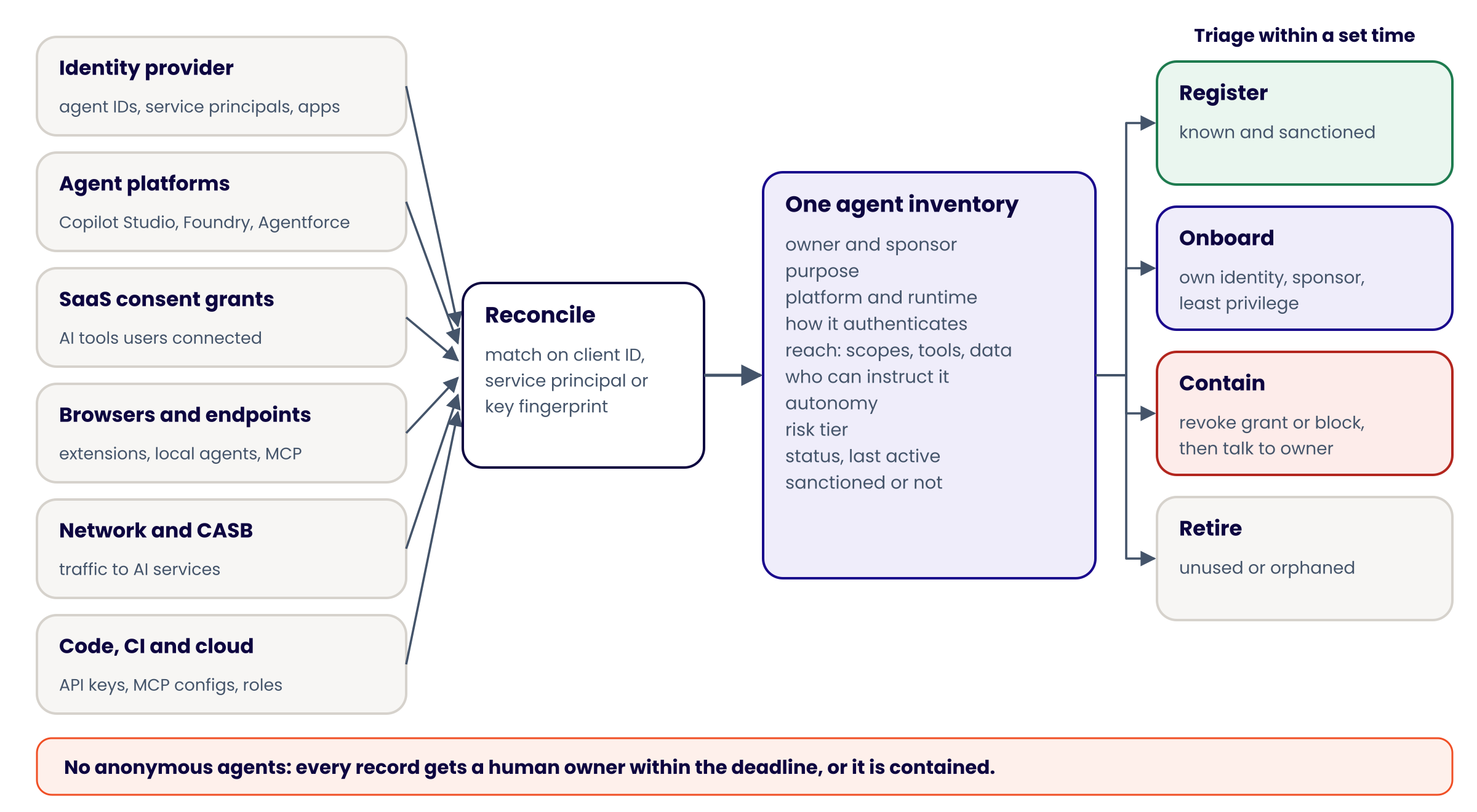
Discovery sources
| Source | What it finds | Typical blind spot |
|---|---|---|
| Identity provider | Agent identities, service principals, app registrations, OAuth clients, consent grants | Agents that use a personal API key or a human's credentials |
| Agent platforms | Agents built in Copilot Studio, Foundry, Agentforce, Bedrock, Vertex AI and similar | Agents built anywhere else |
| SaaS consent grants | Third-party AI tools that users connected to Microsoft 365, Google Workspace, Salesforce and others | Tools that use pasted API keys instead of OAuth |
| Browser and endpoint | AI extensions, coding agents, local MCP servers, desktop assistants | Unmanaged devices |
| Network and CASB | Traffic to model providers and AI SaaS, by user and device | Encrypted or personal-device traffic |
| Code, CI and cloud | Model-provider API keys, MCP configuration files, workload identities with model access | Repositories and accounts you do not scan |
Minimum inventory record
| Field | Why it matters |
|---|---|
| Agent ID and name | One stable key across sources |
| Platform and runtime | Where it runs; who can change it |
| Owner and sponsor | The accountable human (see TIE-AGT-001) |
| Purpose | What it is for; drives least privilege and reviews |
| How it authenticates | Its own identity, a shared account, a human's credential, an API key |
| Reach | Scopes, connections, MCP servers, data classes and systems it can touch |
| Who can instruct it | Internal users, customers, other agents, external content |
| Autonomy | Suggests, acts with approval, or acts alone |
| Risk tier | Drives the control baseline (see TIE-AGT-013) |
| Status, first seen, last active | Lifecycle and orphan detection |
| Sanctioned? | Approved for use, tolerated, or prohibited |
How it works
- Collect. Turn on each discovery source that applies to you, starting with the identity provider and your main agent platforms, then SaaS consent grants, then browsers, endpoints and code.
- Reconcile. Match records on client ID, service principal, credential fingerprint or OAuth grant. Merge duplicates; keep every source that saw the agent.
- Attribute. Find the human owner from the creator, the consenting user, the repository owner or the device user. Unattributed agents go to a named queue with a deadline.
- Triage. Decide: register sanctioned agents, onboard useful unmanaged ones (own identity, sponsor, least privilege), contain risky ones (revoke the grant or block first, then talk to the owner) and retire unused or orphaned ones.
- Publish. Make the inventory readable by other controls: risk tiering, conditional access, the policy decision point, access reviews and the kill switch.
- Repeat. Run collectors continuously or at least weekly, and track coverage and time to triage.
Design rules#
- Discovery is continuous. A one-off survey is out of date within weeks.
- One inventory, many sources. Agent platforms keep their own lists; the enterprise inventory reconciles them.
- Reconcile on credentials, not names. Names change and collide; client IDs, service principals and key fingerprints do not.
- No anonymous agents. Every agent has a human owner within a set number of days, or it is contained.
- Consent grants count as agents. An AI tool a user connected with broad scopes is an agent acting on your data.
- Include MCP servers and tools. They extend what every agent that uses them can reach.
- Contain before you investigate when an agent has high reach and no owner.
- Measure coverage. Track which sources are on, how many agents are unowned, and how long triage takes.
Anti-patterns#
| Anti-pattern | What goes wrong |
|---|---|
| Annual survey spreadsheet | Out of date immediately; misses everything nobody declares |
| Inventory equals one platform's registry | Agents on other platforms, in SaaS and on laptops are invisible |
| Matching on display name | Duplicates and misses; renamed agents disappear |
| Delete everything found | People move to tools and devices you cannot see |
| Discovery with no owner process | A growing list of known risks with nobody accountable |
| Ignoring consent grants | Third-party AI tools keep standing access to mail, files and CRM data |
Trade-offs#
Benefits
- A defensible answer to "how many agents do we run, and who owns them?"
- Shadow AI and orphaned agents found before they cause an incident.
- The foundation for risk tiering, access reviews and the kill switch.
- Evidence for AI governance frameworks that require an AI system inventory.
Costs and risks
- Licensing or build effort for several discovery sources.
- Privacy and employee-relations work for browser and endpoint discovery.
- An operating process for triage and owner chasing.
- Ongoing tuning to cut noise from benign tools and duplicate records.
Recipes#
How to build this pattern on specific products. Each recipe shows its own maturity and when it was last verified.
Ping Identity recipe
Ping Identity
PingOne Privilege AI discovery, PingOne Protect and Advanced Identity Cloud Agent Governance
Written from vendor documentation and design experience; not yet lab-tested by Trevonix. Validate each step in a non-production tenant first.
PingOne Privilege discovers and risk-scores agents on AI platforms; PingOne Protect detects agents at runtime; the Agent Governance add-on imports agents for governance. Written from Ping documentation; not lab-tested by Trevonix.
Components
| Component | Role in this pattern |
|---|---|
| PingOne Privilege, AI discovery | Finds agents on connected AI platforms, inventories them and scores each one for risk |
| PingOne Protect, agent detection | Detects AI agents acting in user sessions at runtime |
| PingOne Advanced Identity Cloud, Agent Governance add-on | Imports agent identities from AI platforms through reconciliation so they can be governed |
Configure
- In PingOne Privilege, add the platform applications for the AI platforms you use, then review discovered agents under AI Security > AI Platform Agents. Each agent has a risk score built from findings such as excessive permissions, missing owners or no monitoring.
- If you run Advanced Identity Cloud with Identity Governance and the Agent Governance add-on, add a custom property such as
custom_iga_identity_typeto mark identities as agents, then onboard each AI platform with provisioning, property mappings, correlation and reconciliation. - Use PingOne Protect agent detection to spot agents acting inside user sessions on your web applications.
- Feed the results into your inventory and assign owners.
Okta recipe
Okta
Okta Identity Security Posture Management with Okta for AI Agents
Written from vendor documentation and design experience; not yet lab-tested by Trevonix. Validate each step in a non-production tenant first.
ISPM discovers agents, OAuth grants, shadow AI apps and MCP servers from integrations, the browser plugin and endpoint connectors; Okta for AI Agents registers them with an owner. Written from Okta documentation; not yet lab-tested by Trevonix.
Components
| Component | Role in this pattern |
|---|---|
| Identity Security Posture Management (ISPM) | Discovers AI agents, OAuth grants, shadow AI apps and MCP servers, with an AI agent risk category |
| Secure Access Monitor browser plugin | Sees OAuth grants and shadow AI apps used in managed browsers |
| Endpoint integration | Inventories locally running agents and MCP servers through an endpoint detection connector (early access) |
| Okta for AI Agents (Universal Directory) | Registers discovered agents as managed identities with a human owner |
Configure
- In ISPM, connect the sources you have: your Okta org, the SaaS and agent platforms ISPM integrates with (for example Microsoft Copilot Studio and Salesforce Agentforce), the Secure Access Monitor plugin for managed Chrome browsers, and the endpoint connector if you are in its early access.
- Review the AI agent pages in the ISPM console: each discovered agent shows its owner, what it can access and the resources it can affect.
- Work the AI agent risk findings, starting with agents that have broad grants and no owner.
- For each agent you keep, register it in Directory > AI agents in the Admin Console, assign a human owner, and replace its grant or key with a managed connection.
Gotchas
- Browser discovery only sees managed browsers with the plugin deployed; plan the browser rollout with your endpoint team early.
Microsoft Entra recipe
Microsoft Entra
Microsoft Agent 365 and Microsoft Entra Agent ID
Written from vendor documentation and design experience; not yet lab-tested by Trevonix. Validate each step in a non-production tenant first.
Agent 365 provides the unified agent registry and Entra Agent ID the agent identities, owners and sponsors; enterprise application grants and Defender for Cloud Apps cover third-party and shadow AI. Written from Microsoft documentation; not yet lab-tested by Trevonix for discovery.
Components
| Component | Role in this pattern |
|---|---|
| Microsoft Agent 365 registry | The unified inventory of Microsoft and non-Microsoft agents, viewed in the Microsoft 365 admin center |
| Microsoft Entra Agent ID | Agent identities and blueprints, with owners and sponsors, in the Entra admin center |
| Enterprise applications and consent grants | Service principals and delegated OAuth grants that third-party AI tools hold |
| Microsoft Defender for Cloud Apps | Cloud discovery of generative AI apps used from your network and devices |
Configure
- Give the people who run discovery the AI Reader role, which lets them see agents in Agent 365 and Entra Agent ID without changing anything.
- In the Microsoft 365 admin center, open the Agent 365 registry and export the agent list. Microsoft-built and Copilot Studio agents register automatically; register other agent identity blueprints so they appear too.
- In the Entra admin center, browse to Entra ID > Agents > Agent identities and Agent blueprints, and record each agent's owners, sponsors, status and granted permissions.
- Under Enterprise applications, review delegated permission grants and application permissions held by AI tools; filter on publisher and on high-impact scopes such as mail, files and directory access.
- In Defender for Cloud Apps, review discovered generative AI apps and the users and devices that use them.
- Reconcile the four lists on application ID and service principal ID into your inventory.
Gotchas
- Agent registry experiences are converging under Agent 365, and the earlier Entra Agent Registry Graph APIs are being replaced; check which APIs your scripts call.
- Applying Conditional Access or governance to agents needs the right Agent ID licensing, even though seeing them does not.
Saviynt recipe
Saviynt
Saviynt Identity Security for AI
Written from vendor documentation and design experience; not yet lab-tested by Trevonix. Validate each step in a non-production tenant first.
Saviynt's posture management for AI discovers authorised and unauthorised agents and surfaces over-privileged access; lifecycle management registers each agent with an owner and successor. Written from Saviynt's published material; not lab-tested by Trevonix.
Capabilities used
| Capability | Role in this pattern |
|---|---|
| Identity Security Posture Management for AI | Continuous discovery of authorised and unauthorised agents, with risk and over-privilege findings |
| Identity lifecycle management | Registers each agent with a purpose, scope and owner, including a succession plan |
Configure
- Connect the agent platforms, cloud accounts and SaaS applications in scope to Saviynt's posture management for AI.
- Review discovered agents and their risk findings; prioritise unowned agents with excessive access.
- Register the agents you keep, with an owner, a successor and an approved purpose, so lifecycle governance applies from then on.
CASB, secret scanning and cloud inventory recipe
CASB, secret scanning and cloud inventory
Written from vendor documentation and design experience; not yet lab-tested by Trevonix. Validate each step in a non-production tenant first.
Generic sources that find agents outside the identity platforms: AI traffic in your secure web gateway or CASB, model-provider keys in code, and cloud workload identities with model access.
Whatever your identity platform, three generic sources close most remaining gaps: your secure web gateway or CASB for traffic to AI services, secret scanning in source control for model-provider API keys and MCP configuration files, and your cloud provider's inventory of workload identities that can call model endpoints.
Configure
- Enable the generative AI category in your CASB or secure web gateway reports and export users and devices per AI service.
- Add model-provider key patterns and MCP configuration file names to your secret scanning rules.
- List cloud workload identities with permission to invoke model endpoints (for example Amazon Bedrock, Azure OpenAI or Vertex AI).
- Feed all three into the same inventory and reconciliation process.
Verification tests#
| Test | Expected result |
|---|---|
| Create a test agent on a sanctioned platform | Appears in the inventory with its owner within the agreed time |
| Grant a test AI app broad OAuth scopes as a normal user | Discovered as an agent with the consenting user as provisional owner |
| Install a test AI browser extension or local MCP server on a managed device | Discovered and attributed to the device user |
| Commit a dummy model-provider key to a scanned repository | Raised as an unregistered agent credential |
| The same agent seen by two sources | One inventory record, two sources listed |
| Owner leaves the organisation | Agent flagged for reassignment or retirement |
| Unowned high-reach agent past its deadline | Contained (grant revoked or agent disabled) and logged |
Maturity and verification#
Documented. This pattern is written from vendor documentation and Trevonix's discovery method; Trevonix has registered and governed agent identities in Microsoft Entra, Okta and Ping lab tenants (November 2026), but has not yet lab-tested the shadow AI discovery sources described here end to end.
Frequently asked questions#
Where should we start?
Start with the identity provider (agent identities, service principals and OAuth consent grants) and the agent platforms you already license. They are cheap to turn on and find most sanctioned agents. Add browser, endpoint and code discovery next to find shadow AI.
Should we block every unsanctioned agent we find?
No. Contain the ones with high reach and no owner, onboard the useful ones properly, and retire the unused ones. Blocking everything pushes people to tools you cannot see.
Is an OAuth consent grant really an agent?
Yes, if it acts on your data. A third-party AI tool that a user connected with read and write access to their mailbox can act on that data without the user present. Record it, find its owner and review its scopes.
How do we avoid counting the same agent twice?
Match on what the agent uses to authenticate: its client ID, service principal, OAuth grant or a fingerprint of its key. Keep the display name as a label only.
Related patterns and references#
Cite this pattern
Trevonix (2026). Discover and inventory every AI agent, including shadow AI (TIE-AGT-012, version 1.0). Identi Patterns. https://exchange.trevonix.com/patterns/tie-agt-012-discover-and-inventory-every-ai-agent-including-shadow-ai
Licensed under CC BY 4.0. Credit Trevonix and link to this page when you reuse it.
Patterns are guidance, provided as is and without warranty. Test in a non-production environment and check current vendor documentation before you rely on them. Read the full disclaimer.