
TIE-AGT-001Reference buildAgent identity/Identity and ownership
Agent as a first-class identity with an accountable sponsor
Register every AI agent as its own identity, with a named human sponsor accountable for its purpose, access and retirement.
In short#
- Every AI agent gets its own identity in your identity platform: never a person's account, a shared service account or an unowned API key.
- Every agent has a named sponsor who is accountable for why it exists and what it may access, and at least two owners who look after its configuration and credentials.
- Reviews, sponsor changes and retirement are driven from that record, so no agent outlives the people accountable for it.
Problem#
AI agents are being built faster than identity teams can see them. Many run on credentials that were never meant for them: a service account shared by several workloads, an API key in a configuration file, or a developer's own login. When something goes wrong, for example an agent reads data it should not, sends the wrong message or is compromised, nobody can answer the first two questions an investigation asks: which agent was this, and who is accountable for it?
Treating agents as ordinary service accounts does not close the gap. Service accounts usually have a technical contact at best, no recorded business purpose and no review cycle, and they outlive the projects that created them. Agents make this worse: they act on their own, chain tools together, and are created and abandoned in weeks rather than years.
When to use it#
Use it when
- AI agents, whether custom-built or created in a platform such as Microsoft Copilot Studio, Azure AI Foundry, AWS Bedrock or Google Vertex AI, reach enterprise applications, APIs or data.
- You need to show auditors or regulators who is accountable for each automated actor.
- Agents are built by many teams and you need one inventory.
- You plan to add delegation, fine-grained authorisation or human approval later; all of them need a known agent identity first.
Avoid it, or add more, when
- The "agent" is a fixed, scripted integration with no autonomy. Standard workload or service-account governance may be enough, although registering it does no harm.
- You do not yet know which agents exist. Start with discovery, then register what you find using this pattern.
- You expect registration alone to make agents safe. It makes them attributable and governable; least-privilege access and runtime controls still have to be added.
Forces#
- Speed against control. Developers want to ship agents without waiting in a ticket queue; security wants nothing running unregistered.
- Business against technical accountability. The person who knows why an agent exists is rarely the person who manages its credentials.
- People move; agents stay. Sponsors change roles and leave, and an agent keeps running unless something stops it.
- Platform sprawl. Agents live in many builder platforms, each with its own idea of identity and ownership.
- Granularity. One identity per running copy drowns reviewers; one identity for a whole fleet makes actions impossible to attribute.
- Symbolic ownership. In some products the owner field grants nothing and triggers nothing, so filling it in creates no real accountability.
Solution#
Register each agent as a distinct, non-human identity in your identity platform, with its own credentials, and attach two kinds of people to it: a sponsor and owners. Then connect the platform's lifecycle and governance processes to those people, so the record does work rather than sitting in a directory.
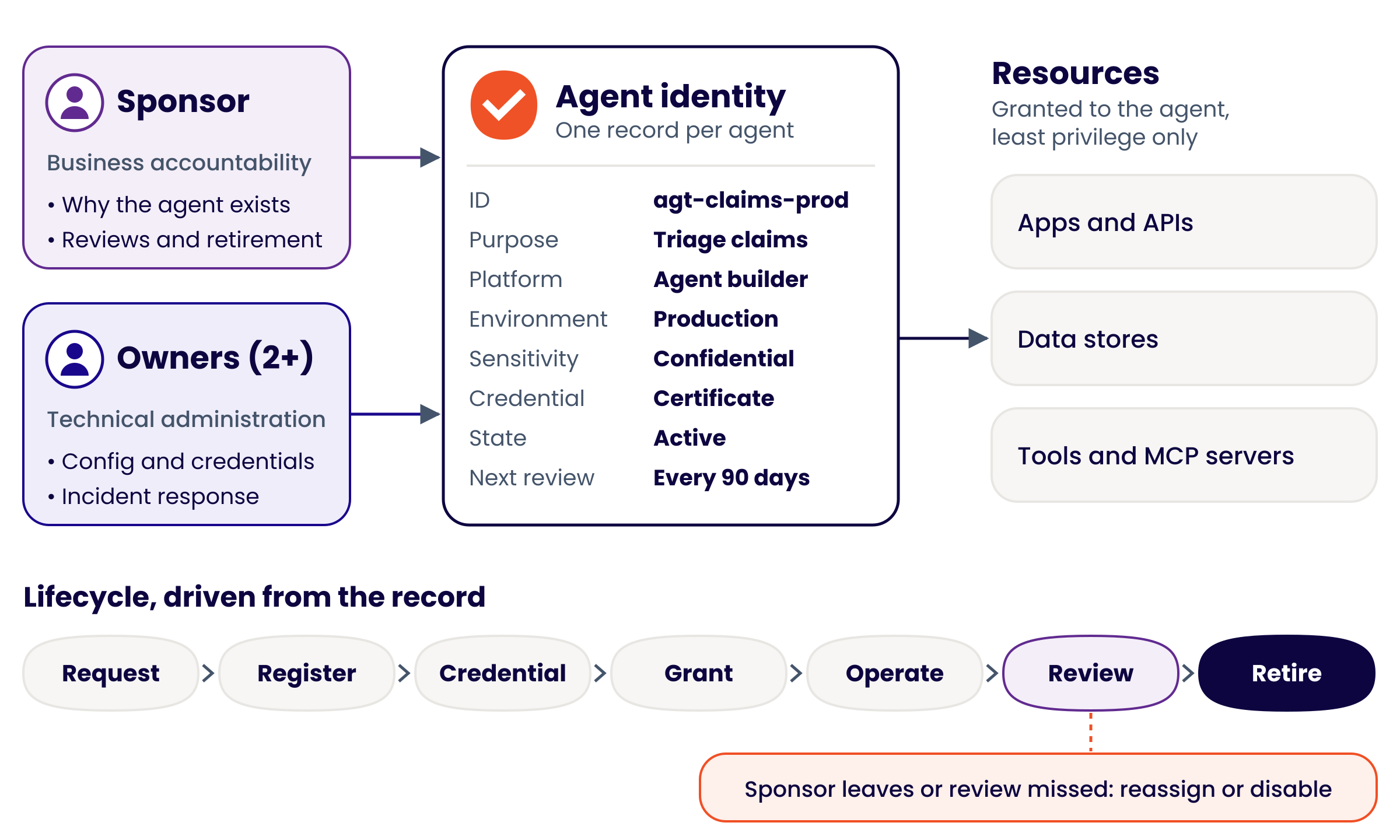
What the agent record holds
| Element | What it is | Rule |
|---|---|---|
| Agent identity | A dedicated identity for one agent, or for one agent type in one environment | Unique and never shared; created through a supported registration channel |
| Sponsor | The business person, or managed group, accountable for why the agent exists and what it may access | Required before activation; must be an active employee |
| Owners | The technical people or team who manage configuration, credentials and incidents | At least two people, or a group, so the agent is never ownerless |
| Purpose and context | Business purpose, platform of origin, environment and data sensitivity | Structured fields, not free text, so they can drive policy and reports |
| Credential | The agent's own certificate, key pair or federated credential | No human passwords and no shared secrets; prefer keys and federation to static secrets |
| Lifecycle | Requested, active, under review, disabled, retired, plus a next-review date | Every change is logged; an overdue review disables the agent |
How it works
- Request. The team asks for a new agent, stating its purpose, the data it needs, its sponsor and its owners.
- Register. The identity team, or an approved pipeline, creates the agent identity and records the sponsor, owners and context.
- Credential. The agent gets its own credential, preferably a certificate, key pair or workload federation rather than a long-lived secret.
- Grant. Access is granted to the agent identity, never to the developer who built it, with only the scopes its purpose needs.
- Operate. Tokens and audit events carry the agent's own identity, so every action can be attributed.
- Review. The sponsor confirms purpose and access on a schedule; every 90 days is a sensible default for agents that touch sensitive data.
- Respond. When a sponsor moves or leaves, sponsorship is reassigned within an agreed time, or the agent is disabled.
- Retire. When the purpose ends, the sponsor approves retirement, credentials are revoked and the identity is disabled, then deleted after your retention period.
{
  "agentId": "agt-claims-triage-prod",
  "displayName": "Claims triage assistant",
  "purpose": "Classifies inbound claims emails and drafts a routing decision",
  "platform": "Agent builder of record",
  "environment": "production",
  "dataSensitivity": "confidential",
  "sponsor": "head.of.claims@example.com",
  "owners": ["claims-platform-team@example.com"],
  "credentialType": "certificate",
  "status": "active",
  "nextReview": "2027-03-01",
  "retireBy": "2027-12-31"
}Design rules#
- One agent, one identity. Never let an agent run as a person or on a shared service account.
- No sponsor, no activation. Make the sponsor mandatory at creation and block activation without one: in the platform if it can, in your registration process if it cannot.
- Separate business accountability from technical administration. The sponsor answers for purpose and access; owners answer for configuration and credentials.
- Never a single owner. Require at least two owners, or a maintained group, so a holiday or a resignation does not orphan the agent.
- Tie sponsorship to joiner-mover-leaver. A sponsor's move or departure must trigger reassignment within an agreed time.
- Record purpose and sensitivity as data. Structured fields can drive policy, reviews and reports; free text cannot.
- Give every agent a next-review date. An overdue review disables the agent instead of being forgotten.
- Grant access to the agent, not its builder. Developers keep their own, separate access.
- Make ownership do something. Route reviews, alerts and approvals to the sponsor and owners. A field that triggers nothing is decoration.
Anti-patterns#
| Anti-pattern | What goes wrong |
|---|---|
| Agent runs as its developer | Every action looks as if the person did it, the agent's access grows with theirs, and the agent breaks, or keeps running, when they leave |
| One service account for many agents | No action can be attributed to an agent, and revoking one agent stops them all |
| Owner field with no process | The directory looks governed, but nothing happens when the owner leaves |
| Team mailbox as the only sponsor | Nobody in particular is accountable, and review requests go unanswered |
| Register after go-live | By the time the agent is registered it already holds access nobody approved |
| An identity for every session or prompt | Thousands of short-lived identities that nobody can review |
Trade-offs#
Benefits
- Every agent action can be attributed to a specific agent and a named sponsor.
- One inventory of agents across builder platforms.
- Reviews, incidents and retirement reach accountable people.
- A foundation for delegation, fine-grained authorisation and human approval.
- Evidence of accountability for auditors and regulators.
Costs and risks
- Extra steps for developers. Offset them with a self-service request form and automated registration.
- Review workload for sponsors. Scale review frequency to the agent's data sensitivity.
- Licensing. Agent identity features are separately licensed add-ons in some platforms.
- Uneven enforcement. Where a product's ownership field is only a label, your process has to supply the enforcement.
Recipes#
How to build this pattern on specific products. Each recipe shows its own maturity and when it was last verified.
Ping Identity recipe
Ping Identity
PingOne Advanced Identity Cloud
In PingOne Advanced Identity Cloud, agents are created on the AI Agents page with their own OAuth 2.0 client. The Agent Owners field is for visibility only and grants no permissions, so pair it with a sponsor attribute and a review process. PingOne, with the Agent IAM Core package, offers the same capability; see the notes after the steps.
Components
| Component | Role in this pattern |
|---|---|
| AI agent identity | The agent's identity and its own OAuth 2.0 client; the client ID cannot be changed later |
| Agent Owners | People responsible for the agent; for visibility only, with no functional permissions |
| Custom attributes | Key-value metadata for sponsor, purpose, sensitivity, status and review date |
| Applications | The resources the agent may use, the users it may act for, and its scopes |
| Agent Governance (add-on) | Discovers agents in builder platforms and governs them like human identities, including reviews |
Before you start
- Check that the AI agents feature is enabled in your tenant; it is on by default in newer tenant environments.
- Agree a client ID naming convention, such as agt-<purpose>-<environment>. The client ID cannot be changed after you save.
- Agent Governance is a separately licensed add-on to PingOne Identity Governance.
Create the agent identity (PingOne Advanced Identity Cloud)
- In the Advanced Identity Cloud admin console, go to AI Agents and select Add AI Agent.
- In Add new AI Agent, enter a descriptive Name and a Client ID that follows your convention. Leave Client Secret blank to set it later, or use Use Secret Store for secrets with a secret label identifier. Select Save.
- Open the agent. On the Overview tab, enter a Description stating its purpose and select at least two Agent Owners.
- Select Show advanced settings and add custom attributes: sponsor, purpose, dataSensitivity, environment, status and nextReview. Select Save.
- On the Applications tab, select Add Application, choose the resource, limit Acting On Behalf Of to the users or groups it serves, and choose only the scopes it needs under Permissions. Select Save.
- On the Access tab, set the credential. Prefer the secret store, and rotate secrets on a schedule.
On PingOne instead
- AI agent capabilities in PingOne need the Agent IAM Core package.
- In the PingOne admin console, go to AI Agents, add the agent with a Name and Description, then complete its configuration and resources.
- Manage owners by granting users the Application Owner role for the agent.
- Use the toggle at the top of the agent's details panel to disable it quickly.
Gotchas
- Agent Owners grant no permissions and trigger no process on their own. Without a sponsor attribute and a review process, ownership is only a label.
- A client secret entered at creation cannot be viewed again; store it in a secret store straight away.
Check it works
- Every agent on the AI Agents page has owners, a sponsor attribute and a nextReview date.
- Audit events for the agent's activity identify the agent's own client, not a person.
Okta recipe
Okta
Okta for AI Agents
Okta for AI Agents registers agents as first-class identities in Universal Directory, alongside the people they work for, with up to five individual owners or a group owner. Owners are optional in the console, so enforce them in your registration process.
Components
| Component | Role in this pattern |
|---|---|
| AI agent (Universal Directory) | The agent's identity, with name, description, platform and external ID |
| Owners | Up to five individual owners, or one group owner with at least two members |
| Linked app | An OIDC or SAML app that defines how users reach the agent; one app per agent |
| Client registration | The agent's own credential: key pair, SPIFFE, client ID metadata document or secret |
| Machine access | Other agents or services allowed to call this agent |
Before you start
- Okta for AI Agents is for Okta Workforce Identity customers on Identity Engine. Some capabilities have been released as Early Access, so check what is enabled in your org.
- You need permission to manage AI agents in your org. For agents built on a supported builder platform, import them instead of registering them by hand.
Register the agent
- In the Admin Console, go to Directory > AI Agents and select Register AI agent > Register manually.
- Enter a Name and a Description that states the agent's business purpose.
- In Identifier, select the Platform and enter the agent's External ID, then select Next.
- Choose how users reach the agent: create a new OIDC app linked to it, or select an existing SAML app. An app can be linked to only one agent.
- On the Owners tab, select Edit, then Assign individual owners (up to five) or Assign a group owner (a group with at least two members), and select Save. Assign at least two owners.
- On the Client registration tab, configure the agent's credential. Prefer a public/private key, SPIFFE or a client ID metadata document to a client secret.
- Only if other agents or services call this agent, configure the Machine access tab.
- Select Actions > Activate and confirm.
Record the sponsor and review date
- Okta records owners but has no separate business sponsor field. Name the sponsor in the description, or keep the sponsor and next-review date in your agent register, and include a business owner among the owners.
- Use Actions > Deactivate to stop an agent quickly; it is the first step of retirement.
Gotchas
- Owners are optional in the console, so it will let you activate an agent without one. Block this in your registration checklist.
- Imports from builder platforms update existing agent records instead of creating duplicates, so correct ownership on the Okta record as well as at the source.
Check it works
- On Directory > AI Agents, use View to show the owners column and confirm that every active agent has at least two.
- Confirm that System Log events for the agent's activity identify the agent rather than a user.
Microsoft Entra recipe
Microsoft Entra
Microsoft Entra Agent ID
Microsoft Entra Agent ID creates agent identities from an agent identity blueprint. A sponsor is required on both; owners are optional technical administrators. Sponsors can enable and disable the agent without admin rights, which gives the business a stop button.
Components
| Component | Role in this pattern |
|---|---|
| Agent identity blueprint | Template for a type of agent; has its own owners and sponsors and creates agent identities |
| Agent identity | The agent's own identity (a special service principal), used for tokens and audit |
| Sponsor | Business person or group accountable for the agent; can enable, disable and soft-delete it |
| Owners | Technical administrators; manage credentials and settings, and can add owners and sponsors |
| Custom security attributes | Structured purpose, environment and sensitivity fields |
| Lifecycle workflows | Notify co-sponsors and managers when a sponsor moves or leaves |
Before you start
- Microsoft Entra Agent ID is available to Microsoft Entra customers. Conditional Access for agents needs Entra ID P1 and ID Protection for agents needs P2; governance features for agents depend on your Microsoft licensing, so confirm it before you design reviews and workflows around them.
- To create blueprints and agent identities you need the Agent ID Administrator or Agent ID Developer role, or ownership of the blueprint.
- Agree your custom security attributes (for example AgentPurpose, Environment and DataSensitivity) before you register agents.
Create the blueprint (once per type of agent)
- Sign in to the Microsoft Entra admin center.
- Browse to Entra ID > Agents > Agent blueprints and create a blueprint with the admin center wizard. Give it a name that describes the type of agent.
- In the wizard, assign at least two owners (technical administrators) and the sponsor (the accountable business person or group). The wizard also creates the blueprint principal.
Create the agent identity
- Browse to Entra ID > Agents > Agent identities and select New agent identity.
- On the Basics tab, under Agent blueprint, select your blueprint and give the agent a display name that says what it does.
- Assign the agent's sponsor and owners, then create it.
- Add your custom security attributes (purpose, environment, data sensitivity) to the agent identity.
Maintain owners and sponsors
- Browse to Entra ID > Agents > Agent identities and select the agent.
- Under Access, select Owners and sponsors.
- Select Add, then Add owner or Add sponsor. Choose the users (sponsors can also be groups) and select Add.
- Set up a lifecycle workflow that notifies co-sponsors and the sponsor's manager when a sponsor moves or leaves, and assign a new sponsor within your agreed time.
Gotchas
- Do not create agents as plain app registrations or service principals; they would miss the built-in sponsor accountability and lifecycle controls.
- Only dynamic membership groups and Microsoft 365 groups can be assigned as group sponsors.
- After a change to a dynamic group's rule or a user's properties, it can take up to 24 hours before a new sponsor is recognised.
- Sponsors cannot change authentication settings; those stay with owners, which keeps business and technical duties apart.
Check it works
- Sign in as the sponsor: the agent should be visible to them, and they should be able to disable it.
- Sign-in and audit logs for an agent action should show the agent identity, not a user or a shared principal.
Saviynt recipe
Saviynt
Saviynt Identity Security for AI
Written from vendor documentation and design experience; not yet lab-tested by Trevonix. Validate each step in a non-production tenant first.
Saviynt Identity Security for AI brings agents from many builder platforms into one inventory and assigns owners by rule. This recipe is written from Saviynt's published material and has not been lab-tested by Trevonix, so it describes what to configure rather than exact screens.
Capabilities used
| Capability | Role in this pattern |
|---|---|
| Agent inventory | One view of agents onboarded from platforms such as AWS Bedrock and AgentCore, Azure AI Foundry, Google Vertex AI, Salesforce Agentforce, ServiceNow AI and Microsoft Copilot |
| Rule-based ownership | Assigns owners automatically when agents are registered or their labels change, and can be applied to agents already in the inventory |
| Lifecycle governance | Takes each agent from registration through change to retirement, with reviews sent to its owner |
| Posture management | Finds unregistered, unowned and over-privileged agents |
Configure
- Connect each agent builder platform you use, so its agents appear in the agent inventory with their model, criticality, status and owner.
- Define ownership rules that map platform labels or attributes to an accountable owner, and apply them to agents already in the inventory to close "no owner" gaps.
- Review any agents still without an owner and assign one. Require a business sponsor for agents that handle sensitive data.
- Set lifecycle states and review frequency, and route access reviews to each agent's owner.
- Use posture findings to catch agents that appear without registration or ownership, and register or disable them.
Gotchas
- Ownership rules are only as good as the labels on the source platform. Agree a labelling standard with the teams that build agents first.
- Check which builder platforms your Saviynt version supports before you rely on automatic onboarding.
Other product recipe
Not available
No recipe for another product has been published for this pattern yet. Recipes for further products, for example SailPoint, CyberArk or ForgeRock, are added here as they are written.
Product: to be specified
Verification tests#
| Test | Expected result |
|---|---|
| Try to activate an agent with no sponsor or owners | Blocked by the platform or the registration process; the agent stays inactive |
| Disable a sponsor's account in a test tenant | The co-sponsor, owners or the sponsor's manager are asked to reassign within the agreed time, and the agent is flagged |
| Let a review deadline pass | The agent is disabled automatically or flagged for disabling |
| Run an access review | The sponsor receives the agent's access to confirm; anything removed is revoked |
| Check the audit log for an agent action | The event shows the agent's own identity, not a person or a shared account |
| Retire the agent | Credentials are revoked, the identity is disabled and no new tokens are issued |
| Search for agents on personal or shared credentials | None found; any that are found are migrated or disabled |
Maturity and verification#
Reference build. Trevonix has implemented this pattern end to end in lab tenants on Microsoft Entra, Okta and Ping Identity (November 2026). The Saviynt recipe is written from Saviynt's published material and has not yet been lab-tested by Trevonix.
Frequently asked questions#
Is an AI agent just another service account?
No. A service account usually has no recorded business purpose, no business sponsor and no review cycle. An agent acts on its own, can chain tools and data together, and is created and retired quickly, so it needs the accountability of a person and a faster lifecycle than a service account.
What is the difference between a sponsor and an owner?
The sponsor is the business person accountable for why the agent exists and what it may access. Owners are the technical people who manage its configuration and credentials. Microsoft Entra uses both terms. Okta and Ping Identity use "owner" for the people responsible for an agent, so record the business sponsor separately if the product has no field for it.
Should every running copy of an agent get its own identity?
Usually not. Give one identity to each agent, or to each agent type in each environment. Give separate identities to running copies only when they act for different users or must be revoked separately.
What should happen when a sponsor leaves?
Reassign sponsorship before their leaving date as part of your leaver process. If that does not happen, flag the agent and disable it after a short grace period. An agent with no accountable person should not keep running.
Does registering an agent make it secure?
No. Registration makes an agent attributable and governable. You still need least-privilege access, delegation that preserves the user's identity, and runtime controls for high-risk actions.
Related patterns and references#
- Microsoft Learn: Administrative relationships in Microsoft Entra Agent ID (owners, sponsors and managers)
- Microsoft Learn: Best practices for Microsoft Entra Agent ID
- Okta Help: Add AI agents manually
- Ping Identity: Manage AI agent identities in PingOne Advanced Identity Cloud
- Ping Identity: AI agents in PingOne
- Saviynt: Lifecycle management for AI agents
- OpenID Foundation: Identity Management for Agentic AI (2025)
- NIST SP 800-53 Rev. 5 (control AC-2, Account Management)
- OWASP Top 10 for LLM Applications 2025: LLM06 Excessive Agency
Cite this pattern
Trevonix (2026). Agent as a first-class identity with an accountable sponsor (TIE-AGT-001, version 1.0). Identi Patterns. https://exchange.trevonix.com/patterns/tie-agt-001-agent-as-a-first-class-identity-with-an-accountable-sponsor
Licensed under CC BY 4.0. Credit Trevonix and link to this page when you reuse it.
Patterns are guidance, provided as is and without warranty. Test in a non-production environment and check current vendor documentation before you rely on them. Read the full disclaimer.