
TIE-AGT-006Reference buildAgent identity/Workforce agents
Guardrails for autonomous coding agents
Let coding agents write and test code freely, while identity controls stop them from pushing, merging, deploying or touching production on their own authority.
In short#
- Each coding agent has its own identity, never a developer's personal access token, SSH key or cloud session.
- The agent works freely in a sandbox: its own branches, test data and non-production credentials. Production credentials are never in its reach.
- Push to protected branches, merge and deploy go through gates the agent cannot pass alone: a human review by someone other than the requester, and an approval for every deployment the agent starts.
Problem#
Coding agents have moved from suggesting lines to doing the work: they clone repositories, run tests, commit, open pull requests and, increasingly, trigger pipelines and call cloud APIs. Most run with whatever the developer who started them can do. That usually includes pushing to shared branches, reading secrets from the developer's environment and, through deployment tooling, reaching production.
The failure modes are public. In July 2025 a widely reported incident saw a coding agent delete a live production database during a declared code freeze, despite instructions not to make changes. The instruction was a sentence in a chat; nothing in the agent's identity or access stopped it. The same pattern appears with credentials committed to repositories, dependencies added on the agent's own judgement, and proofs of concept deployed straight to production.
When to use it#
Use it when
- Developers use coding agents that can run commands, commit code or call cloud and pipeline APIs.
- Agents run unattended, for example on issues assigned to them or on a schedule.
- Your repositories and pipelines can reach production systems or customer data.
- You must show auditors who changed production and who approved it.
Avoid it, or add more, when
- The assistant only suggests code inside an editor and the developer commits it. Normal developer controls apply.
- You have no branch protection or deployment approval for human developers yet. Put those in place first; agents should not get a weaker path than people.
Forces#
- Speed against control. The value of a coding agent is that it does not wait; every gate slows it.
- Developer identity against agent identity. Using the developer's access is the easiest setup and makes the agent indistinguishable from the person.
- Real environments against realistic risk. Agents test better against real systems, which is exactly where they can do harm.
- Platform controls against identity controls. Repository platforms offer some protections for their own agents; agents from other vendors may get none.
Solution#
Treat each coding agent as a new team member with no production access on day one. It gets its own registered identity with an accountable sponsor, a sandbox with non-production credentials, and the right to create branches and pull requests. Everything that changes shared or production state, protected branches, merges, releases and deployments, passes through gates enforced by the repository, the pipeline or a gateway, each needing a human who is not the person who asked the agent to act.
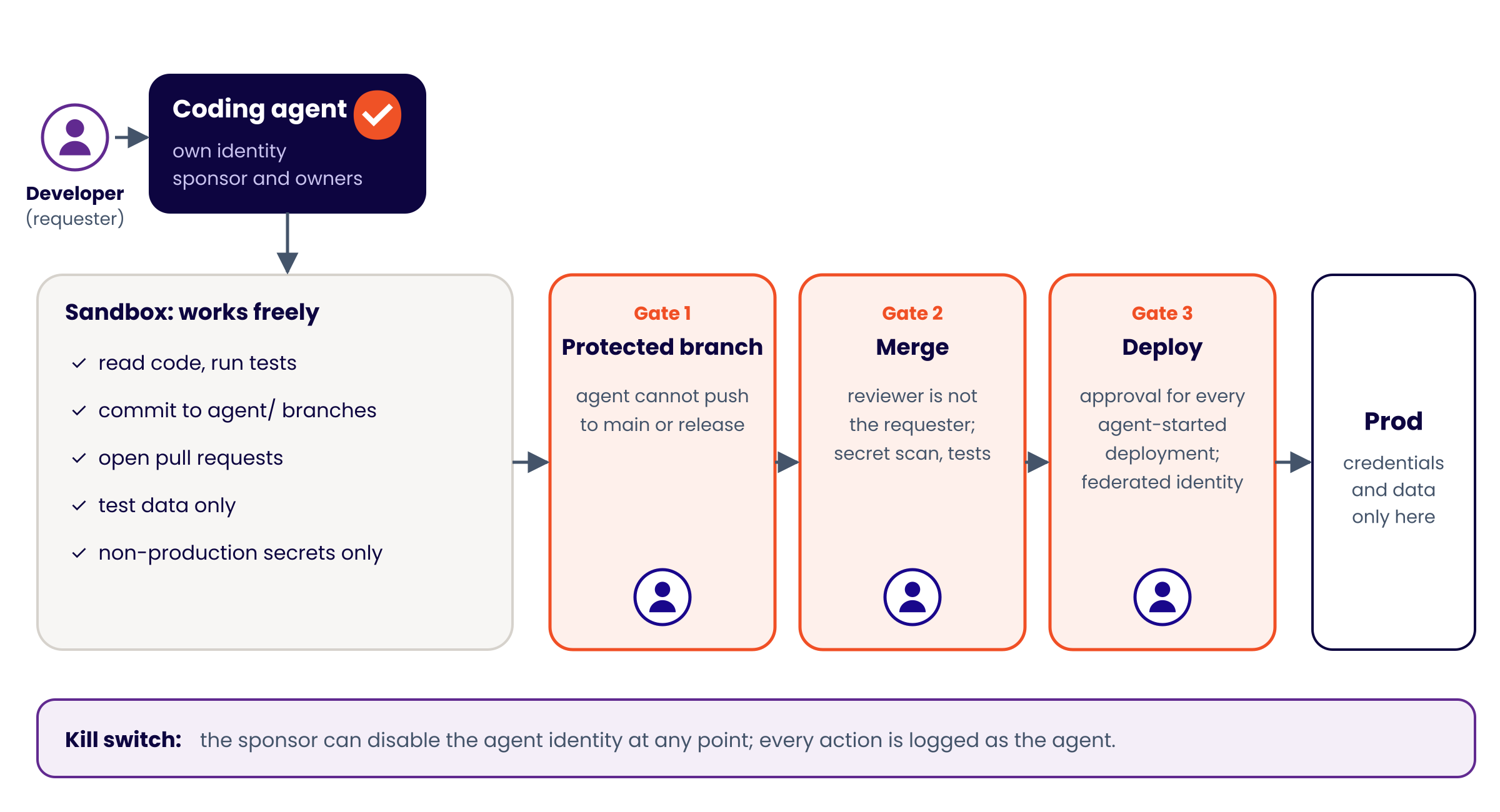
Controls and what each one stops
| Control | Where it lives | Stops |
|---|---|---|
| Own identity per agent (or agent type per team) | Identity platform, repository platform app or bot account | Agent actions logged as the developer; agent inheriting the developer's reach |
| Sandbox with non-production credentials | Dev environment, secrets manager | Agent reaching production data or systems while it works |
| Agent branches only | Repository rules | Direct pushes to main or release branches |
| Required review by someone else | Repository rules | The requester approving their own agent's change |
| Required checks: tests, secret scanning, dependency review | CI | Leaked credentials and unreviewed dependencies |
| Federated, short-lived pipeline identity | CI and cloud identity provider | Long-lived deployment keys the agent could find and use |
| Approval for every agent-started deployment | Pipeline environment rules or a gateway | Unattended production releases |
| Kill switch | Identity platform and repository | An agent that keeps acting after something has gone wrong |
How to apply it
- Register the agent with its own identity, a sponsor and owners (see TIE-AGT-001). Revoke any personal tokens it used before.
- Build its sandbox: repository access limited to the repositories it works on, its own branch prefix, test data and non-production secrets.
- Protect what matters: protected branches, required pull request review by someone other than the requester, required status checks.
- Separate deployment identity: pipelines authenticate to cloud with short-lived federated credentials tied to the protected branch and environment, never with keys the agent can read.
- Gate deployments: every deployment the agent triggers waits for approval, with the agent's findings shown to the approver (see TIE-AGT-004).
- Watch and stop: log agent actions under its own identity, alert on attempts to reach production, and give the sponsor a way to disable it immediately.
Design rules#
- No personal credentials. Agents never run on a developer's personal access token, SSH key or cloud login.
- No production credentials in the sandbox. If the agent can read it, assume an injection can use it.
- Agents propose, people dispose. Agents open pull requests; humans merge.
- The requester does not approve. The person who asked the agent to act cannot be the reviewer or the deployment approver.
- Every agent-started deployment is approved. Not only the ones that look risky; findings are shown as context to the approver.
- Separate production data. Development, preview and production never share a database.
- Workflow runs on agent changes need approval before they get access to secrets.
- Same or stronger controls than people. An agent never gets a path to production that a developer would not have.
Anti-patterns#
| Anti-pattern | What goes wrong |
|---|---|
| Agent uses the developer's personal access token | Every push and deployment looks like the developer; the agent can reach everything they can |
| Code freeze declared in the chat | The agent's instructions are not a control; nothing stops a change |
| Production secrets in the dev container | The agent, or an injection, finds and uses them |
| Same database for preview and production | A test run by the agent changes live data |
| Auto-merge when checks pass | Nobody reviews what the agent changed before it ships |
| Developer approves their own agent's pull request | Separation of duties exists on paper only |
Trade-offs#
Benefits
- Agents can work quickly and safely inside the sandbox.
- Production changes always have a human reviewer and approver on record.
- Agent actions are attributable to the agent, its sponsor and the requester.
- A compromised or confused agent cannot reach production on its own.
Costs and risks
- Waiting time for reviews and deployment approvals.
- Set-up effort: agent identities, sandboxes, branch rules and federated pipeline identities.
- Licensing for agent-specific identity features and repository protections.
- Developers may push back on losing their own credentials in the agent; explain the incident record.
Recipes#
How to build this pattern on specific products. Each recipe shows its own maturity and when it was last verified.
Ping Identity recipe
Ping Identity
PingOne Advanced Identity Cloud, PingGateway and Ping authorisation
The coding agent has its own AI agent identity; PingGateway fronts the repository and deployment APIs, and Ping's authorisation engine requires approval for pushes to shared branches and for every deployment.
Components
| Component | Role in this pattern |
|---|---|
| AI agent identity (Advanced Identity Cloud) | The coding agent's own OAuth client, sponsor and owners |
| PingGateway | Enforcement point in front of repository and deployment APIs the agent calls |
| Ping's authorisation engine | Policies for push, merge and deploy actions, returning approval obligations |
| Approval service | Holds gated actions until an approver who is not the requester approves |
Configure
- Register the coding agent under AI Agents in Advanced Identity Cloud with a sponsor attribute and owners (see TIE-AGT-001).
- Expose the repository and deployment APIs the agent uses only through PingGateway routes, each requiring a delegated token for the right audience.
- Write policies that permit reads and agent-branch commits, return an approval obligation for pushes to shared branches and for every deployment, and deny direct production access.
- Have PingGateway hold gated calls and release them only after approval (see TIE-AGT-004).
- Keep production credentials in PingGateway or the pipeline, never in the agent's environment.
Gotchas
- If the agent can reach the repository platform directly with its own token, the gateway is bypassed. Make the gateway the only network path, or use repository rules as a second line.
Okta recipe
Okta
Okta for AI Agents with Agent Gateway
Written from vendor documentation and design experience; not yet lab-tested by Trevonix. Validate each step in a non-production tenant first.
Okta registers the coding agent and brokers short-lived, per-user access to repository tools through Agent Gateway. Written from Okta's documentation; not yet lab-tested by Trevonix for this pattern.
Components
| Component | Role in this pattern |
|---|---|
| Okta for AI Agents | The coding agent's identity and owners |
| Agent Gateway | Okta-secured endpoint for the MCP tools the agent uses, such as a repository MCP server |
| Brokered consent (Okta STS) | Per-user, short-lived access to the repository platform instead of a stored token |
Configure
- Register the coding agent under Directory > AI Agents with at least two owners.
- Connect the agent to an Agent Gateway and add the repository platform's MCP server; allow only the tools its tasks need.
- Use brokered consent so the agent uses short-lived, per-user access rather than a stored personal access token.
- Keep branch protection, review and deployment approval in the repository and pipeline as the second line.
Microsoft Entra recipe
Microsoft Entra
Microsoft Entra Agent ID with Power Automate and Microsoft Teams
The DevOps agent runs with its own Entra agent identity and non-production access; every deployment it starts waits for the accountable manager's approval in Teams, and the pipeline deploys with a separate federated identity.
Components
| Component | Role in this pattern |
|---|---|
| Entra Agent ID | The DevOps or coding agent's identity, with sponsor and owners |
| Agent platform (for example Microsoft Foundry) | Runs the agent with its agent identity |
| Power Automate and Microsoft Teams | Deployment approval to the accountable manager, with findings as context |
| Workload identity federation | Short-lived credentials for the pipeline, separate from the agent |
Configure
- Create the agent from a blueprint under Entra ID > Agents, with the accountable manager or team lead as sponsor (see TIE-AGT-001).
- Give the agent identity access to non-production resources only.
- Configure the pipeline to authenticate to Azure with a federated credential on a separate app or managed identity, scoped to the protected branch and environment.
- Route every deployment the agent starts through an approval flow in Power Automate that posts to the approver in Teams (see TIE-AGT-004).
- Create a Conditional Access policy that blocks high-risk agent identities.
Gotchas
- Do not give the agent identity rights on the production subscription so that it can 'just run the deployment'. The pipeline deploys; the agent requests.
Saviynt recipe
Saviynt
Saviynt Identity Security for AI
Written from vendor documentation and design experience; not yet lab-tested by Trevonix. Validate each step in a non-production tenant first.
Saviynt discovers coding agents and their access, assigns owners and runs access reviews. Written from Saviynt's published material; not lab-tested by Trevonix.
Capabilities used
| Capability | Role in this pattern |
|---|---|
| AI inventory and posture | Finds coding agents and their access, including agents running on developer machines |
| Ownership and lifecycle | Assigns owners and retires agents that are no longer used |
| Access reviews | Sponsors certify each agent's repository and environment access |
Configure
- Discover coding agents and the credentials they use; flag any using personal tokens.
- Assign owners and register each agent; set review frequency by environment.
- Certify repository and environment access quarterly and remove anything that reaches production.
GitHub recipe
GitHub
Written from vendor documentation and design experience; not yet lab-tested by Trevonix. Validate each step in a non-production tenant first.
GitHub rulesets, required reviews, environments and OIDC federation provide the repository and pipeline gates. Written from GitHub's documentation; not lab-tested by Trevonix for this pattern.
GitHub settings
| Setting | What to configure |
|---|---|
| Agent identity | A GitHub App or machine account per agent, not a developer's personal access token |
| Rulesets or branch protection | Require pull requests, required reviews, and the "most recent push must be approved" rule on main and release branches |
| Required checks | Tests, secret scanning push protection and dependency review |
| Environments | Production environment with required reviewers and "prevent self-review" |
| OIDC to cloud | Deployment jobs use OpenID Connect federation, scoped to the production environment |
| Copilot cloud agent | Keep the default that workflows on agent pull requests need approval before they run |
Gotchas
- Copilot's cloud agent can push only to its own branch, and approvals by the person who started it do not count towards required reviews. Third-party agents get none of these defaults; apply the rules to them yourself.
- GitHub lets repository administrators allow workflows on agent pull requests to run without approval. Leave approval on: those workflows can reach secrets.
Verification tests#
| Test | Expected result |
|---|---|
| Agent pushes directly to main | Rejected by branch protection |
| Agent opens a pull request and the requester approves it | Approval does not count; merge blocked |
| Agent's change includes a secret | Secret scanning blocks the merge |
| Agent tries to read a production secret from its environment | Not present |
| Agent triggers a deployment | Deployment waits for approval; approver sees the agent's findings |
| Approver rejects | Nothing is deployed; agent and requester are told |
| Sponsor disables the agent | Agent can no longer authenticate to the repository or pipeline |
| Audit a production change | Shows agent identity, requester, reviewer and deployment approver |
Maturity and verification#
Reference build. Trevonix has built governed coding and DevOps agents with gated push and deployment steps on Ping Identity (PingOne Advanced Identity Cloud, PingGateway and Ping's authorisation engine) and on Microsoft Entra (Entra Agent ID with approvals in Microsoft Teams), in lab tenants (November 2026). The Okta, Saviynt and GitHub recipes are written from vendor documentation and have not yet been lab-tested by Trevonix for this pattern.
Frequently asked questions#
Can developers still run agents on their own machines?
Yes, but not on their personal credentials. Give each agent its own identity, scoped to the repositories and environments it needs, with the developer as requester and a named sponsor accountable for it.
Our repository platform already protects its own coding agent. Is that enough?
They help, and you should turn them on. They only cover that vendor's agent on that platform. Identity controls cover every agent you run and every system it touches, including cloud and databases.
Does every deployment really need approval?
Start with every deployment the agent starts. Once you have data on what the agent deploys and how often approvers reject, you can lower the bar for low-risk environments, never for production.
Related patterns and references#
- Fortune: AI coding tool wiped a database during a code freeze (July 2025)
- GitHub Docs: Risks and mitigations for Copilot cloud agent
- GitHub Docs: Configuring OpenID Connect in Azure
- OWASP Top 10 for Agentic Applications
- NIST SP 800-218: Secure Software Development Framework
- Microsoft Learn: Microsoft Entra Agent ID
Cite this pattern
Trevonix (2026). Guardrails for autonomous coding agents (TIE-AGT-006, version 1.0). Identi Patterns. https://exchange.trevonix.com/patterns/tie-agt-006-guardrails-for-autonomous-coding-agents
Licensed under CC BY 4.0. Credit Trevonix and link to this page when you reuse it.
Patterns are guidance, provided as is and without warranty. Test in a non-production environment and check current vendor documentation before you rely on them. Read the full disclaimer.