
TIE-AGT-004Reference buildAgent identity/Human oversight
Human approval gate for consequential agent actions
Hold an AI agent's high-impact action until an accountable human approves that exact request, and enforce the hold outside the agent.
In short#
- A policy, not the agent, decides which actions need a human: irreversible, external, high-value or production-affecting ones.
- The enforcement point holds the request and asks an accountable approver who is not the requester, showing them what the agent wants to do, for whom, and why it was flagged.
- Approval releases that exact request, once, before it expires. Rejection or silence means nothing happens.
Problem#
An agent with legitimate, correctly scoped access can still take an action whose impact is out of proportion to what was asked: deploying to production, moving a large sum, deleting records, emailing every customer, granting itself more access. Scopes and roles answer "may this agent ever do this?" They cannot answer "should this action, by this agent, for this person, happen now?"
Most teams add a confirmation step inside the agent: the agent asks "shall I go ahead?" and proceeds when the chat says yes. That step runs inside the thing it is meant to control. A prompt injection can answer it, a bug can skip it, and the person answering may be the same person, or the same compromised session, that asked for the action in the first place.
When to use it#
Use it when
- Actions that are hard or impossible to undo: payments, deletions, production deployments, external communications, access grants.
- Actions above a threshold the business sets: amount, number of records, number of recipients, data sensitivity.
- Regulated processes that already need maker-checker or four-eyes control.
- New agents, until their behaviour is understood well enough to lower the bar.
Avoid it, or add more, when
- Routine, reversible, low-impact actions. Gating them trains approvers to click approve without reading.
- Decisions a policy can make reliably on its own. Use a deny or a limit instead (see TIE-AGT-003).
- You cannot identify an accountable approver who is not the requester. Fix ownership first (see TIE-AGT-001).
Forces#
- Safety against speed. Every gate adds waiting; too many gates and people route around them.
- Context against brevity. Approvers need enough to judge, but a wall of detail gets skimmed.
- Availability against accountability. The right approver may be asleep; a fallback approver may lack context.
- Convenience against separation of duties. Letting requesters approve their own agent's actions is fast and defeats the control.
Solution#
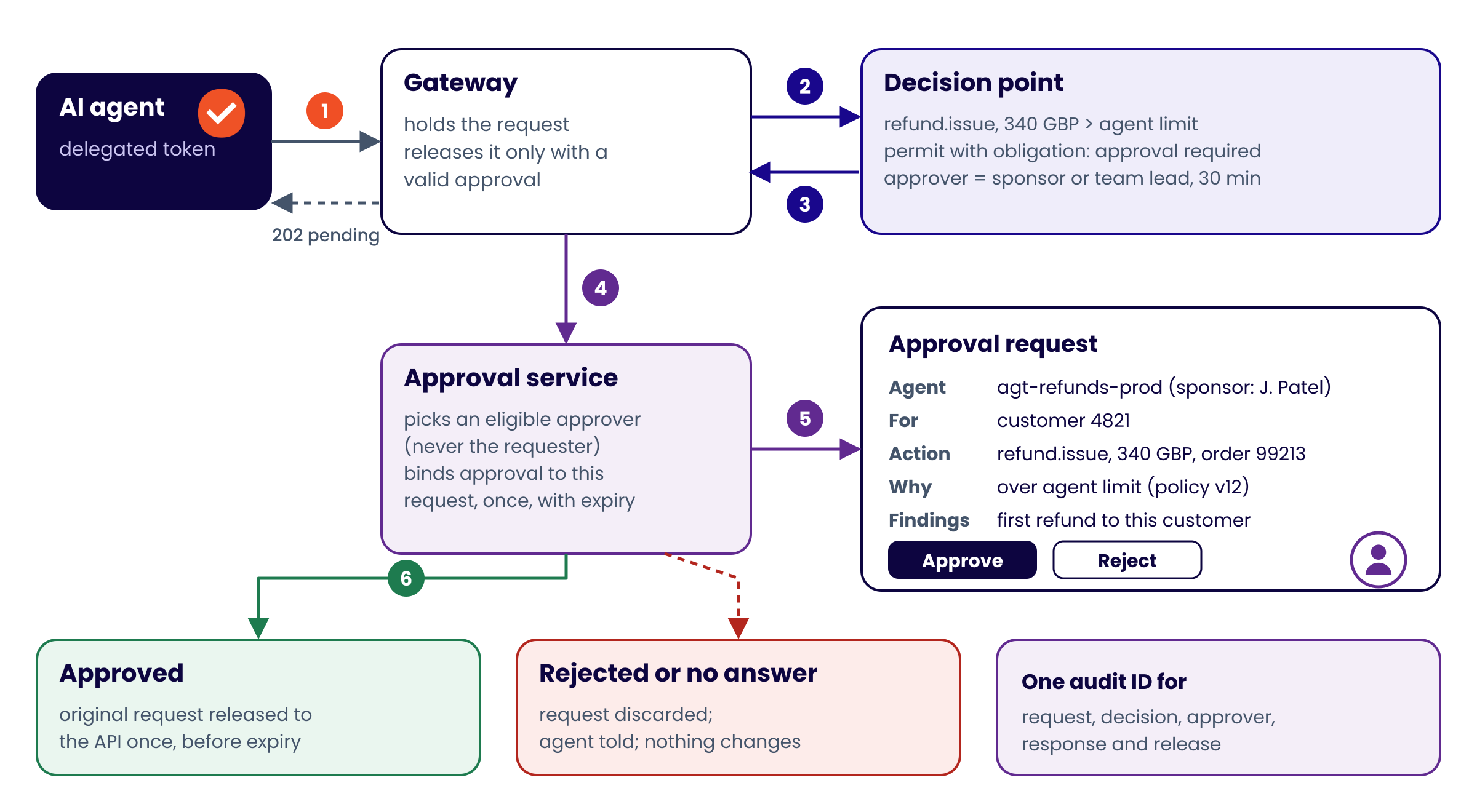
Make approval an obligation returned by the policy decision point, enforced by a gateway the agent cannot bypass. When the decision is "permit only with approval", the gateway holds the original request, opens an approval with a summary built from trusted data (not from the agent's own description), and sends it to an approver chosen by rule. Only an approval for that request, by an allowed approver, before the deadline, releases it. Every step is logged under one ID.
Design decisions
| Decision | Rule |
|---|---|
| Which actions | A policy decides, using action type, amount, data sensitivity, environment and the agent's risk tier. The agent cannot opt out. |
| Who approves | Chosen by rule: the agent's sponsor, the resource owner or a team lead. Never the person who asked the agent to act. |
| What they see | A context pack built from trusted data: agent, user, action, target, values, why it was flagged, and findings such as detected secrets |
| What approval covers | One specific request, once, before an expiry time. A changed request needs a new approval. |
| What silence means | Rejection. Timeouts are logged and the agent is told the action did not happen. |
| Where it is enforced | At a gateway or the resource, never in the agent's code or prompt |
How it works
- Request. The agent calls the action through the gateway with a delegated token.
- Decide. The gateway asks the PDP. The PDP returns permit with obligation: approval required, with the approver rule and an expiry.
- Hold. The gateway stores the request, returns "pending approval" with a reference to the agent, and opens an approval.
- Ask. The approver receives the context pack in their channel: a Teams or Slack card, a push notification, or an approval console.
- Decide again. The approver approves or rejects. The approval service checks the approver is allowed and is not the requester.
- Release or discard. On approval, the gateway releases the stored request once. On rejection or timeout, it discards it and tells the agent.
Design rules#
- Policy decides when to ask. The list of gated actions lives in the PDP, not in the agent.
- Enforce outside the agent. Only the gateway or resource can release the action.
- Approver is never the requester. Check it in the approval service, not by convention.
- Approve the request, not the agent. Bind approval to the exact request, once, with an expiry.
- Show trusted context. Build the approver's summary from the request and system data, not from text the agent wrote.
- Default to no. Timeouts, errors and ambiguous answers reject.
- Measure the gate. Track approval rates, response times and rejections; a gate that approves everything is either set too low or not being read.
- Log the whole story under one ID. Request, decision, approver, response, release or discard.
Anti-patterns#
| Anti-pattern | What goes wrong |
|---|---|
| "Shall I proceed?" in the chat | The agent, a prompt injection or the requester answers; there is no separation of duties |
| Approve the agent for the day | One approval covers everything the agent does next, including actions nobody saw |
| Approval summary written by the agent | A compromised agent describes a harmful action as harmless |
| Requester approves their own agent | The four-eyes control has two eyes |
| Timeout means approve | Approvals arrive while people sleep and are waved through by the clock |
| Gate everything | Approvers drown in requests and approve without reading |
Trade-offs#
Benefits
- Consequential actions need a real, accountable human decision.
- Prompt injection and model errors cannot approve their own actions.
- Evidence of human oversight for regulators and auditors.
- A safe way to give new agents more autonomy step by step.
Costs and risks
- Waiting time on gated actions, and an operating model for approver cover.
- Approval fatigue if thresholds are set too low.
- State to manage: held requests, expiries and the approval record.
- Integration work for the approval channel (Teams, mobile push, approval console).
Recipes#
How to build this pattern on specific products. Each recipe shows its own maturity and when it was last verified.
Ping Identity recipe
Ping Identity
PingGateway with PingOne Authorize or PingAuthorize
Ping's authorisation engine returns an approval statement for gated actions; PingGateway holds the request, opens the approval and releases the request only after an allowed approver approves it. Advanced Identity Cloud can deliver approvals by CIBA push.
Components
| Component | Role in this pattern |
|---|---|
| PingGateway | Holds the gated request, opens the approval and releases or discards the request |
| PingOne Authorize or PingAuthorize | Decides which actions need approval and returns a statement such as approval.required with the approver rule |
| Approval channel | An approval console, or a CIBA push journey in Advanced Identity Cloud for approvers with a registered device |
| PingOne Advanced Identity Cloud | Agent identity, delegated tokens and approver identities |
Configure
- In the policy for the protected API, add a rule for each gated action that returns a statement with a code such as
approval.required, the approver rule (for example the agent's sponsor) and an expiry. - In PingGateway, after the PingAuthorizeFilter, add a filter that handles that statement: store the request with a hash and expiry, return
202 Acceptedwith an approval reference to the agent, and create the approval. - Deliver the approval to the approver: through your approval console, or, for approvers with Ping's authenticator app, through a CIBA push journey in Advanced Identity Cloud (Journeys, with the push nodes the CIBA guide lists).
- When the approval service records the outcome, have PingGateway release the stored request once if approved, or discard it.
- Log the decision ID, approval ID and outcome together.
Gotchas
- Do not configure a CIBA journey as a transactional authentication journey; Advanced Identity Cloud will not run it.
- Treat any statement code the gateway does not recognise as a denial.
Okta recipe
Okta
Okta Identity Engine with CIBA
Written from vendor documentation and design experience; not yet lab-tested by Trevonix. Validate each step in a non-production tenant first.
Okta supports CIBA for out-of-band approval through a custom authenticator app. Written from Okta's documentation; not yet lab-tested by Trevonix for this pattern.
Components
| Component | Role in this pattern |
|---|---|
| CIBA grant on a custom authorization server | Lets the agent's backend ask a user to approve out of band |
| Custom authenticator | A mobile app built with the Okta Devices SDK that receives the push; required for CIBA in Okta |
| Web application client | CIBA is supported for the Web application type |
| Gateway or PDP | Decides when approval is needed and holds the request |
Configure CIBA approval
- In the Admin Console, set up the notification service under Security > Device Integrations, then create a custom authenticator under Security > Authenticators.
- On the custom authorization server, allow the CIBA grant type in an access policy rule.
- Create a Web application for the agent's backend, enable the CIBA grant and select your custom authenticator as the preferred authenticator for CIBA.
- When the policy requires approval, have the backend call the backchannel authentication endpoint with the approver's identifier and a binding message that describes the action.
- Release the held action only when the CIBA request completes with a token for the expected approver.
Gotchas
- Okta's CIBA needs a custom authenticator app built with the Okta Devices SDK; plain Okta Verify is not used for this flow.
Microsoft Entra recipe
Microsoft Entra
Microsoft Entra Agent ID with Power Automate and Microsoft Teams
An orchestrator or gateway holds the agent's action and calls a Power Automate flow that posts the approval to the approver in Teams and returns the outcome. Entra provides the agent identity and its sponsor.
Components
| Component | Role in this pattern |
|---|---|
| Agent identity (Entra Agent ID) | The agent whose action is gated; its sponsor is often the approver |
| Gateway or orchestrator | Holds the action and calls the approval flow; Entra does not hold requests itself |
| Power Automate approvals | Creates the approval, posts it to Microsoft Teams and waits for the response |
| Microsoft Teams | Where the approver sees the context and approves or rejects |
Before you start
- Calling a flow from your gateway with the When an HTTP request is received trigger uses a premium connector, so check your Power Automate licensing.
- Decide whether approvers respond in Teams only; responses through email do not update the Teams card.
Configure the approval flow
- In Power Automate, create a flow triggered by When an HTTP request is received, with a JSON schema for the approval request (approval ID, agent, user, action, target, findings, expiry, approver).
- Add Create an approval (type Approve/Reject - First to respond), assign the approver from the request, and put the context pack in the details.
- Post the approval's Teams adaptive card to the approver with the Teams connector, then add Wait for an approval.
- Return the outcome (approved or rejected, approver and comments) to your gateway's callback endpoint, signed or authenticated.
- In the gateway, release the held request only for an approved outcome from the expected approver before the expiry; otherwise discard it.
Gotchas
- Start and wait for an approval completes the approval before it produces a Teams card, so use Create an approval plus Wait for an approval when you want the approval inside Teams.
- If an approver responds by email, the Teams card does not update. Turn off the default email notification to avoid mismatches.
- Approval timestamps are in UTC. Guest approvers need a Power Automate licence to respond.
Saviynt recipe
Saviynt
Saviynt Identity Security for AI
Written from vendor documentation and design experience; not yet lab-tested by Trevonix. Validate each step in a non-production tenant first.
Saviynt identifies and certifies the accountable approvers and can block unapproved actions at Agent Access Gateway; the hold itself is built in your gateway. Written from Saviynt's published material; not lab-tested by Trevonix.
Capabilities used
| Capability | Role in this pattern |
|---|---|
| Agent inventory and ownership | Identifies the accountable sponsor or owner who should approve |
| Agent Access Gateway | Runtime enforcement that can stop agent actions that break policy |
| Access governance | Certifies who may approve for which agents and resources |
Configure
- Make sure each gated agent has an owner and sponsor in the inventory; they are your approver pool.
- Define in Saviynt who may approve actions for which agents, and certify that list periodically.
- Where Agent Access Gateway fronts the tools, add policies that block high-impact actions unless the request carries a valid approval reference from your approval service.
Gotchas
- Saviynt access requests approve standing access, not individual agent actions. Use them to govern who may approve; build the per-action hold in your gateway.
Auth0 for AI Agents recipe
Auth0 for AI Agents
Written from vendor documentation and design experience; not yet lab-tested by Trevonix. Validate each step in a non-production tenant first.
Auth0 provides asynchronous authorisation for customer-facing agents using CIBA with Rich Authorization Requests. Written from Auth0's documentation; not lab-tested by Trevonix for this pattern.
Auth0 for AI Agents implements human-in-the-loop approval as asynchronous authorisation: CIBA, optionally with Rich Authorization Requests to carry the details being approved, delivered by push notification, SMS or email.
Configure asynchronous authorisation
- Enable CIBA for the agent's application and configure the notification channel your customers will use.
- When the policy requires approval, have the agent's backend start a CIBA request with the user's identifier, a binding message and
authorization_detailsdescribing the action (for example payee and amount). - Poll, or receive a callback, until the user approves or rejects; only then perform the action with the resulting token.
- Use the Auth0 AI SDKs for LangChain or LlamaIndex if your agent uses them; they wrap this flow.
Verification tests#
| Test | Expected result |
|---|---|
| Agent attempts a gated action | Held; agent told it is pending; approver receives the context pack |
| Approver approves | The original request is released once and succeeds |
| Approver rejects | Request discarded; agent told; nothing changes downstream |
| Nobody responds before the deadline | Treated as rejection and logged |
| Requester tries to approve their own request | Refused by the approval service |
| Agent retries the same action after approval | Needs a new approval |
| Agent calls the API directly to bypass the gateway | Rejected by the API |
| Approver sees a summary | Built from the request and system data, not from the agent's text |
Maturity and verification#
Reference build. Trevonix has built this pattern end to end on Ping Identity (PingGateway with Ping's authorisation engine) and on Microsoft Entra (Entra Agent ID with Power Automate approvals in Microsoft Teams), in lab tenants (November 2026). The Okta, Saviynt and Auth0 recipes are written from vendor documentation and have not yet been lab-tested by Trevonix for this pattern.
Frequently asked questions#
Which actions should need approval?
Start with irreversible actions, actions that leave your organisation (payments, external email), production changes and access grants. Add thresholds such as amount or record count. Review the list monthly using approval and rejection data.
Who should approve?
The person accountable for the outcome who did not ask for the action: usually the agent's sponsor, the resource owner or a team lead. For customer agents acting on a customer's own account, the customer.
What if the agent changes the request after approval?
The approval must cover one specific request. If the agent changes the amount, target or payload, it is a new request and needs a new approval.
How do we avoid approval fatigue?
Raise thresholds for low-impact actions, make the context pack short and specific, and watch approval rates. If almost everything is approved within seconds, the gate is not doing its job.
Related patterns and references#
- OpenID Client-Initiated Backchannel Authentication Flow - Core 1.0
- RFC 9396: OAuth 2.0 Rich Authorization Requests
- EU AI Act, Article 14: Human oversight
- Auth0 for AI Agents: Asynchronous authorization
- Okta Developer: Transactional verification using CIBA
- PingOne Advanced Identity Cloud: Backchannel request grant (CIBA)
- Microsoft Learn: Differences between flow approval actions
Cite this pattern
Trevonix (2026). Human approval gate for consequential agent actions (TIE-AGT-004, version 1.0). Identi Patterns. https://exchange.trevonix.com/patterns/tie-agt-004-human-approval-gate-for-consequential-agent-actions
Licensed under CC BY 4.0. Credit Trevonix and link to this page when you reuse it.
Patterns are guidance, provided as is and without warranty. Test in a non-production environment and check current vendor documentation before you rely on them. Read the full disclaimer.