
TIE-AGT-022DocumentedAgent identity/Human oversight
Customer confirmation of agent actions on a second device
When a customer-facing agent wants to do something consequential on a customer's account, ask the customer to confirm that exact action on a trusted device they already use, out of band, and let the API act only on a token that carries the confirmed details.
In short#
- The customer, not the chat, confirms consequential actions: the agent's backend starts a CIBA request and the customer approves on their trusted app, out of band.
- The request carries the exact details (payee, amount, account, item) as authorization_details, plus a short binding message. The app shows them; the token returned carries them.
- The API acts only when the token's details match the request, once, before expiry. Silence, rejection or a mismatch means nothing happens.
Problem#
Customer-facing agents are moving from answering questions to doing things: paying a bill, moving money between accounts, changing a delivery address, cancelling a policy. The usual safeguard is a confirmation inside the conversation: "Shall I go ahead? Reply yes." That reply comes through the same channel the agent controls. A prompt injection in a document, a manipulated agent or a session hijack can produce the "yes", and the customer may never see what was actually done.
Customers already have something better: the banking or retail app on their phone, bound to their account and protected by device keys and biometrics. The missing piece is a standard way for the agent's backend to ask that app to confirm a specific action, and for the API to know the confirmation covered exactly what it is being asked to do.
When to use it#
Use it when
- A customer-facing agent can take actions on the customer's account that are hard to undo or that move money or data out.
- Customers already use a mobile app you control, or an authenticator app, that can receive push requests.
- The action needs the customer's own approval, not an employee's (for employee approvals see TIE-AGT-004).
Avoid it, or add more, when
- Low-value, reversible actions. Use a mandate with limits instead (TIE-AGT-023) so customers are not interrupted constantly.
- You have no trusted second channel. Email links and SMS codes are weak for high-value actions; fix the channel before relying on this pattern.
Forces#
- Safety against friction. Every confirmation interrupts the customer; too many and they approve without reading.
- Detail against readability. The phone screen must show enough to decide (payee, amount, account) but not a wall of text.
- Speed against patience. The agent must wait for the customer; timeouts must fail safe without losing the conversation.
- Convenience against fraud. A compromised agent could flood customers with requests hoping one is approved.
Solution#
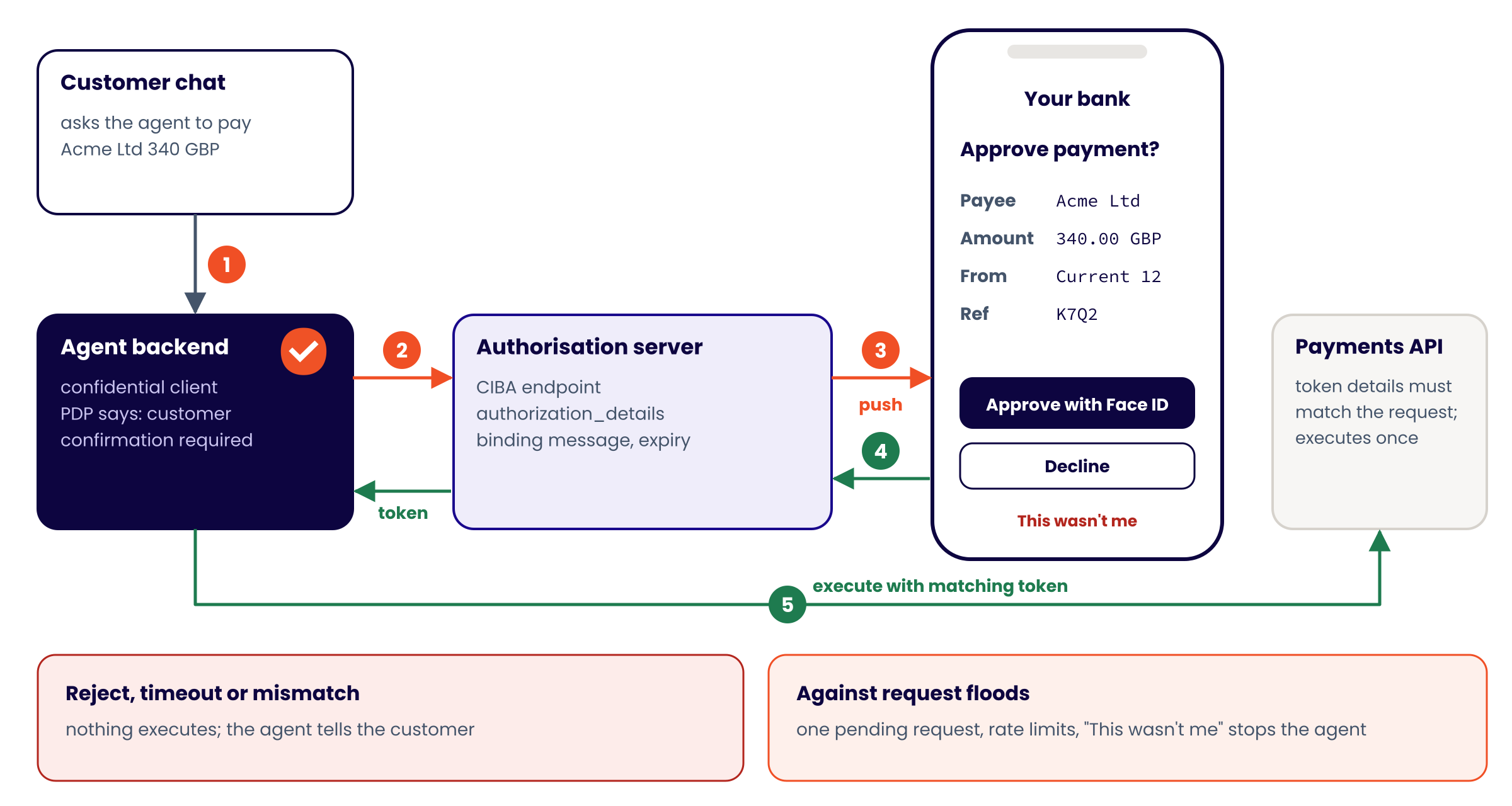
When the policy decides an action needs the customer's confirmation, the agent's backend (a confidential client, never the model) sends a backchannel authentication request to the authorisation server. It identifies the customer with a hint, includes a binding message and the structured details of the action as authorization_details, and sets a short expiry. The authorisation server pushes the request to the customer's trusted app, which shows the details and asks for approval with a device-bound key and biometrics. The backend polls for the result. On approval it receives a token carrying the approved details, scoped to the target API. The API compares the details in the token with the request it receives and executes only on an exact match.
Request design
| Element | Purpose | Guidance |
|---|---|---|
login_hint or id_token_hint | Identifies the customer | Use an opaque customer ID, not a phone number typed into chat |
binding_message | Short text shown on both devices | Payee, amount and a short reference; keep within the authorisation server's limit (often 100 characters) |
authorization_details | Structured details the token will carry | Register the types (for example payment_initiation) on the authorisation server |
requested_expiry | How long the customer has | A few minutes; expiry means rejection |
| Delivery mode | How the backend learns the result | Poll or ping; avoid push mode, which FAPI's CIBA profile does not allow |
| Token audience | Where the token can be used | Only the API that performs the action |
How it works
- Decide. The PDP returns customer confirmation required for the action (for example payments above the customer's mandate, new payees, address changes).
- Ask. The agent's backend sends the CIBA request with the customer hint, binding message, authorization_details and expiry. It tells the agent "waiting for your approval in the app".
- Show. The customer's app displays the action from the authorisation server's data, not from text the agent wrote, and asks for biometric approval.
- Collect. The backend polls (or receives a ping) until approval, rejection or expiry.
- Execute. On approval, the backend calls the API with the new token. The API checks audience, expiry and that the token's authorization_details match the request, then executes once.
- Close. The agent tells the customer the outcome; the decision, request, approval and execution share one reference in the logs.
POST /bc-authorize
client_id=agent-backend&client_assertion=...
&scope=openid payments
&login_hint=cust-4821
&binding_message=Pay Acme Ltd 340.00 GBP? Ref K7Q2
&requested_expiry=180
&authorization_details=[{"type":"payment_initiation",
   "instructedAmount":{"currency":"GBP","amount":"340.00"},
   "creditorName":"Acme Ltd",
"creditorAccount":{"iban":"GB00EXMP00000012345678"}}]Design rules#
- The customer confirms on a channel the agent does not control.
- Show trusted details, not the agent's words. The app renders authorization_details from the authorisation server.
- Bind the token to the details. The API checks the token's authorization_details against the request.
- One approval, one action, short expiry.
- Only the backend can start a request. The model never holds client credentials.
- Silence means no. Expired or rejected requests do nothing.
- Limit the requests. Rate limits, one pending request per customer, and a "This wasn't me" path.
- Use mandates for routine actions so confirmations stay rare and meaningful.
Anti-patterns#
| Anti-pattern | What goes wrong |
|---|---|
| "Reply YES to confirm" in the chat | The agent or an injection supplies the yes |
| Push notification that says only "Approve sign-in?" | The customer approves without knowing what they approved |
| Token without the confirmed details | The backend or agent swaps the payee after approval |
| Email or SMS link for high-value actions | Phishable; the link can be forwarded or intercepted |
| No limit on confirmation requests | Customers are bombarded until one taps approve |
| Push delivery mode | Tokens arrive at an endpoint without client authentication |
Trade-offs#
Benefits
- Customer approval that a manipulated agent cannot fake.
- What the customer saw is exactly what executes.
- Reuses the customer's existing app, device binding and biometrics.
- Evidence of customer consent for disputes and regulators.
Costs and risks
- A mobile app or authenticator that can receive and render CIBA requests.
- Authorisation server support for CIBA and, ideally, Rich Authorization Requests.
- Waiting time in the conversation, and design for timeouts.
- Fraud monitoring of rejections and "This wasn't me" reports.
Recipes#
How to build this pattern on specific products. Each recipe shows its own maturity and when it was last verified.
Ping Identity recipe
Ping Identity
PingOne Advanced Identity Cloud, PingOne or PingFederate with PingOne MFA
Written from vendor documentation and design experience; not yet lab-tested by Trevonix. Validate each step in a non-production tenant first.
CIBA with binding messages and push to the customer's device; partial Rich Authorization Requests support in Advanced Identity Cloud. Written from Ping documentation; the customer device leg is not yet lab-tested by Trevonix.
Options
| Product | CIBA support |
|---|---|
| PingOne Advanced Identity Cloud and PingAM | Backchannel request grant following FAPI guidance; a CIBA journey sends the push with the binding message |
| PingOne | CIBA through a DaVinci flow of type P1 with subtype CIBA |
| PingFederate | CIBA with the PingOne MFA CIBA Authenticator for push to the customer's paired device |
Configure (Advanced Identity Cloud)
- In Advanced Identity Cloud, register the agent's backend as a confidential OAuth client allowed to use the backchannel request grant, with signed request objects.
- Create a CIBA journey that sends the push notification with the binding message, and select it for CIBA requests. Do not mark it as a transactional journey.
- Send authorization_details in the request where your version supports it (Advanced Identity Cloud added partial RAR support in 2026), or carry the details in a signed request object and enforce them at the API.
- Poll the token endpoint with the auth_req_id until approval, rejection or expiry.
- In the payments API or at PingGateway, compare the approved details with the request before executing.
Gotchas
- Binding messages are limited to 100 characters and, for push, must start with a letter, number or punctuation mark and contain no line breaks.
- With PingFederate and PingOne MFA, the MFA policy used for CIBA must have number matching turned off.
Okta recipe
Okta
Okta custom authorization server with CIBA
Written from vendor documentation and design experience; not yet lab-tested by Trevonix. Validate each step in a non-production tenant first.
CIBA for Web application clients with a custom authenticator app; no documented RAR, so details are enforced from your own transaction record. Written from Okta documentation.
Configure (Okta)
- Okta supports CIBA on custom authorization servers for Web application clients only, with a custom authenticator app built with the Okta Devices SDK.
- Set up the notification service and custom authenticator, allow the CIBA grant in an access policy rule, and enable CIBA on the agent backend's Web application.
- Okta does not document Rich Authorization Requests; put the action details in the binding message and enforce them at the API from your own transaction record.
Microsoft Entra recipe
Not available
No Microsoft Entra recipe has been published for this pattern yet.
Saviynt recipe
Not available
No Saviynt recipe has been published for this pattern yet.
Auth0 for AI Agents (asynchronous authorisation) recipe
Auth0 for AI Agents (asynchronous authorisation)
Written from vendor documentation and design experience; not yet lab-tested by Trevonix. Validate each step in a non-production tenant first.
CIBA with Rich Authorization Requests and Guardian push, built for agents that need customer approval. Written from Auth0 documentation; not lab-tested by Trevonix.
Auth0 implements asynchronous authorisation for agents as CIBA with Rich Authorization Requests. Guardian push to the Auth0 Guardian app, or to your own app built with the Guardian SDK, is the recommended channel; email is a paid add-on and must be enabled explicitly.
Configure (Auth0)
- Configure CIBA for the tenant and enable it on the agent backend's application, with Guardian push as the notification channel.
- Register the authorization_details types (for example
payment_initiation) on the API in Auth0. - Enrol customers in Guardian push, or integrate the Guardian SDK into your own app so it renders the details.
- Start requests from the backend with
/bc-authorize, the customer's user ID, a binding message and authorization_details; poll/oauth/tokenfor the result.
Verification tests#
| Test | Expected result |
|---|---|
| Agent requests a payment above the mandate | CIBA request sent; agent waits; customer's app shows payee, amount and reference |
| Customer approves | Payment executes once with the approved details |
| Customer rejects or ignores until expiry | Nothing executes; agent informs the customer |
| Backend changes the amount after approval | API rejects: token details do not match |
| Agent tries to start a second request while one is pending | Refused |
| Ten requests in a minute for one customer | Rate limit blocks further requests; alert raised |
| Customer taps "This wasn't me" | Agent session stopped; fraud alert |
Maturity and verification#
Documented. Trevonix has built approval holds and release at an API gateway with Ping Identity in a lab tenant (November 2026); the customer CIBA leg on a real device is written from vendor documentation and has not yet been lab-tested by Trevonix.
Frequently asked questions#
Can we use email or SMS instead of an app?
Only for low-value actions. Email links can be phished and forwarded. Use a push to an app with a device-bound key for anything consequential.
How do we avoid confirmation fatigue?
Ask only for actions outside the customer's standing mandate (TIE-AGT-023), above a threshold, or to new payees. Track approval rates and times; if customers approve everything in two seconds, you are asking too often.
Is CIBA really meant for this?
Yes. CIBA was designed for exactly this kind of decoupled flow, and banks already use it for call-centre and point-of-sale confirmation. The agent's backend simply plays the role of the client that cannot show the customer a screen.
Related patterns and references#
- OpenID Connect Client-Initiated Backchannel Authentication Flow - Core 1.0
- RFC 9396: OAuth 2.0 Rich Authorization Requests
- PingOne Advanced Identity Cloud: Backchannel request grant (CIBA)
- PingOne: Configuring a CIBA flow
- Auth0 for AI Agents: Asynchronous authorization
- Okta Support: CIBA is available for web applications only
Cite this pattern
Trevonix (2026). Customer confirmation of agent actions on a second device (TIE-AGT-022, version 1.0). Identi Patterns. https://exchange.trevonix.com/patterns/tie-agt-022-customer-confirmation-of-agent-actions-on-a-second-device
Licensed under CC BY 4.0. Credit Trevonix and link to this page when you reuse it.
Patterns are guidance, provided as is and without warranty. Test in a non-production environment and check current vendor documentation before you rely on them. Read the full disclaimer.