
TIE-AGT-026DocumentedAgent identity/Runtime authorisation
Context-aware access for agents: runtime, network and risk
Grant agents access only from the runtimes and networks they are supposed to run in, and only while their risk is acceptable, by checking those signals when tokens are issued, when requests arrive and, where possible, continuously.
In short#
- Each agent has an expected context: the runtime it runs in, the networks it calls from, the device for computer-using agents, and an acceptable risk level.
- Check context at three points: when the token is issued, when the request reaches the gateway, and in per-action decisions.
- Rising risk blocks first and asks questions second; signals are shared so a block in one place takes effect everywhere.
Problem#
An agent's credential, or a token it holds, is only as safe as the place it is used from. Prompt injection, compromised dependencies and leaked configuration can all move an agent's authority somewhere else: a token copied into an attacker's script, an API key pasted into a personal tool, a computer-using agent running on an unmanaged machine. Without context checks, every system sees a valid credential and serves the request.
Human access learned this lesson long ago with conditional access on location, device and risk. Agents need the same, adapted: they have no device in the human sense, they cannot do MFA, and they run in clouds, pipelines and virtual desktops.
When to use it#
Use it when
- Agents run in known runtimes: a cloud service, a cluster, a pipeline, a managed virtual desktop.
- Agent credentials or tokens could be exfiltrated by prompt injection or supply-chain compromise.
- You have identity risk signals for agents, or a gateway in front of agent traffic.
Avoid it, or add more, when
- Agents that legitimately run anywhere, such as personal assistants on employees' own devices, need device-based controls on the person's session instead; network rules will only produce false blocks.
Forces#
- Strictness against agility. Tight network rules break when platforms change egress addresses.
- Coverage against capability. Identity providers offer few conditions for agents; much of the context must be checked at gateways.
- Speed of response against false positives. Automatic blocks on risk stop attacks and occasionally stop healthy agents.
Solution#
Record each agent's expected context in the inventory: runtime and workload identity, egress networks, device (for computer-using agents) and risk tolerance from its tier. At token issuance, require workload-federated authentication (so tokens can only be minted from the real runtime) and apply the identity provider's agent policies, such as blocking risky agents or allowing only approved agents. At the gateway, check source network, mutual TLS or sender-constrained tokens, and that the agent is not on a deny list. In the decision point, use context attributes (runtime, network zone, risk, time) in per-action rules. Feed risk events between these points so a block in one place applies everywhere.
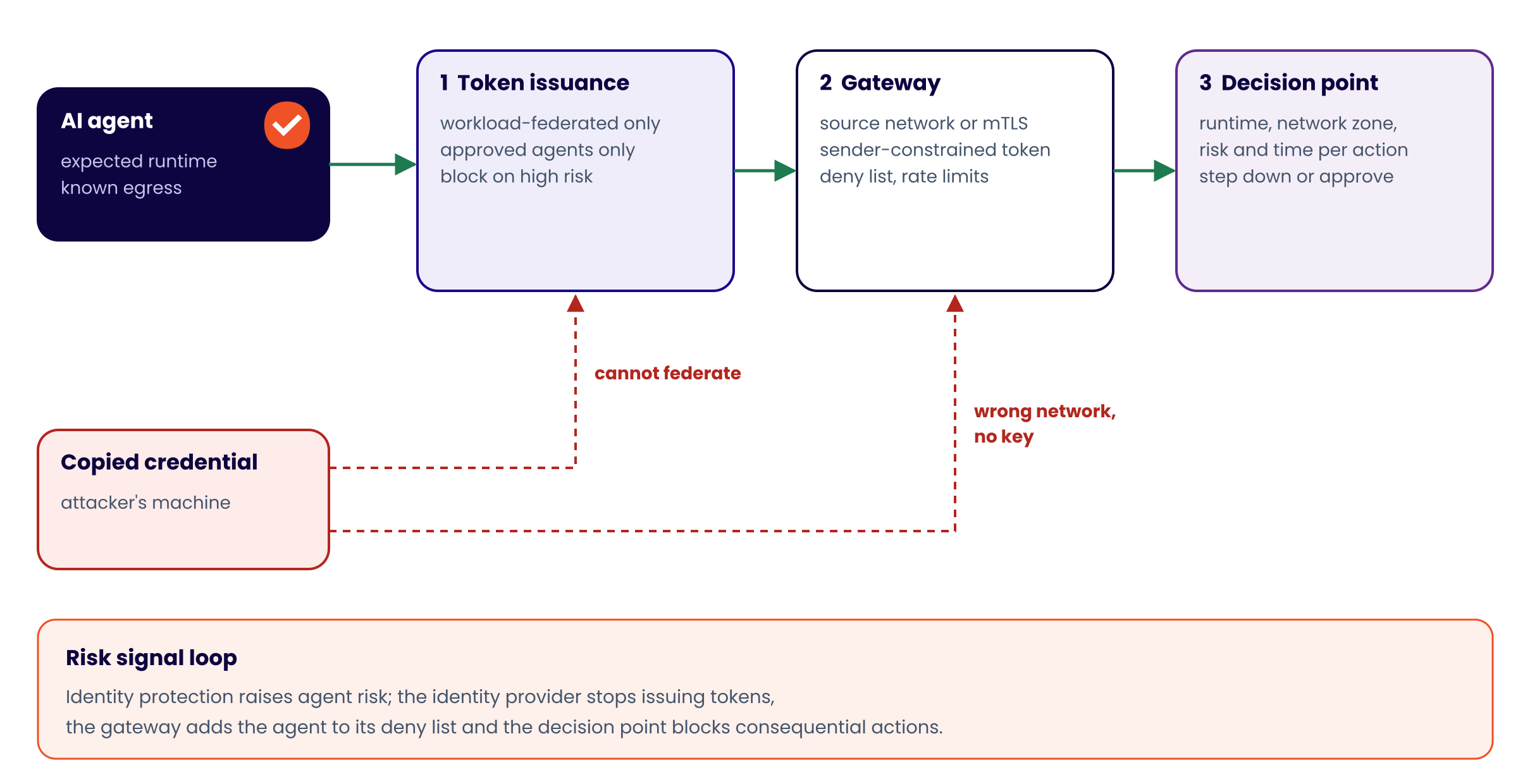
Signals and checkpoints
| Signal | Where it is checked | Example rule |
|---|---|---|
| Workload identity | Token issuance | Tokens only for authentication federated from the agent's runtime |
| Approved agent | Token issuance | Only agents with an approved attribute may access finance APIs |
| Agent risk | Token issuance and PDP | Block when risk is high; require approval when medium |
| Source network | Gateway | Calls only from the runtime's egress ranges or private endpoint |
| Proof of possession | Gateway | Token must be DPoP-bound or mTLS-bound to the agent's key |
| Device and network (computer-using agents) | Token issuance | Agent user sessions only from compliant managed desktops on a compliant network |
| Time and volume | PDP and gateway | Rate limits; no consequential actions outside business hours for tier 4 |
How it works
- Describe the expected context for each agent in the inventory, by tier.
- Make tokens hard to mint elsewhere: federate agent authentication to the runtime (TIE-AGT-014); remove secrets.
- Apply identity provider policies for agents: approved agents only for sensitive resources, block on high risk.
- Check at the gateway: network origin, sender constraint, deny list, rate limits.
- Use context in decisions: pass runtime, network zone and risk to the PDP for per-action rules.
- Connect the signals: route risk events to the identity provider, gateway and PDP; prefer standards such as the Shared Signals Framework where products support them.
- Start in report-only mode, tune, then enforce.
Design rules#
- Every agent has an expected context.
- Tokens should be impossible to mint outside the runtime.
- Check context at issuance, at the gateway and per action.
- Risk blocks first. Investigate after containment.
- Signals flow both ways between identity, gateway and PDP.
- Report-only before enforce.
- Review rules when platforms change egress or hosting.
Anti-patterns#
| Anti-pattern | What goes wrong |
|---|---|
| Static API key usable from anywhere | A leaked key works from any machine |
| Network rules only at the identity provider | Tokens issued in context are replayed from outside it |
| Conditional access that targets all agents with no exceptions | Cloud agents with no device are blocked with no path to comply |
| Risk detected, nothing connected | The identity provider flags the agent while the gateway keeps serving it |
| Blanket blocks on medium risk | Healthy agents fail; teams switch the control off |
Trade-offs#
Benefits
- Stolen agent credentials and tokens are much less useful.
- Faster containment when an agent becomes risky.
- Consistent context rules for agents across identity provider, gateway and decisions.
Costs and risks
- Up-to-date records of runtimes and egress ranges.
- Licensing for agent risk and network controls in some products.
- Gateway configuration for network and sender-constraint checks.
- Tuning to avoid false blocks.
Recipes#
How to build this pattern on specific products. Each recipe shows its own maturity and when it was last verified.
Ping Identity recipe
Ping Identity
PingOne Protect, Ping authorisation and PingGateway
Written from vendor documentation and design experience; not yet lab-tested by Trevonix. Validate each step in a non-production tenant first.
Agent detection risk, context-aware per-action decisions and gateway network checks. Written from Ping documentation.
Configure
- Use PingOne Protect agent detection to identify AI agents acting in user sessions and add the risk result to authentication journeys.
- Pass network zone, runtime and risk attributes to PingOne Authorize or PingAuthorize, and write per-action rules that step down or require approval as risk rises.
- At PingGateway, restrict agent routes by source address or mutual TLS and deny listed agents.
Okta recipe
Okta
Okta for AI Agents, custom authorization servers and Agent Gateway
Written from vendor documentation and design experience; not yet lab-tested by Trevonix. Validate each step in a non-production tenant first.
Key-bound agent authentication, narrow authorization server policies and inline gateway controls. Written from Okta documentation.
Configure
- Register agents with public keys so tokens can only be obtained with the agent's private key held in its runtime.
- On custom authorization servers, write access policy rules per agent client with the narrowest scopes and short lifetimes.
- Route agent tool calls through Okta's Agent Gateway to apply inline controls and revoke access when risk appears; use Okta for AI Agents threat detection signals to trigger review.
- Enforce network origin at your API gateway, as authorization server policies focus on client, grant and scopes.
Microsoft Entra recipe
Microsoft Entra
Microsoft Entra Conditional Access for agents, ID Protection and Global Secure Access
Written from vendor documentation and design experience; not yet lab-tested by Trevonix. Validate each step in a non-production tenant first.
Block risky or unapproved agents; device and network controls for computer-using agents; network security for Copilot Studio agent traffic. Written from Microsoft documentation; several conditions in preview.
What Conditional Access can do for agents
| Target | Conditions available | Grant |
|---|---|---|
| Agent identities | Agent risk (preview) only | Block |
| Agents' user accounts (computer-using agents) | Agent risk, agent execution environments (preview), device platforms, network | Block, or require compliant device or compliant network where the agent runs on a managed endpoint |
Configure
- Create a policy that blocks agent identities with high agent risk for all resources (start in report-only).
- Tag approved agents with a custom security attribute and create a policy that blocks all other agents from sensitive resources.
- For computer-using agents on Windows 365 Cloud PCs for Agents, target agents' user accounts, set Agent execution environments to scope the policy to endpoint sessions, and require a compliant device or compliant network (Global Secure Access client).
- For Copilot Studio agents, enable Global Secure Access for Agents in the Power Platform admin center and apply web content, threat intelligence and file filtering to their traffic.
- Federate agent blueprint credentials to managed identities so tokens can only be obtained from Azure runtimes.
Gotchas
- Conditional Access for agents needs Entra ID P1 or P2 and Agent 365 licensing; network controls need Entra Internet Access.
- Without the agent execution environments condition, device or network policies block cloud agents that have no device.
Saviynt recipe
Saviynt
Saviynt Agent Access Gateway
Written from vendor documentation and design experience; not yet lab-tested by Trevonix. Validate each step in a non-production tenant first.
Context and intent evaluation with behaviour baselining. Written from Saviynt's published material.
Saviynt's Agent Access Gateway evaluates each agent action against identity, context, policy and intent, and Saviynt builds behaviour baselines for agents. Use deviations from the baseline as risk input and block actions outside the agent's approved context at the gateway.
Cloud workload identity, private endpoints and SPIFFE recipe
Cloud workload identity, private endpoints and SPIFFE
Written from vendor documentation and design experience; not yet lab-tested by Trevonix. Validate each step in a non-production tenant first.
Runtime binding and network pinning outside the identity provider.
Cloud platforms provide the strongest runtime binding: managed or workload identities that cannot be used outside the platform, private endpoints for APIs, and egress controls that pin agent traffic to known addresses. SPIFFE/SPIRE adds workload attestation for Kubernetes and VMs.
Verification tests#
| Test | Expected result |
|---|---|
| Use a copied agent token from an unknown network | Gateway rejects |
| Try to obtain a token without the runtime's workload identity | Authentication fails |
| Raise the agent's risk in a test tenant | Token issuance blocked; gateway and PDP deny consequential actions |
| Computer-using agent on an unmanaged desktop | Blocked by policy for agent users |
| Cloud-only agent with no device | Not blocked by device rules (scoped out) |
| New egress range after a platform change | Detected in report-only before enforcement |
Maturity and verification#
Documented. Written from vendor documentation and standards; Trevonix has not yet lab-tested context-aware agent policies end to end. Several agent conditions in identity products are in preview.
Frequently asked questions#
Can we require MFA for agents?
No. Agents cannot complete interactive controls such as MFA, so identity providers generally offer only block for agent identities. Use approvals and scope reduction in your PDP for graded responses.
Do device rules apply to agents?
For agents that operate a desktop (computer-using agents) on managed virtual machines, yes: device compliance and compliant network checks apply to the agent's user session. For cloud-native agents with no device, scope device rules out.
Related patterns and references#
- Microsoft Learn: Target agent identities in Conditional Access
- Microsoft Learn: Conditional Access for autonomous agents
- Microsoft Learn: Global Secure Access network controls for Copilot Studio agents
- NIST SP 800-207: Zero Trust Architecture
- Saviynt: Why Agent Access Gateway is required to close AI access control gaps
Cite this pattern
Trevonix (2026). Context-aware access for agents: runtime, network and risk (TIE-AGT-026, version 1.0). Identi Patterns. https://exchange.trevonix.com/patterns/tie-agt-026-context-aware-access-for-agents-runtime-network-and-risk
Licensed under CC BY 4.0. Credit Trevonix and link to this page when you reuse it.
Patterns are guidance, provided as is and without warranty. Test in a non-production environment and check current vendor documentation before you rely on them. Read the full disclaimer.