
TIE-AGT-032DocumentedAgent identity/Credentials
Token vault: agents call other apps without holding people's tokens
Let agents call third-party and internal APIs on a person's behalf without ever storing, seeing or passing on that person's long-lived tokens, by keeping refresh tokens in a vault or broker that issues short-lived, narrowly scoped access, or injects it at a gateway.
In short#
- The person consents once per connected app; the vault keeps the refresh token, encrypted and bound to that person and connection.
- At run time the agent gets a short-lived, downscoped access token for one connection, or better, a gateway injects it into the outbound call so the agent never sees a token.
- Tokens never enter the model's context, every retrieval is logged, and revoking the person, the agent or the connection takes effect immediately.
Problem#
Useful agents act in other people's apps: reading a mailbox, posting to a chat channel, updating a CRM record, opening a ticket. Each of those apps has its own OAuth authorisation server, so the agent needs a token issued by that app for that person. The fast way to build this is to run the consent flow once and save the refresh token in the agent's database, a configuration file or the agent framework's memory.
That shortcut creates a pile of long-lived, high-value credentials in the least protected place in the architecture. Prompt injection can make an agent print or forward a token. Debug logs and traces capture tokens in tool arguments. A developer copies a refresh token into a notebook to test something. When a person leaves or withdraws consent, nobody knows which agents still hold their tokens, and there is no single place to revoke them. The MCP authorisation specification forbids passing a client's token through to downstream APIs for the same reason.
When to use it#
Use it when
- Agents call third-party SaaS APIs (mail, calendar, chat, CRM, code hosting) for a person.
- Several agents or tools need the same person's access to the same app.
- You must be able to show who consented, which agent used the access, and to revoke it quickly.
Avoid it, or add more, when
- The API trusts your own identity provider directly. Use on-behalf-of delegation (TIE-AGT-002) or enterprise-managed cross-app access (TIE-AGT-007) instead of storing third-party tokens.
- The agent acts with its own authority and no person is involved. Use the agent's own short-lived credentials (TIE-AGT-014).
Forces#
- Convenience against exposure. One stored token makes the agent easy to build and the token easy to steal.
- Retrieval against injection. Handing the agent a short-lived token is simple; injecting it at a gateway keeps it away from the agent entirely but needs a gateway in the path.
- Offline work against standing access. Background agents need access when the person is not present, which looks a lot like a standing credential.
- Scope at consent against scope at use. People consent to broad scopes once; each task needs far less.
Solution#
Put a token vault, or a broker that contains one, between agents and the apps they call. The person connects their account to the vault through the app's normal consent screen. The vault stores the refresh token encrypted, keyed by person, connection and organisation, and handles refresh and rotation. At run time the agent authenticates as itself, presents the person's context (a session or delegated token from your identity provider), and either receives a short-lived access token for one connection and the smallest set of scopes the task needs, or sends the request through a gateway that adds the credential on the way out. Tool code uses the token; the model never sees it. Revocation, audit and consent records all live in the vault.
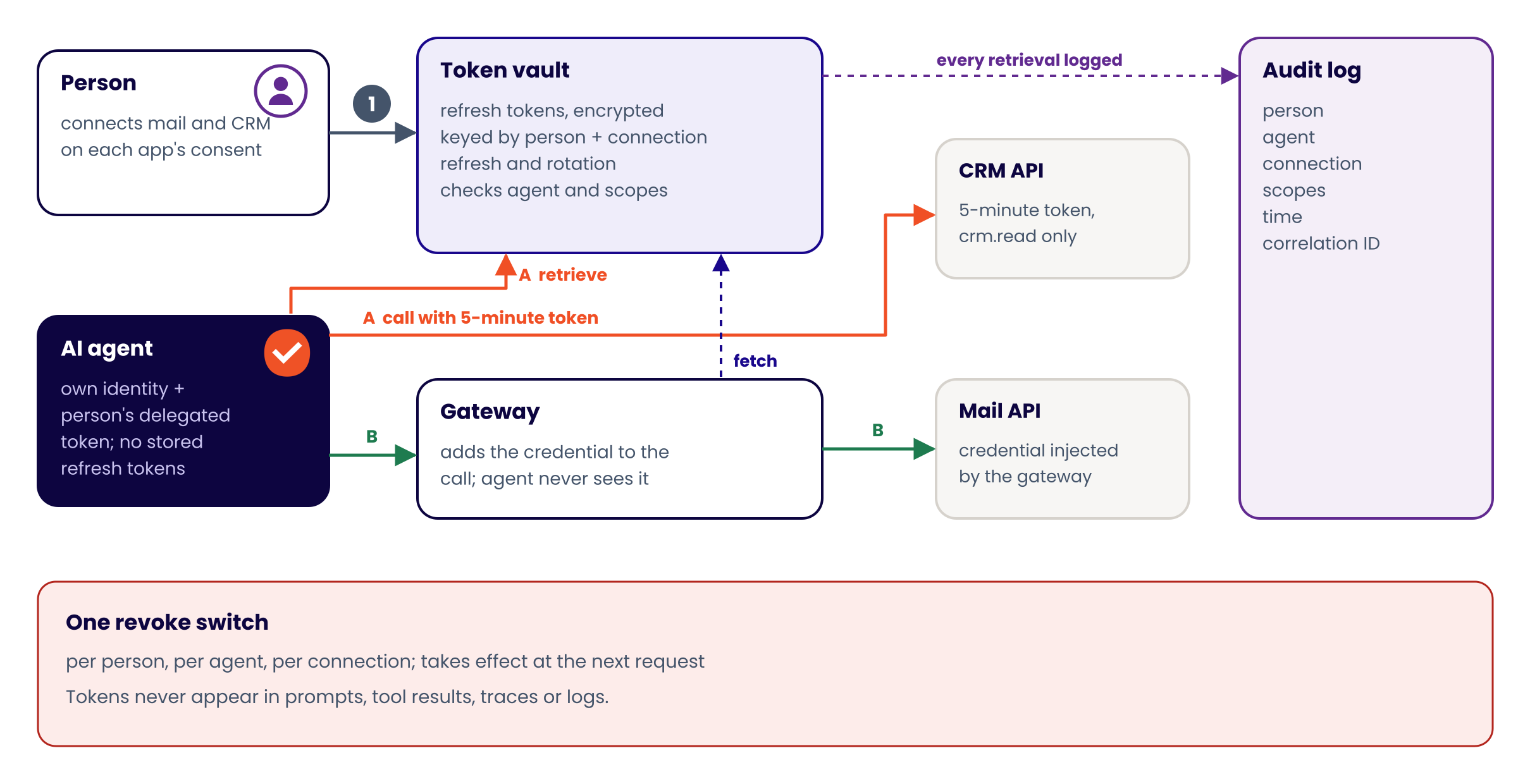
Options compared
| Approach | Agent sees a token? | Revocation | When to use |
|---|---|---|---|
| Agent stores refresh tokens itself | Yes, long-lived | Per agent, often impossible | Never in production |
| Vault retrieval (token exchange) | Yes, short-lived access token only | Central | Tool code needs to call the API directly, for example through an SDK |
| Gateway injection | No | Central | Calls go through a gateway or MCP proxy you control |
| Vaulted static secret | Yes, unless injected | Central, with rotation | Legacy APIs with API keys or passwords only |
How it works
- Register each third-party app once as a connection in the vault, with its OAuth client, allowed scopes and token endpoint.
- Let people connect their accounts through the app's own consent screen, initiated from your app, and show them which agents may use each connection.
- Authenticate the agent as itself and pass the person's context; the vault checks that this agent may use this connection for this person.
- Downscope at use: request only the scopes the current task needs; the vault refuses scopes the person never granted.
- Prefer injection: route calls through a gateway that adds the credential, so neither the agent nor the model handles tokens.
- Keep tokens out of the model: tools receive and use tokens in code; tool results returned to the model never contain them.
- Log every retrieval (person, agent, connection, scopes, time, correlation ID) and alert on unusual use.
- Revoke centrally when a person leaves, withdraws consent, or an agent is stopped (TIE-AGT-016); revoke at the app as well where it supports revocation.
Design rules#
- No refresh tokens outside the vault.
- Agents authenticate as themselves before any retrieval. A request without the agent's own identity is refused.
- Access tokens are short-lived and downscoped per task.
- Tokens never appear in prompts, tool results, traces or logs. Redact them at the framework level.
- One revoke switch per person, per agent and per connection.
- Consent records are auditable and visible to the person.
- Prefer injection over retrieval wherever a gateway is in the path.
Anti-patterns#
| Anti-pattern | What goes wrong |
|---|---|
| Refresh tokens in the agent's database or environment variables | One breach exposes every person's access to every connected app |
| Tokens passed to the model as tool context | Prompt injection prints or forwards them |
| One broad consent reused for every task | Each task carries full mailbox or CRM access |
| Shared service account in the SaaS app instead of per-person tokens | The app cannot tell whose request it is; audit is meaningless |
| No link between offboarding and the vault | Leavers' tokens keep working in agents for months |
| Token passthrough from the client to downstream APIs | Tokens reach audiences they were never issued for |
Trade-offs#
Benefits
- Long-lived credentials sit in one hardened place instead of in every agent.
- Central consent, revocation and audit across agents and apps.
- Smaller blast radius: stolen tokens expire in minutes and carry few scopes.
- Developers stop writing OAuth refresh logic for every integration.
Costs and risks
- A vault or broker product, or a gateway that can inject credentials.
- Per-app connection setup and consent screens.
- Changes to agent tool code to fetch tokens on demand.
- Some apps issue only broad scopes, limiting how far downscoping can go.
Recipes#
How to build this pattern on specific products. Each recipe shows its own maturity and when it was last verified.
Ping Identity recipe
Ping Identity
PingGateway token mediation and PingOne Privilege
Written from vendor documentation and design experience; not yet lab-tested by Trevonix. Validate each step in a non-production tenant first.
Gateway maps agent tokens to backend credentials held in secret stores; no per-person third-party token vault documented.
Use PingGateway as the broker: agents present tokens from PingOne or Advanced Identity Cloud, and PingGateway maps them to the credential each backend expects (scoped tokens, API keys or mTLS), loading downstream secrets from its secret stores, so agents never hold backend credentials. For agent access to MCP and Git servers with just-in-time, policy-controlled credentials, PingOne Privilege offers an Agent Privilege MCP gateway. Ping does not document a per-person third-party token vault equivalent to a connected-accounts store; confirm with Ping before designing one around it.
Okta recipe
Okta
Okta for AI Agents: brokered consent, Agent Gateway and vaulted secrets
Written from vendor documentation and design experience; not yet lab-tested by Trevonix. Validate each step in a non-production tenant first.
Okta brokers third-party tokens after consent and its Agent Gateway injects downstream credentials so agents never see them. Written from Okta documentation.
Configure
- Add the third-party MCP server or app under Applications and Resources > MCP Servers, with its external authorisation server.
- On the authorisation server card, configure Brokered consent so Okta brokers the third-party access token after the person consents.
- Create a resource connection from the agent (Directory > AI Agents > agent > Resource connections > Add resource connection) to that MCP server or application.
- For no-token-in-agent operation, put the MCP servers behind an Agent Gateway (Security > Agent Gateway); the gateway authenticates the agent with Okta tokens and injects downstream credentials.
- For legacy APIs with static keys, use the Secret resource type, which retrieves a credential vaulted in Okta Privileged Access.
Gotchas
- Brokered consent requires each person's consent before the agent can act for them.
- Secret and service account connections need the Okta Privileged Access security admin role and are early access; Okta Privileged Access is not in the Okta for AI Agents Core SKU.
- Deactivating a resource connection denies all future requests from that agent to that resource.
Microsoft Entra recipe
Microsoft Entra
Azure API Management credential manager with Microsoft Entra Agent ID
Written from vendor documentation and design experience; not yet lab-tested by Trevonix. Validate each step in a non-production tenant first.
On-behalf-of for Microsoft-protected APIs; API Management stores and injects third-party SaaS tokens. Written from Microsoft documentation.
Configure
- For Microsoft-protected APIs, no vault is needed: use the agent identity with on-behalf-of to obtain tokens for Microsoft Graph and your own APIs.
- For third-party SaaS, use Azure API Management credential manager: in the API Management instance go to APIs > Credential manager > Create, register the SaaS app as an OAuth 2.0 credential provider, and create connections.
- Add access policies so only the agent's identity (or the specific users) can use each connection.
- In the API's inbound policy, use get-authorization-context to fetch the token and set the Authorization header, so the agent calls API Management and never handles the SaaS token.
Gotchas
- API Management encrypts stored tokens and refreshes them when the access token expires.
- User-delegated connections need the Azure API Management Data Plane service principal in the tenant; Microsoft's guide creates it with PowerShell, so make that a planned, recorded admin step.
Saviynt recipe
Not available
No Saviynt recipe has been published for this pattern yet.
Auth0 Token Vault recipe
Auth0 Token Vault
Written from vendor documentation and design experience; not yet lab-tested by Trevonix. Validate each step in a non-production tenant first.
Dedicated token vault for agents: connected accounts, token exchange, organisation isolation; downscoping and offline workers in early access.
Configure (Auth0 Token Vault)
- In Auth0, create a connection for each third-party app (for example Google or Slack) and enable it for Token Vault.
- Let people link accounts through Connected Accounts for Token Vault.
- In agent tool code, exchange the person's Auth0 token for a third-party access token with Token Vault's access token exchange, requesting only the scopes the tool needs.
- Use Token Vault with Organizations (GA May 2026) to keep tokens separate per customer organisation in B2B apps.
Gotchas
- Runtime downscoping (August 2026) and the Privileged Worker flow for offline agents (July 2026) are early access; check status before relying on them.
Verification tests#
| Test | Expected result |
|---|---|
| Search agent storage, logs and traces for refresh tokens | None found |
| Ask the agent (by prompt) to reveal the token it used | It cannot; no token is in its context |
| Agent requests a scope the person never granted | Vault refuses |
| Another agent requests the same person's connection | Refused unless that agent is allowed for this connection |
| Person withdraws consent, then the agent retries | Retrieval fails immediately |
| Disable the agent's identity | No further retrievals for any person |
Maturity and verification#
Documented. Written from vendor documentation and standards. Dedicated token vaults for agents became generally available in 2025 and 2026, and several related features (downscoping at use, offline workers) are still in early access.
Frequently asked questions#
Is a token vault the same as a secrets manager?
No. A secrets manager stores your organisation's secrets. A token vault stores each person's delegated tokens after their consent, refreshes them, and releases access only to agents allowed to act for that person.
Should we vault tokens for our own internal apps too?
Only if the person's account is the only way to reach the app. Prefer an app-level integration that trusts your identity provider (cross-app access), so the app sees both the person and the agent and no third-party refresh token is stored at all.
Related patterns and references#
Cite this pattern
Trevonix (2026). Token vault: agents call other apps without holding people's tokens (TIE-AGT-032, version 1.0). Identi Patterns. https://exchange.trevonix.com/patterns/tie-agt-032-token-vault-agents-call-other-apps-without-holding-people-s-tokens
Licensed under CC BY 4.0. Credit Trevonix and link to this page when you reuse it.
Patterns are guidance, provided as is and without warranty. Test in a non-production environment and check current vendor documentation before you rely on them. Read the full disclaimer.