
TIE-AGT-033DocumentedAgent identity/Credentials
Browser and computer-use agents: their own identity, not the person's session
Let agents that operate a browser or a desktop work for people without borrowing the person's signed-in sessions and saved passwords, so every action is attributable to the agent, credentials never reach the model, and sensitive steps still need the person.
In short#
- Run the agent in its own browser window, profile or desktop, signed in as its own identity (an agent identity or agent user), never inside the person's session.
- When a site needs a password or one-time code, a password manager injects it after the person approves; the model never sees it.
- Prefer APIs over driving the UI; require the person for payments, sends, deletes and sign-ins to new sites; let your own apps detect agent-driven sessions.
Problem#
A new class of agent does its work through the user interface: agentic browsers, browser extensions in "agent mode", and computer-use agents that move the mouse and type on a desktop. The easy design runs the agent inside the person's own browser, with their cookies, saved passwords and single sign-on session already in place. The agent can then do anything the person can, on any site they are signed in to.
Three things go wrong. Attribution disappears: every application, audit log and SIEM sees the person, so nobody can tell what the agent did. Prompt injection becomes powerful: a hidden instruction on any web page the agent reads can steer it, with the person's full access to mail, files and payment pages. And credentials leak: if the agent types passwords or reads one-time codes itself, those secrets pass through the model and its logs. Security agencies' 2026 guidance on agentic AI warns that actions taken under a trusted identity produce logs that look legitimate and delay detection.
When to use it#
Use it when
- People use agentic browsers, browser agents or computer-use agents for work tasks.
- You build an agent that has to use websites with no API, or with an API it cannot get access to.
- Your own web apps are visited by agents acting for customers or employees.
Avoid it, or add more, when
- An API with delegated OAuth access exists for the task. Use it (TIE-AGT-002, TIE-AGT-032); driving the UI is slower, more fragile and harder to control.
- The agent only reads public web pages with no sign-in. Normal browsing controls apply.
Forces#
- Reach against control. The UI reaches every app; only APIs give fine-grained, auditable access.
- Convenience against attribution. Reusing the person's session is seamless and makes the agent invisible.
- Autonomy against approval. Asking the person at every sign-in defeats the purpose; never asking hands the agent everything.
- Detection against friction. Apps that block automation also block helpful agents.
Solution#
Treat a browser or computer-use agent as a separate actor with its own identity and its own session container. Where the platform supports it, the agent runs in a managed window or desktop signed in as an agent identity or agent user, so applications and logs see the agent, and policies can target it. Credentials for sites without single sign-on come from a password manager that fills them into the page after the person approves, without the value ever reaching the model; one-time codes are handled the same way. Sensitive steps pause for the person. Your own applications detect agent-driven sessions and respond, for example by limiting actions or pointing the agent to an API. Discovery tools find agentic browsers and extensions you have not approved.
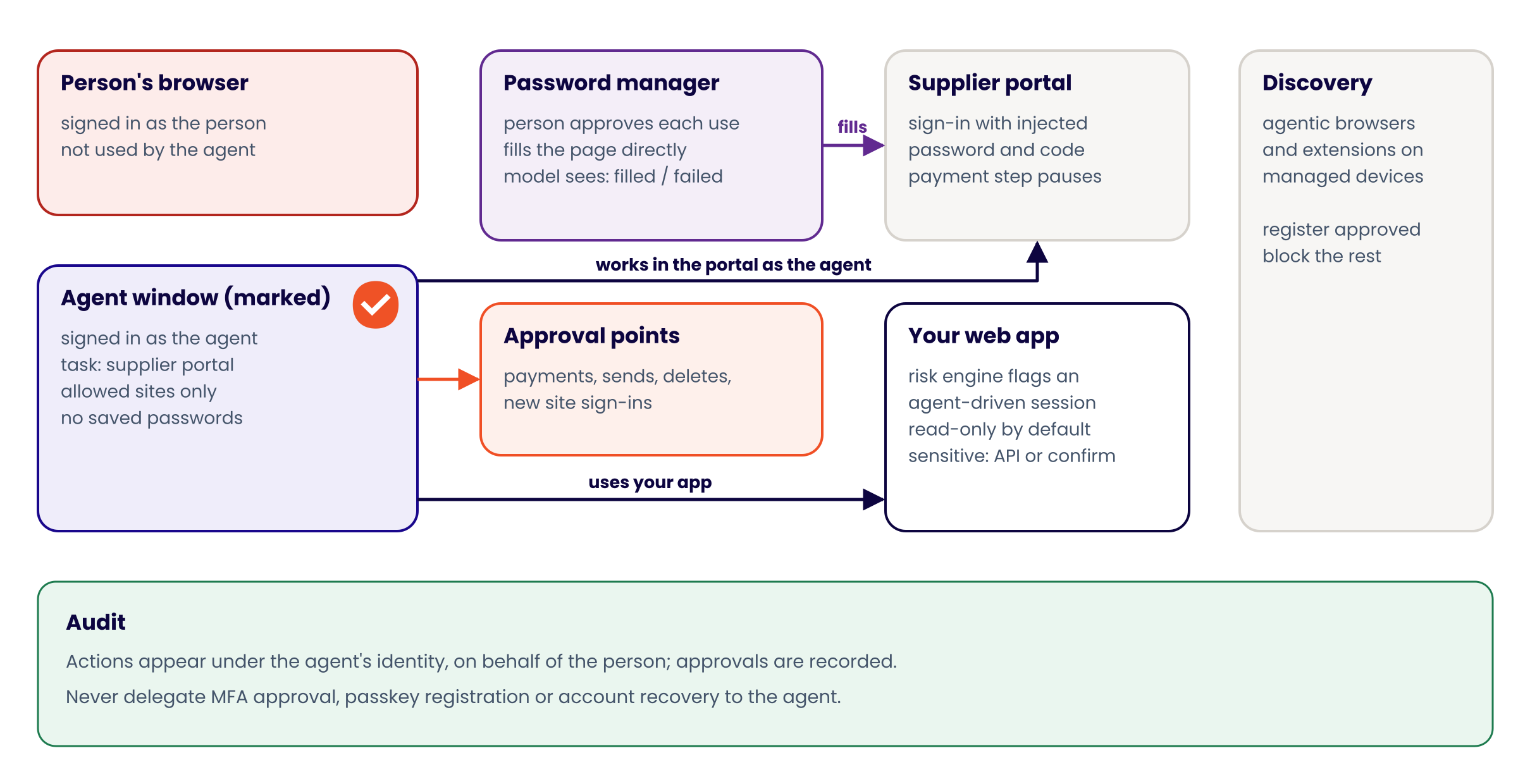
Risks and controls
| Risk | Control |
|---|---|
| Agent acts inside the person's session; logs show the person | Separate window, profile or desktop signed in as the agent's identity |
| Agent reads or types passwords and codes | Password manager fills them in after the person approves; model sees only success or failure |
| Hidden instructions on web pages steer the agent | Site allow-lists per task, no cross-site actions without approval, approval for sensitive steps |
| Agent completes purchases, sends or deletes | Pause for the person; payment flows with explicit confirmation (TIE-AGT-022, TIE-AGT-023) |
| Unknown agentic browsers and extensions | Discovery on managed browsers and endpoints; register or block (TIE-AGT-012) |
| Agents use your own apps through the UI | Detect agent sessions; offer an API with delegated access; restrict UI actions |
How it works
- Decide which tasks may use a browser agent at all, and which sites each task may visit.
- Give the agent its own identity and session container: a managed agent window, a separate browser profile, or a cloud browser or virtual desktop signed in as the agent.
- Connect a password manager for sites without single sign-on, with per-use approval and no secret values returned to the agent.
- Set approval points for payments, outbound messages, deletions, downloads of sensitive data and sign-ins to sites not on the task's list.
- Prefer APIs: where a site offers delegated OAuth access, switch the task to an API tool.
- Discover and register agentic browsers and extensions on managed devices; block unapproved ones.
- In your own apps, detect agent-driven sessions and apply rules: read-only by default, sensitive actions only through the API or with the customer's confirmation.
- Log agent sessions with the agent identity, the person it acts for, sites visited and approvals given.
Design rules#
- The agent never shares the person's browser session.
- Agent windows are visibly marked and signed in as the agent.
- Secrets are filled, not revealed. The model sees outcomes, never values.
- Sensitive steps pause for the person.
- APIs first; the UI is the fallback.
- Unknown browser agents are discovered and either registered or blocked.
- Your apps can tell an agent session from a person and respond.
Anti-patterns#
| Anti-pattern | What goes wrong |
|---|---|
| Browser extension agent running in the person's main profile | It can reach every signed-in site; actions are logged as the person |
| Saving site passwords in the agent's configuration | Passwords leak through prompts, logs and repositories |
| Agent reads one-time codes from the person's mailbox | Takes over the second factor; any injected instruction can reuse it |
| Blocking all automation on your site | Helpful customer agents fail; bad bots adapt anyway |
| Allowing the agent to complete checkout unattended | Purchases from injected instructions or misunderstood tasks |
Trade-offs#
Benefits
- Agent actions are attributable and auditable.
- Credentials stay in the password manager; prompt injection cannot extract them.
- Prompt injection has less to work with: no ambient access to the person's sessions.
- Clear rules for which tasks may use the UI at all.
Costs and risks
- Managed agent browsing features are new and often limited to specific licences or browsers.
- Password manager integrations for agents are still maturing.
- More approvals for people until tasks move to APIs.
- Site owners may still challenge or block agent sessions.
Recipes#
How to build this pattern on specific products. Each recipe shows its own maturity and when it was last verified.
Ping Identity recipe
Ping Identity
PingOne Protect agent detection
Written from vendor documentation and design experience; not yet lab-tested by Trevonix. Validate each step in a non-production tenant first.
Detect computer-using agents in your own apps and respond in DaVinci or journeys. Written from Ping documentation.
Configure
- Add the PingOne Signals (Protect) SDK to your web apps (version 5.6.10 or later, with isIAFDetectionEnabled and agentIdentification set to true) so PingOne Protect's Bot Detection predictor can flag computer-using agents and identify some agent types.
- Evaluate risk in your DaVinci flow or Advanced Identity Cloud journey and branch: allow read-only use, require the customer's confirmation, or direct the agent to an API.
- Use the Agent Detection (CUA) dashboard (early access, under Monitoring) to see how much agent traffic your apps receive.
Gotchas
- Bot Detection needs a PingOne Protect licence; it is not in the PingOne Risk predictor set.
Okta recipe
Okta
Okta ISPM browser discovery and Okta for AI Agents
Written from vendor documentation and design experience; not yet lab-tested by Trevonix. Validate each step in a non-production tenant first.
Discover browser-based agents, register approved ones and move tasks to API access. Written from Okta documentation.
Configure
- Use Shadow AI Agent Discovery for Browsers (Okta Identity Security Posture Management; Microsoft Edge support GA October 2026) to find browser-based agents on managed devices.
- Register approved agents in Directory > AI Agents with owners, and move their tasks to API access through resource connections or Cross App Access where the target app supports it.
- Block or remove unapproved agentic extensions through your browser management tooling.
Microsoft Entra recipe
Microsoft Entra
Edge for Business managed agent browsing and Microsoft Entra agent identities
Written from vendor documentation and design experience; not yet lab-tested by Trevonix. Validate each step in a non-production tenant first.
Agents from other vendors in managed Edge windows with their own Entra agent identity (preview, Microsoft 365 E5). Written from Microsoft announcements.
Configure
- Use Edge for Business managed agent browsing (preview at Ignite, November 2026, Microsoft 365 E5) to require agents from other vendors to use Edge; each agent works in its own marked window with its own Microsoft Entra agent identity and within the person's permissions and company policies.
- Use Edge's Agent Mode policies: it does not use passwords or payment methods stored in Edge and pauses for the person when they are needed.
- For computer-use agents on Windows 365 Cloud PCs for Agents, apply Conditional Access to the agent's user account (compliant device, compliant network), as in TIE-AGT-026.
Gotchas
- Microsoft has said browser agents will appear in Agent 365 and Entra logs later, without a date; until then, check what the logs show before relying on them for attribution.
Saviynt recipe
Not available
No Saviynt recipe has been published for this pattern yet.
1Password agentic autofill recipe
1Password agentic autofill
Written from vendor documentation and design experience; not yet lab-tested by Trevonix. Validate each step in a non-production tenant first.
Credentials and one-time codes filled after approval without reaching the model.
1Password's Secure Agentic Autofill (with Browserbase) and 1Password for Claude fill credentials and one-time codes directly into the page after the person approves; the agent and the model receive only success or failure, and 1Password checks that no secret remains exposed on the page. On 1Password Business accounts, administrators control availability with the Allow AI agents to autofill for users policy.
Verification tests#
| Test | Expected result |
|---|---|
| Check audit logs of a site the agent used | Actions show the agent identity, not only the person |
| Ask the agent (by prompt) to reveal a password it used | It cannot; it never received the value |
| Plant an instruction on a test page to send data to an external site | Blocked by the site allow-list or paused for approval |
| Agent reaches a payment page | Pauses for the person |
| Install an unapproved agentic browser extension on a managed device | Discovered and flagged or blocked |
| Drive your own app with a computer-use agent | Session flagged as agent-driven; sensitive actions limited |
Maturity and verification#
Documented. Written from vendor documentation and announcements from 2025 and 2026. Managed agent browsing, agent detection in risk engines and password manager integrations for agents are new, and several are in preview or early access.
Frequently asked questions#
Is a separate browser profile enough?
Only if it is a different person from the agent's point of view. The goal is that the application and its logs can tell the agent from the person. A separate profile signed in as the person still shows the person; a separate profile signed in as the agent's identity does not.
Can an agent sign in to a third-party site as itself?
Usually not: most consumer and partner sites have no way to admit an agent identity today. Inject the person's credential through a password manager with approval, keep the agent in its own container, and record that the agent acted for the person.
Related patterns and references#
- Microsoft: Edge for Business AI browsing
- 1Password: Closing the credential risk gap for AI agents using a browser
- 1Password Support: About the security of 1Password for Claude
- Ping Identity: PingOne Protect predictors (Bot Detection)
- Okta: New AI release highlights
- OWASP: Top 10 for Agentic Applications 2026
Cite this pattern
Trevonix (2026). Browser and computer-use agents: their own identity, not the person's session (TIE-AGT-033, version 1.0). Identi Patterns. https://exchange.trevonix.com/patterns/tie-agt-033-browser-and-computer-use-agents-their-own-identity-not-the-person-s-session
Licensed under CC BY 4.0. Credit Trevonix and link to this page when you reuse it.
Patterns are guidance, provided as is and without warranty. Test in a non-production environment and check current vendor documentation before you rely on them. Read the full disclaimer.